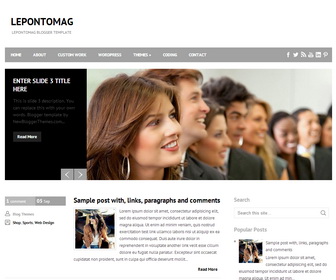
LepontoMag Blogger Template is a Beautiful Business Blogger Template with 2 Columns, Right Sidebar, 3 Columns Footer, Featured Content Slider, Top Drop down Menus and Social Buttons.
How To Configure Social Buttons
Find this in “Edit HTML”:
<div id='social-wrap'>
<ul id='social'>
<li><a href='#' id='facebook' title='Facebook'/></li>
<li><a href='#' id='twitter' title='Twitter'/></li>
<li><a href='#' id='rss' title='RSS'/></li>
<li><a href='#' id='youtube' title='Youtube Channel'/></li>
<li><a href='#' id='linkedin' title='Linkedin'/></li>
<li><a href='#' id='pinterest' title='Pinterest'/></li>
</ul>
</div>
Add your own social links replacing “#” marks.
How To Configure Top Navigation Menu
Find this in “Edit HTML”:
<div class='menu'>
<ul class='' id='menu-primary-items'>
<li><a href='#'>Home</a></li>
<li><a href='#'>About</a></li>
<li><a href='#'>Custom work</a></li>
<li><a href='#'>WordPress</a></li>
<li><a href='#'>Themes</a>
<ul class='sub-menu'>
	<li><a href='#'>Bronze Package</a></li>
	<li><a href='#'>Silver Package</a></li>
	<li><a href='#'>Golden Package</a></li>
</ul>
</li>
<li><a href='#'>Coding</a></li>
<li><a href='#'>Contact</a></li>
</ul>
</div>
Replace “#” marks with real URLs and change anchor texts as you like.
How To Configure Featured Content Slider:
Find this in “Edit HTML”:
<div id='slider-wrap'>
<div id='slider'>
<ul>

<!-- slide 1 code start -->
<li>
   <div class='slider-entry'>
      <h2 class='slider-entry-title'><a href='ENTER-SLIDE-1-LINK-HERE'>Enter Slide 1 Title Here</a></h2>
      <p>This is slide 1 description. You can replace this with your own words. Blogger template by NewBloggerThemes.com...</p>
      <a class='more-link' href='ENTER-SLIDE-1-LINK-HERE'>Read More</a>
   </div>
   <a href='ENTER-SLIDE-1-LINK-HERE'><img height='340' src='http://3.bp.blogspot.com/-iZXB1rM-6kY/UnYWeAdSV6I/AAAAAAAALSE/4hSuLD-AjIY/s1600/slide-image-1.jpg' width='750'/></a>
</li>
<!-- slide 1 code end -->

<!-- slide 2 code start -->
<li>
   <div class='slider-entry'>
      <h2 class='slider-entry-title'><a href='ENTER-SLIDE-2-LINK-HERE'>Enter Slide 2 Title Here</a></h2>
      <p>This is slide 2 description. You can replace this with your own words. Blogger template by NewBloggerThemes.com...</p>
      <a class='more-link' href='ENTER-SLIDE-2-LINK-HERE'>Read More</a>
   </div>
   <a href='ENTER-SLIDE-2-LINK-HERE'><img height='340' src='http://2.bp.blogspot.com/-PBYlcQj-2vU/UnYWe3WMuKI/AAAAAAAALSM/L6oBrTESL_g/s1600/slide-image-2.jpg' width='750'/></a>
</li>
<!-- slide 2 code end -->

<!-- slide 3 code start -->
<li>
   <div class='slider-entry'>
      <h2 class='slider-entry-title'><a href='ENTER-SLIDE-3-LINK-HERE'>Enter Slide 3 Title Here</a></h2>
      <p>This is slide 3 description. You can replace this with your own words. Blogger template by NewBloggerThemes.com...</p>
      <a class='more-link' href='ENTER-SLIDE-3-LINK-HERE'>Read More</a>
   </div>
   <a href='ENTER-SLIDE-3-LINK-HERE'><img height='340' src='http://2.bp.blogspot.com/-1ErdUsT8hRo/UnYWeKS1AhI/AAAAAAAALSA/H3FNMlavkjM/s1600/slide-image-3.jpg' width='750'/></a>
</li>
<!-- slide 3 code end -->

</ul>
</div><!--#slider-->
</div><!--#slider-wrap-->
There are 3 slides in the slider. You can add a remove more slides if you want.
Now replace,
“ENTER-SLIDE-X-LINK-HERE”s with your real slide link,
“Enter Slide X Title Here” with your real slide title,
“This is slide X description. You can replace this with your own words. Blogger template by NewBloggerThemes.com…” with your real slide description,
Slide image URL,
for each slide. (X = 1 or X = 2 or X = 3)




many many thank’s
Really great!!!!
Thanks for this amazing template!!
hi, how do I cahnge the size of my photos displayed in the blog post?
find this:
.pbtthumbimg {
float:left;
margin:0px 10px 5px 0px;
padding:6px;
border:1px solid #eee;
background:#ffffff;
width:120px;
height:90px;
}
change 120px value to change the width of post thumbnails.
I have : undefined undefi, on the date text box. How can I sovle it? Many thank you!
https://newbloggerthemes.com/blog/fix-posted-date-undefined-error-blogger/
Is there a way to manipulate the favicon on the xml templates. Blogger won’t let me change it in the edit tool. Thanks in advance for your advice!
Add this just before <b:skin> tag:
<link href=’YOUR-FAVICON-IMAGE-URL’ rel=’shortcut icon’ type=’image/vnd.microsoft.icon’/>
Remember to replace “YOUR-FAVICON-IMAGE-URL” with your real favicon image address.
the template is amazing but how can i change the time tha the slides change?
find this:
jQuery("#slider").easySlider({
auto: true,
continuous: true,
pause: 4000
});
Here “pause” is set in milliseconds and it represent the duration of each slide when plugin is set to auto sliding. you can change 4000 value to new value you need.
Thank you very much. I am using your Blogger Template. Because I just blogger a litte day.
Thanks!
Thank You! This template is awesome and very easy to use – especially for someone that is not html savvy!
Some slight tweaks I made:
1) I noticed that dates on my posts weren’t being “recognized” so I went to Settings >> Formatting >>
I then changed the Date Header Format, Timestamp Format and Comment Timestap Format to all match exactly.
The format used was: Friday, October 17th, 2014.
2) I added a related posts widget. It would be great to have as a default in this template though.
3) I added a 4th slider image, based on your directions it was pretty straightforward.
Can I change the value ” site width”? Because my social buttons doesn’t fit in menu bar.
find this to change social buttons container width:
#social-wrap {
width: 145px;
float: right;
margin-top: 0px;
}
change “145px” value to a higher value you like.
how can i delete featured content slider…
delete code between:
<!– featured post slider started –>
<b:if cond=’data:blog.pageType != "static_page"’>
<b:if cond=’data:blog.pageType != "item"’>
and:
</ul>
</div><!–#slider–>
</div><!–#slider-wrap–>
</b:if>
</b:if>
<!– featured post slider end –>
Hi there! How can I change the text box color of the slides and how can I change the color of the nav bar? Thank you
Find this to change text box color of the slides:
.slider-entry {
float: left;
width: 200px;
height: 290px;
background: #000;
padding: 25px;
color: #555555;
}
change values of “background” and “color” properties as you like.
Find this to change background color of nav bar:
#menu-primary {
width: 1000px;
margin: 0 auto;
height: 45px;
background: #a2a2a2;
position: relative;
z-index: 999999;
}
change “#a2a2a2” value to other you like.
Just tested this template. Sadly, the date in the box at isnt showing a date, just “undefined”. Additional the documentation is poorly.
Implementing a disqus comment counter seems hard, too, since the comment section strangely is way larger than in googles layout.
https://newbloggerthemes.com/blog/fix-posted-date-undefined-error-blogger/
Use contact form if you need more help.
Go to Settings -> Language and Formatting
Use same value for “Date header Format, Timestamp format and Current Timestamp format” etc.
I used the value ‘Monday,January 2014’
Hi! Your website template is simply amazing! How can I remove the features such as date, time and comments from the post?
Thanks!
remove this part:
<b:if cond=’data:blog.pageType == "item"’>
<div style=’margin:10px 0px;’>
Posted by <data:post.author/> on <data:post.timestamp/><b:if cond=’data:post.allowComments’> with <a expr:href=’data:post.addCommentUrl’ expr:onclick=’data:post.addCommentOnclick’><b:if cond=’data:post.numComments == 0′>No comments</b:if><b:if cond=’data:post.numComments == 1′>1 comment</b:if><b:if cond=’data:post.numComments >= 2′><data:post.numComments/> comments</b:if></a></b:if>
</div>
<div class=’clear’/>
</b:if>
thanks for information. what this template is SEO, responsive and fast loading?
Hi. Thank you for this amazing template. The comments that the readers have made does not appear at the blog. How can I fix it?
hThank you
https://newbloggerthemes.com/blog/enable-google-plus-comments-in-blogger/
I'm really thank you for this template. It's very comfort to use and very beautiful.
Hi!
Very nice template! Thank you!!
I have some questions, it would be so nice, if you would help an an old lady across the street 😉
1. I want to change the social buttons – I only need Facebook, LinkedIn, RSS, Twitter and – XING (Germany). What is your advice for the best approach? I tried to change them on Photoshop, but the results were not goot and the mouseover was disguisting, because something went totally wrong. Do you have an psd or something like that? Or a tip?
2. I want to show the pages without the sidebar. Is there a possibility to do this?
3. I have problems with showing pictures in pages – I cannot change the size, it's the same size in every page – even, when I choose the right size in the editor. I want to show them bigger.
Thank you so much in advance and nice regards from Germany!
Hope you understand my broken english 🙂
hi, contact me for paid customization. thanks.
I am using this template. Really Awsome! TQ! Please visit my website.
hi, i love your design so much i use it to my website. If it's possible, how to add image to the header? Thank you so much!
Thank u for this template, it's useful