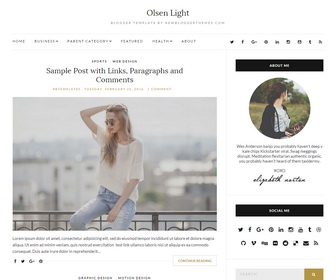
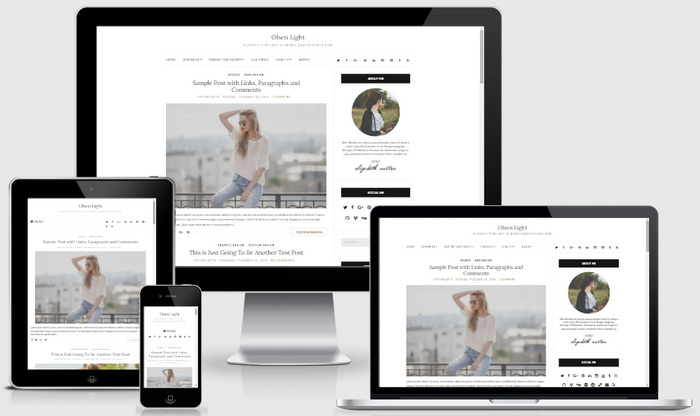
Olsen Light is a clean and elegant, fully responsive, search engine optimized, minimal, 2 columns blogging theme for fashion blogs or other. It is template designer compatible, which means you can change fonts (many beautiful fonts) and colors (unlimited colors) very easily without having any knowledge about coding. Olsen Light blogger template has a footer widgets section, right sidebar, web fonts, unlimited colors, icon fonts, background image support, related posts with thumbnails, clean social buttons, sharing buttons, top and bottom navigation menus, auto post summaries on homepage, custom about me widget, scroll to top button and more.
It is 100% Responsive: Check Mobile Friendly
It has search engine friendly data: Check SEO Friendly
How To Configure Top Navigation Menu
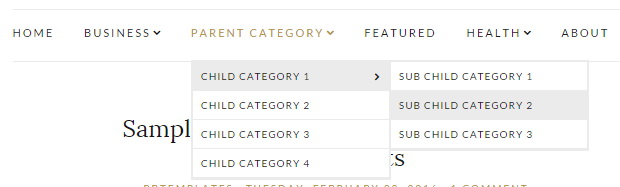
Find this in “Edit HTML”:
<ul class='navigationnbt'>

<li><a expr:href='data:blog.homepageUrl'>Home</a></li>

<li><a href='#'>Business</a>
<ul class='sub-menu'>
<li><a href='#'>Internet</a></li>
<li><a href='#'>Market</a></li>
<li><a href='#'>Stock</a></li>
</ul>
</li>

...

</ul>
Replace “#” marks with real URLs and change anchor texts as you like.
How To Configure Social Buttons

Find this in “Edit HTML”:
<ul class='socialsnbt'> <li><a href='https://twitter.com/' rel='nofollow' target='_blank' title='Twitter'><i class='fa fa-twitter'/></a></li> <li><a href='https://www.facebook.com/' rel='nofollow' target='_blank' title='Facebook'><i class='fa fa-facebook'/></a></li> <li><a href='https://plus.google.com/' rel='nofollow' target='_blank' title='GooglePlus'><i class='fa fa-google-plus'/></a></li> <li><a href='https://www.pinterest.com/' rel='nofollow' target='_blank' title='Pinterest'><i class='fa fa-pinterest'/></a></li> <li><a href='https://www.linkedin.com/' rel='nofollow' target='_blank' title='Linkedin'><i class='fa fa-linkedin'/></a></li> <li><a href='https://www.instagram.com/' rel='nofollow' target='_blank' title='Instagram'><i class='fa fa-instagram'/></a></li> <li><a href='https://www.youtube.com/' rel='nofollow' target='_blank' title='Youtube'><i class='fa fa-youtube-square'/></a></li> <li><a href='https://www.tumblr.com/' rel='nofollow' target='_blank' title='Tumblr'><i class='fa fa-tumblr'/></a></li> <li><a expr:href='data:blog.homepageUrl + "feeds/posts/default"' target='_blank' title='RSS'><i class='fa fa-rss'/></a></li> </ul>
Note: You will find above code twice. (for top and bottom social icons)
Add your own social links replacing default social profile URLs.
How To Configure About Me Widget
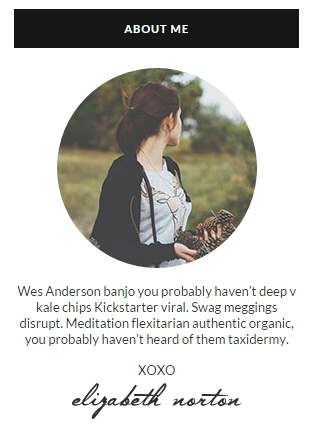
Find this in “Edit HTML”:
<div class='widget widget_aboutmenbt'> <h2>ABOUT ME</h2> <div class='widget_aboutnbt groupnbt'> <p><img class='img-round' src='https://4.bp.blogspot.com/-dIhDjSCy3Mc/VtjmVsqFXZI/AAAAAAAARQc/mBO8jevj1-4/s1600/aboutme-image.jpg'/></p> <p>Wes Anderson banjo you probably haven’t deep v kale chips Kickstarter viral. Swag meggings disrupt. Meditation flexitarian authentic organic, you probably haven’t heard of them taxidermy.</p> <p class='widget_about_sig'>XOXO <img height='36' src='https://3.bp.blogspot.com/-HtYKZvf6N9I/VtjmVjIhfwI/AAAAAAAARQg/4z4g7W85Hfc/s1600/about_me_signature.png' width='170'/></p> </div> </div>
Replace “https://4.bp.blogspot.com/-dIhDjSCy3Mc/VtjmVsqFXZI/AAAAAAAARQc/mBO8jevj1-4/s1600/aboutme-image.jpg” with your own image address.
Replace “https://3.bp.blogspot.com/-HtYKZvf6N9I/VtjmVjIhfwI/AAAAAAAARQg/4z4g7W85Hfc/s1600/about_me_signature.png” with your signature image address.
Also replace the description of the about me widget.
How To Configure Social Me WIdget
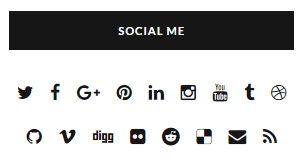
Find this code:
<div class='widget widget_socialsnbt'>
<h2>SOCIAL ME</h2>
<ul class='socialsnbt'>
<li><a href='https://twitter.com/' rel='nofollow' target='_blank' title='Twitter'><i class='fa fa-twitter'/></a></li>
<li><a href='https://www.facebook.com/' rel='nofollow' target='_blank' title='Facebook'><i class='fa fa-facebook'/></a></li>
<li><a href='https://plus.google.com/' rel='nofollow' target='_blank' title='GooglePlus'><i class='fa fa-google-plus'/></a></li>
<li><a href='https://www.pinterest.com/' rel='nofollow' target='_blank' title='Pinterest'><i class='fa fa-pinterest'/></a></li>
<li><a href='https://www.linkedin.com/' rel='nofollow' target='_blank' title='Linkedin'><i class='fa fa-linkedin'/></a></li>
<li><a href='https://www.instagram.com/' rel='nofollow' target='_blank' title='Instagram'><i class='fa fa-instagram'/></a></li>
...
</ul>
</div>
Add your own social links replacing current social profile URLs.
How To Add Links to Bottom Navigation Menu

Go to “Layout”. Click on “Edit” link of “Edit This Menu” widget.
Read more: https://newbloggerthemes.com/blog/how-to-configure-linklist-menu-widget/
Now add your links to that link list widget.
Olsen Light Blogger Template Responsive View




OOOOOOOOOOOOmg the best layout! I love love love love!
do you need to pay for this??
Yes, this is a paid theme.
can i get more sub sub child category in navigation menu if i buy the theme?
yes.
i use olsen light to my blog, olsen is fast loading and easy to customize..
Bought the premium website. Very easy to customize. Fast transaction. Easy to use. Lots of customization. Perfect for people who wants a minimalist theme. Thank you very much!