This tutorial is for you if you are using one of my template.
1. To add recent posts widget for your blogger blog, first go to “Layout” of your blog.
2. Click on “Add a Gadget” link from sidebar section or other where you want to display recent post widget.
3. Select “HTML/JavaScript” widget.
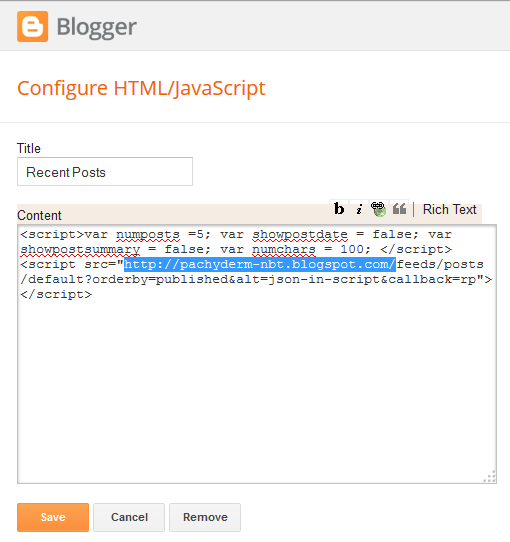
4. Now enter below code into that “HTML/JavaScript” widget.
<script>var numposts =5; var showpostdate = false; var showpostsummary = false; var numchars = 100; </script>
<script src="http://YOURBLOGNAME.blogspot.com/feeds/posts/default?orderby=published&alt=json-in-script&callback=rp">
</script>
Note: Remember to replace “http://YOURBLOGNAME.blogspot.com/” with your blog address or any blogger blog address.
Also you can change these values:
How many posts should be included in recent posts widget? Default is 5.
numposts =5;
Posted date should be displayed or not? true or false.
showpostdate = false;
Post summary should be displayed or not? true or false.
showpostsummary = false;
How many characters should be displayed in post summary? Default is 100.
numchars = 100;
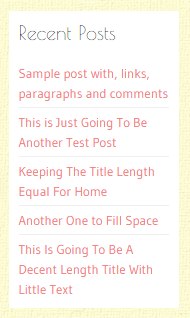
5. Click save and refresh your site. Now you can see recent posts widget is working on your site.
Still not showing recent posts? Then add below code just above </head> tag:
<script type='text/javascript'>
//<![CDATA[

function rp(json){document.write('<ul>');for(var i=0;i<numposts;i++){document.write('<li>');var entry=json.feed.entry[i];var posttitle=entry.title.$t;var posturl;if(i==json.feed.entry.length)break;for(var k=0;k<entry.link.length;k++){if(entry.link[k].rel=='alternate'){posturl=entry.link[k].href;break}}posttitle=posttitle.link(posturl);var readmorelink="(more)";readmorelink=readmorelink.link(posturl);var postdate=entry.published.$t;var cdyear=postdate.substring(0,4);var cdmonth=postdate.substring(5,7);var cdday=postdate.substring(8,10);var monthnames=new Array();monthnames[1]="Jan";monthnames[2]="Feb";monthnames[3]="Mar";monthnames[4]="Apr";monthnames[5]="May";monthnames[6]="Jun";monthnames[7]="Jul";monthnames[8]="Aug";monthnames[9]="Sep";monthnames[10]="Oct";monthnames[11]="Nov";monthnames[12]="Dec";if("content"in entry){var postcontent=entry.content.$t}else if("summary"in entry){var postcontent=entry.summary.$t}else var postcontent="";var re=/<\S[^>]*>/g;postcontent=postcontent.replace(re,"");document.write(posttitle);if(showpostdate==true)document.write(' - '+monthnames[parseInt(cdmonth,10)]+' '+cdday);if(showpostsummary==true){if(postcontent.length<numchars){document.write(postcontent)}else{postcontent=postcontent.substring(0,numchars);var quoteEnd=postcontent.lastIndexOf(" ");postcontent=postcontent.substring(0,quoteEnd);document.write(postcontent+'...'+readmorelink)}}document.write('</li>')}document.write('</ul>')}

//]]>
</script>
very Good
I tried on my site, but it is not working.
This is what I pasted in the HTML Gadget:
<script>var numposts =5; var showpostdate = false; var showpostsummary = false; var numchars = 100; </script>
<script src="http://thebestlifequotes.blogspot.com/feeds/posts/default?orderby=published&alt=json-in-script&callback=rp">
</script>
Hi, I updated the tutorial. follow steps again.
thank so much! this is nice style for blogger.
thanks. 😀
Thank you very much admin its 100% Working on my Blog!
you explained very well..
Thanks bro for helping ,i making a website by my own so it's really helpful
thank you very much this is working for me
thank you
Thanks! It worked!