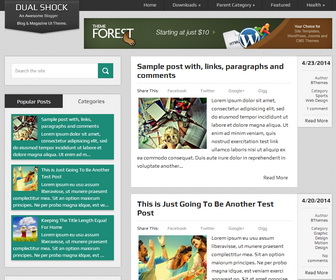
DualShock Blogger template is a free, responsive and dual purpose blog and magazine theme for your blog. DualShock blogger theme has custom post meta, left sidebar, 3 columns footer, share buttons, related posts, email subscribe box, tabbed widget and more.
How To Setup Timestamp Format
Go to “Settings” –> “Language and formatting”.
Select “Timestamp Format” from drop-down menu similar to “7/25/2014” format.
Important: You need to change “Timestamp Format”. Not “Comment Timestamp Format”.
Click on “Save settings” button.
How To Add Links to Top Navigation Menu
Find this in “Edit HTML”:
<nav class='navigationnbt' id='navigationnbt'>

<ul class='menunbt'>

<li><a expr:href='data:blog.homepageUrl'>Home</a></li>

<li><a href='#'>Downloads</a>
<ul class='sub-menu'>
<li><a href='#'>Dvd</a></li>
<li><a href='#'>Games</a></li>
<li><a href='#'>Software</a>
<ul class='sub-menu'>
<li><a href='#'>Office</a>
</li>
</ul>
</li>
</ul>
</li>

...

</ul>
<a href='#' id='pullnbt'>Menu</a>

</nav>
Replace “#” marks with real URLs and change anchor texts as you like.
How To Configure Email Subscribe Box
Find this in “Edit HTML”:
<form action='http://feedburner.google.com/fb/a/mailverify' method='post' onsubmit='window.open('http://feedburner.google.com/fb/a/mailverify?uri=newbthemes', 'popupwindow', 'scrollbars=yes,width=550,height=520');return true' target='popupwindow'>
<input name='email' onblur='if (this.value == '') {this.value = 'Your email Address...';}' onfocus='if (this.value == 'Your email Address...') {this.value = '';}' type='text' value='Your email Address...'/>
<input name='uri' type='hidden' value='newbthemes'/>
<input name='loc' type='hidden' value='en_US'/>
<input type='submit' value='Subscribe'/>
</form>
Add your feedburner ID replacing my feedburner ID (newbthemes).
How To Change Tab Names
Find this in “Edit HTML”:
<ul class='tabsnbt'>
	<li><a href='#popular-postsnbt'>Popular Posts</a></li>
	<li class='tab-recent-postsnbt'><a href='#recent-postsnbt'>Categories</a></li>
</ul> <!--end .tabs-->
Change “Popular Posts” and “Categories” words as you like.
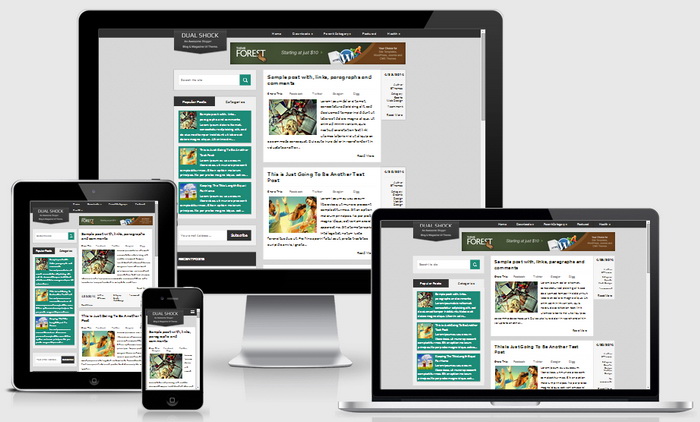
DualShock Blogger Template Responsive View:




Great blogger template i love it keep it up
Hi, nice free blogger templates. I didn’t know the free templates had so many features.
Thanks for sharing.
PLEASE HELP ME.
the font size is too small, and I want to change Font, but there is no script to change the font.
PLEAST HELP…
find this:
.post-body {
font-size: 15px;
clear: both;
line-height: 24px;
display: block;
color: #222222;
padding-top: 0px;
margin-top: 15px;
padding-bottom: 1px;
margin-bottom: 0px;
}
change "15px" value of "font-size" property to change the size of post fonts.
thank you very much.
I fixed it! thanks :3