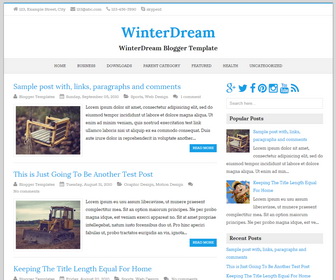
WinterDream is an easy to use, minimalistic, fully responsive and Retina ready Blogger theme that allows for easy viewing on any device. WinterDream Blogger template has Google web fonts, related posts with thumbnails, social buttons, scroll to top button, post share buttons, multi-level navigation menu, contact information in header, auto post summaries and more.
How to Change Contact Information

Find this in “Edit HTML”:
<div class='top-navigation'>
  <p class='header-contact'>
	<span class='header-contact-address'><i aria-hidden='true' class='icon_house'/>123, Example Street, City</span>
	<span class='header-contact-email'><i aria-hidden='true' class='icon_mail'/>123@abc.com</span>
	<span class='header-contact-phone'><i aria-hidden='true' class='icon_phone'/>123-456-7890</span>
	<span class='header-contact-skype'><i aria-hidden='true' class='social_skype'/>skypeid</span>
  </p>
</div>
Change above contact information with yours.
How To Add Links to Top Navigation Menu
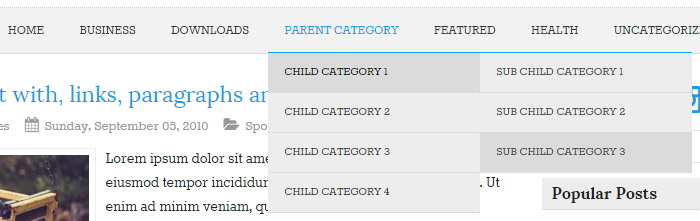
Find this in “Edit HTML”:
<div class='menu-nbt-menu-container'>
<ul class='menunbt' id='main-nav'>

<li><a expr:href='data:blog.homepageUrl'>Home</a></li>

<li><a href='#'>Business</a>
<ul class='sub-menu'>
<li><a href='#'>Internet</a></li>
<li><a href='#'>Market</a></li>
<li><a href='#'>Stock</a></li>
</ul>
</li>

...

</ul>
</div>
Replace “#” marks with real URLs and change anchor texts as you like.
How To Configure Social Buttons

Find this in “Edit HTML”:
<div class='social-buttonsnbt'> <a href='https://plus.google.com/' rel='nofollow' target='_blank' title='Google Plus'><i class='fa fa-google-plus'/></a> <a href='https://twitter.com/' rel='nofollow' target='_blank' title='Twitter'><i class='fa fa-twitter'/></a> <a href='https://www.facebook.com/' rel='nofollow' target='_blank' title='Facebook'><i class='fa fa-facebook'/></a> <a href='http://www.pinterest.com/' rel='nofollow' target='_blank' title='Pinterest'><i class='fa fa-pinterest'/></a> <a href='https://www.linkedin.com/' rel='nofollow' target='_blank' title='Linkedin'><i class='fa fa-linkedin'/></a> <a href='http://instagram.com/' rel='nofollow' target='_blank' title='Instagram'><i class='fa fa-instagram'/></a> <a href='https://www.youtube.com/' rel='nofollow' target='_blank' title='Youtube'><i class='fa fa-youtube'/></a> <a expr:href='data:blog.homepageUrl + "feeds/posts/default"' rel='nofollow' target='_blank' title='RSS'><i class='fa fa-rss'/></a> </div>
Add your own social links replacing default social profile URLs.
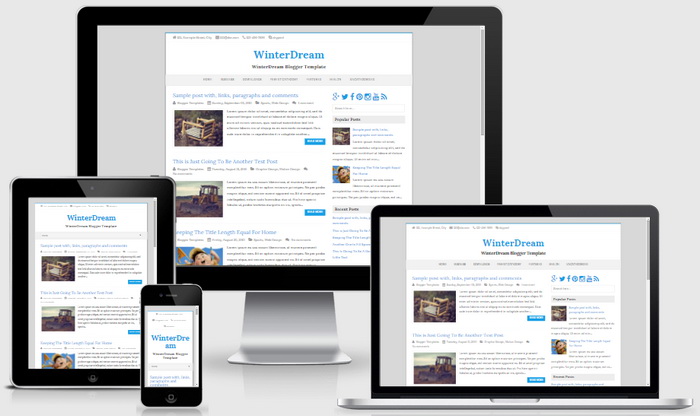
WinterDream Blogger Template Responsive View




thanks
I love this template and worked at my blog. thanks for share.