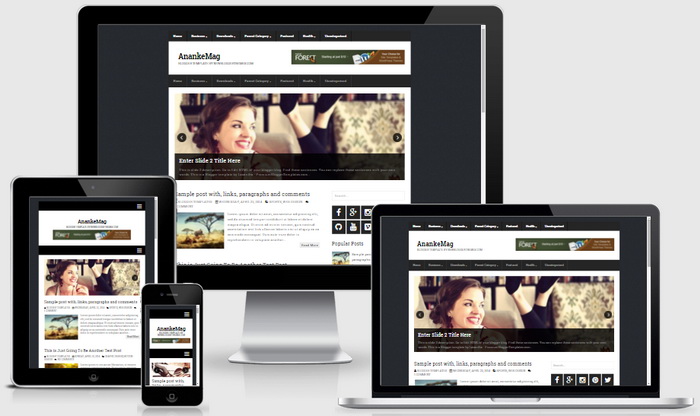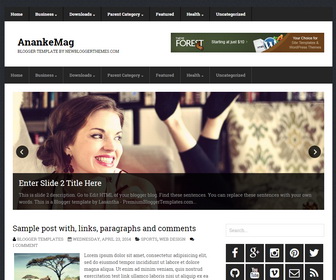
AnankeMag is a fully responsive, 2 columns (with right sidebar) Blogger theme with 3 columns footer widgets area. AnankeMag Blogger template has a easy to configure slider, Google web fonts, related posts with thumbnails, social buttons, post share buttons, 2 multi-level top navigation menu, auto post summaries and more.
How To Configure Featured Content Slider
There are 3 slides in the slider. You can add or remove more slides if you want. This is the code for slide 1:
<!-- slide 1 code start -->
<li>
<article class='slidepbt'>

	<a href='ENTER-SLIDE-1-LINK-HERE'><img src='http://4.bp.blogspot.com/-iGcNzF-yZF8/ViRg98uNbjI/AAAAAAAANDM/4VoNpy9wKGg/s1600/slide-1.jpg'/></a>

	<div class='bx-caption'>
		<h2 class='slider-title'><a href='ENTER-SLIDE-1-LINK-HERE'>Enter Slide 1 Title Here</a></h2>
		<p>This is slide 1 description. Go to Edit HTML of your blogger blog. Find these sentences. You can replace these sentences with your own words. This is a Blogger template by Lasantha - PremiumBloggerTemplates.com...</p>
	</div>

</article>
</li>
<!-- slide 1 code end -->
Now replace,
“ENTER-SLIDE-1-LINK-HERE”s with your own slide link,
“Enter Slide 1 Title Here” with your own slide title,
“This is slide 1 description. Go to Edit HTML of your blogger blog. Find these sentences. You can replace these sentences with your own words. This is a Blogger template by Lasantha – PremiumBloggerTemplates.com…” with your own slide description,
“http://4.bp.blogspot.com/-iGcNzF-yZF8/ViRg98uNbjI/AAAAAAAANDM/4VoNpy9wKGg/s1600/slide-1.jpg” with your own slide image URL.
Also, you can configure next 2 slides following the given steps above.
How To Configure Primary Navigation Menu
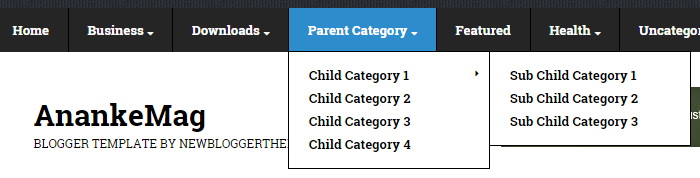
Find this in “Edit HTML”:
<ul class='menu-itemspbt' id='menu-primary-items'>

<li class='menu-item'><a expr:href='data:blog.homepageUrl'>Home</a></li>

<li class='menu-item menu-item-has-children'><a href='#'>Business</a>
<ul class='sub-menu'>
<li class='menu-item'><a href='#'>Internet</a></li>
<li class='menu-item'><a href='#'>Market</a></li>
<li class='menu-item'><a href='#'>Stock</a></li>
</ul>
</li>

...

</ul>
Replace “#” marks with real URLs and change anchor texts as you like.
How To Configure Secondary Navigation Menu
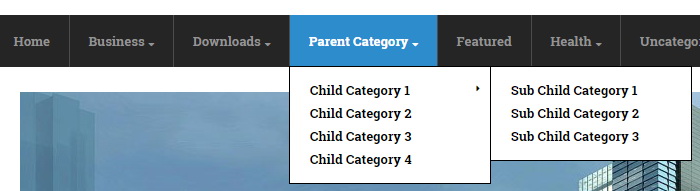
Find this in “Edit HTML”:
<ul class='menu-itemspbt' id='menu-secondary-items'>

<li class='menu-item'><a expr:href='data:blog.homepageUrl'>Home</a></li>

<li class='menu-item menu-item-has-children'><a href='#'>Business</a>
<ul class='sub-menu'>
<li class='menu-item'><a href='#'>Internet</a></li>
<li class='menu-item'><a href='#'>Market</a></li>
<li class='menu-item'><a href='#'>Stock</a></li>
</ul>
</li>

...

</ul>
Replace “#” marks with real URLs and change anchor texts as you like.
How To Configure Social Buttons
Find this in “Edit HTML”:
<ul id='social-profilespbt'> <li class='socialpbt-facebook'><a href='#' rel='nofollow' target='_blank'/></li> <li class='socialpbt-gplus'><a href='#' rel='nofollow' target='_blank'/></li> <li class='socialpbt-instagram'><a href='#' rel='nofollow' target='_blank'/></li> <li class='socialpbt-pinterest'><a href='#' rel='nofollow' target='_blank'/></li> <li class='socialpbt-twitter'><a href='#' rel='nofollow' target='_blank'/></li> <li class='socialpbt-github'><a href='#' rel='nofollow' target='_blank'/></li> <li class='socialpbt-youtube'><a href='#' rel='nofollow' target='_blank'/></li> <li class='socialpbt-vimeo'><a href='#' rel='nofollow' target='_blank'/></li> <li class='socialpbt-email'><a href='#' rel='nofollow' target='_blank'/></li> <li class='socialpbt-feed'><a expr:href='data:blog.homepageUrl + "feeds/posts/default"' rel='nofollow' target='_blank'/></li> </ul>
Add your own social links replacing “#” marks.
AnankeMag Blogger Template Responsive View