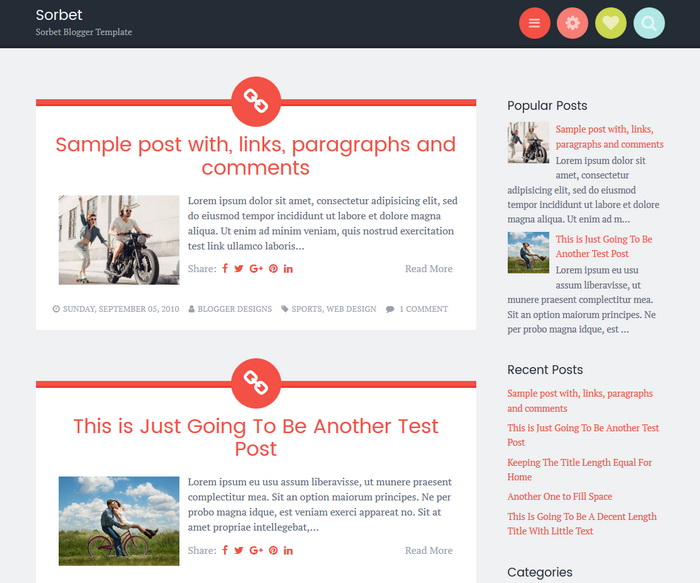
Sorbet is a delicious theme for your blog or website. Sorbet Blogger template has a mobile-friendly design looks great on any device, while navigation menu, search box, social links, and widgets are tucked neatly away in the header for easy access that doesn’t crowd your content. If you’re seeking a fun new look for your site, you’ll enjoy a taste of Sorbet.
It is 100% Mobile Friendly: Check Mobile Friendly
It has search engine friendly data: Check Structured Data
Sorbet Blogger template also includes a 3 columns optional widget area located behind a gear icon in the header.
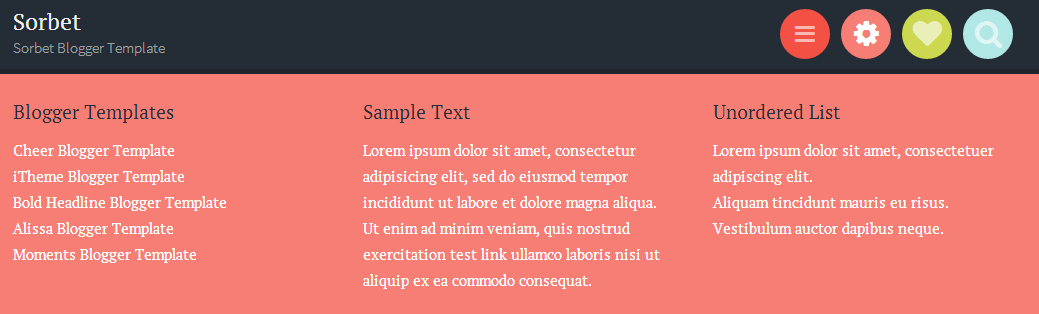
You can use search icon to display search box of the site.

How To Add Links to Top Navigation Menu
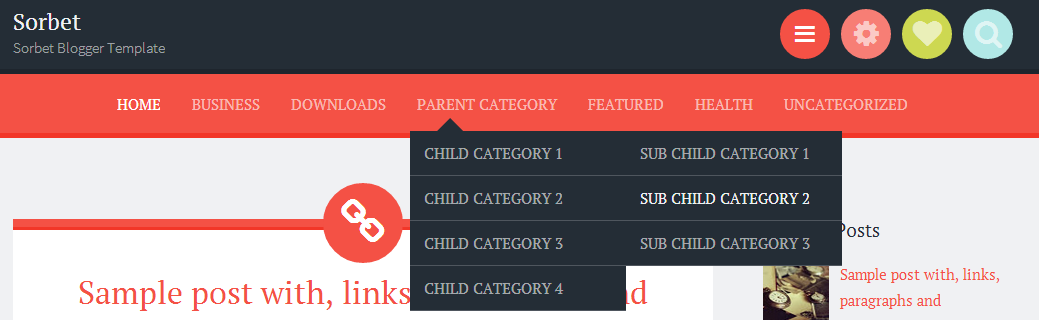
Find this in “Edit HTML”:
<div class='bwraptopmenu'>
<ul>
<li class='current_page_item'><a expr:href='data:blog.homepageUrl'>Home</a></li>
<li><a href='#'>Business</a>
<ul class='children'>
<li><a href='#'>Internet</a></li>
<li><a href='#'>Market</a></li>
<li><a href='#'>Stock</a></li>
</ul>
</li>

<li><a href='#'>Downloads</a>
<ul class='children'>
<li><a href='#'>Dvd</a></li>
<li><a href='#'>Games</a></li>
<li><a href='#'>Software</a>
<ul class='children'>
<li><a href='#'>Office</a>
</li>
</ul>
</li>
</ul>
</li>

...

<li><a href='#'>Uncategorized</a></li>
</ul>
</div>
Replace “#” marks with real URLs and change anchor texts as you like.
How To Add Links to Bottom Navigation Menu

Go to “Layout”. Click on “Edit” link of “Edit This Menu” widget.
Now add your links to that link list widget.
How To Configure Social Buttons

Find this in “Edit HTML”:
<div class='bwrapsocial-links'>
<ul class='socialbmenu' id='menu-social-links'>
<li><a href='https://twitter.com/' rel='nofollow' target='_blank' title='Twitter'><span class='screen-reader-text'>Twitter</span></a></li>
<li><a href='https://www.facebook.com/' rel='nofollow' target='_blank' title='Facebook'><span class='screen-reader-text'>Facebook</span></a></li>
<li><a href='https://plus.google.com/' rel='nofollow' target='_blank' title='GooglePlus'><span class='screen-reader-text'>GooglePlus</span></a></li>
<li><a href='https://www.pinterest.com/' rel='nofollow' target='_blank' title='Pinterest'><span class='screen-reader-text'>Pinterest</span></a></li>
<li><a href='https://www.linkedin.com/' rel='nofollow' target='_blank' title='Linkedin'><span class='screen-reader-text'>Linkedin</span></a></li>
<li><a href='https://www.instagram.com/' rel='nofollow' target='_blank' title='Instagram'><span class='screen-reader-text'>Instagram</span></a></li>
<li><a href='https://www.flickr.com/' rel='nofollow' target='_blank' title='Flickr'><span class='screen-reader-text'>Flickr</span></a></li>
<li><a href='https://www.youtube.com/' rel='nofollow' target='_blank' title='Youtube'><span class='screen-reader-text'>Youtube</span></a></li>
<li><a href='https://vimeo.com/' rel='nofollow' target='_blank' title='Vimeo'><span class='screen-reader-text'>Vimeo</span></a></li>
<li><a href='https://github.com/' rel='nofollow' target='_blank' title='Github'><span class='screen-reader-text'>Github</span></a></li>
<li><a href='https://www.tumblr.com/' rel='nofollow' target='_blank' title='Tumblr'><span class='screen-reader-text'>Tumblr</span></a></li>
<li><a href='https://dribbble.com/' rel='nofollow' target='_blank' title='Dribbble'><span class='screen-reader-text'>Dribbble</span></a></li>
<li><a href='skype:profile_name?chat' rel='nofollow' target='_blank' title='Skype'><span class='screen-reader-text'>Skype</span></a></li>
<li><a href='mailto:123@abc.com' rel='nofollow' target='_blank' title='Contact'><span class='screen-reader-text'>Contact</span></a></li>
<li><a expr:href='data:blog.homepageUrl + "feeds/posts/default"' target='_blank' title='RSS'><span class='screen-reader-text'>RSS</span></a></li>
</ul>
</div>
Add your own social links replacing current social links.
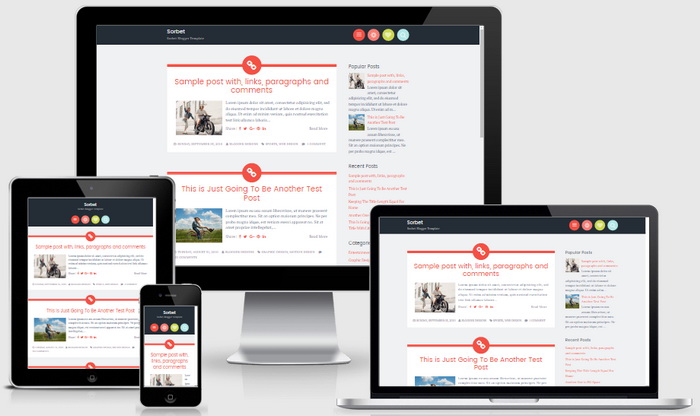
Responsive View / Mobile Friendly View




Hi, amazing template thanks, i have a question, how i can see in the homepage on the post font quote? Thanks
you need to remove auto read more feature from the template.
How do I change the ICONs on the header menu? And How to add new header?
Hi Team,
I am having trouble displaying the blog/post date below my blog posts. It just shows the time. I would appreciate if you could help me in displaying the day alongwith the date beside the time below my posts.
The blog in question is : http://www.reeb-thinks.blogspot.com
Thank you!
Reeb
follow steps here: https://newbloggerthemes.com/blog/fix-posted-date-undefined-error-blogger/
Is there a way to change the coding so that it crops the smaller front-page preview images instead of squishing them to a certain size?
https://newbloggerthemes.com/sorbet-blogger-template/comment-page-1/#comment-61323
Thank you!! Worked like a charm.
Hi ,
Can you please let me know how I can freeze the menu bar rather than having it dropping down whenever I click on it.
hi
may sound dumb, but i don’t know how to enable the links in the top nav bar. any url i try does not work. what am i doing wrong?
thank you
you can configure top navigation going to “Edit HTML”. Please follow the steps given above.
Just installed your theme, the theme is well arranged, simple to configure and looks attractive. thanks
Hey, can I change the link symbol which is on the top of each post? I would rather to make it plain dot..
find this:
.hentry:before {
content: "\f0c1";
z-index: 2;
font-family: FontAwesome;
}
replace it with:
.hentry:before {
content: "\f111";
z-index: 2;
font-family: FontAwesome;
}
The theme is look simple and sweet but it is not showing icons in mobile view
Any solution???? thanks in advance.
I checked and social icons are showing without problem.
i just download and use your template, cool i like it !
thanks bro ….
sir tell me a way how can i make the navigation bar permanent to display even without clicking the menu button at top right side?
Hi! I want to install this theme to my main blog (I linked to my test one), but it stretches the photos in my posts in a weird way which I do not like. How can I avoid this?
Thanks in advance!
find this:
.pbtthumbimg {
float:left;
margin:0px 10px 5px 5px;
padding:4px;
border:1px solid #eee;
background:#fcfcfc;
width:200px;
height:150px;
}
replace it with:
.pbtthumbimg {
float:left;
margin:0px 10px 5px 5px;
padding:4px;
border:1px solid #eee;
background:#fcfcfc;
width:200px;
height:auto;
}
Hi! I wanna remove the menu. How do it? I don’t speak english very well haha
first delete:
<div class=’togglenbtclass’ id=’menu-toggle’ title=’Menu’><span class=’screen-reader-text’>Menu</span></div>
after that, delete:
<div class=’panel’ id=’menu-toggle-nav’>
<div class=’main-navigation’ id=’site-navigation’ role=’navigation’>
…
</div><!– #site-navigation –>
</div>
I love the template! Quick question.. which lines of code to I remove to get rid of tumblr? Do you have a google plus icon to replace it?
to remove tumblr button, remove this line:
<li><a href=’http://tumblr.com’ rel=’nofollow’ target=’_blank’><span class=’screen-reader-text’>Tumblr</span></a></li>
use this code to display google plus button:
<li><a href=’http://plus.google.com’ target=’_blank’><span class=’screen-reader-text’>Google Plus</span></a></li>
Thanks for this but it is not pulling through the G+ icon; instead it shows a right pointing arrow. Can you please advise?
Hi Nick, I didn't understand your problem well.
Just downloaded your template and it was wonderful! So simple and classy. Thank you!
Wow, this template is amazing!!
Thank you.
i downloaded the template, but when i open the downloaded folder, i dont understand where to find the code. can you help?
follow this guide: https://newbloggerthemes.com/blogger-template-installation-guide/
Thanks to share pretty theme.
I have a question.
How can I modifiy always appear to upper drop menu?
currently, only when click, it appear to drop menu.
hi, it requires some modification. hard to explain in a comment.
the template is amazing, thanks
but i need to add google plus to social media panel . how to do it ?
I have explained it in a comment.
hi
how can i change the width of sidebar !! bcz i want to add a adsense ads ( width 300 px )
thnx a lot for this amazing template
Edit these css in html code
.bwrapsite-content .bwrapwidget-area {
float: right;
overflow: hidden;
width: 25%;
.content-area {
float: left;
margin: 0 -25% 0 0;
width: 100%;
}
into
.bwrapsite-content .bwrapwidget-area {
float: right;
overflow: hidden;
width: 30%;
.content-area {
float: left;
margin: 0 -25% 0 0;
width: 95%;
}
Love the template! Just one question. How do you adjust the image size on the landing page? My images are showing up squished and I can’t find the html to correct it.
find this:
.pbtthumbimg {
float:left;
margin:0px 10px 5px 5px;
padding:4px;
width:200px;
height:150px;
}
change it with:
.pbtthumbimg {
float:left;
margin:0px 10px 5px 5px;
padding:4px;
width:200px;
height:auto;
}
Awesome template – so happy that I found it! Thanks!
Hi, can i set the top menu static? thanks
Is there no Google+ icon?
Hi, great theme, like it a lot. have installed and edited no problems. was just wondering if it’s possible to make the menu stay on the screen at all times, rather than have it tucked away behind the buttons
cheers
I was so glad when I found this because I was about to give up adding my soical links, but I love this template so a million thanks for this post.
Cool…. I love it…!!!
In this template, 720*90, adsense is possible ?
it is possible with few theme modifications.
First of all lot of thanks for this template. Its simple and crisp and more over its responsive.
But I have got an issue. In my home my I am not able to get posts list. Sometimes its showing 2 and in next page 4 like that. I have many articles but I require them to be posted like say 10 of them in one page. I have tried settings still its not working.
follow steps here:
http://www.premiumbloggertemplates.com/blog/incorrect-number-of-posts-per-page-blogger/
Hello, I just applied this template on my site and it looks amazing, thanks a lot!
Is it possible to keep the menu bar static? Could you please tell me how?
Thanks very much.
Hello all right, I wonder if it would like to increase the size of the column or space would be like leaving the “fluid layoute”.
Sought by the width but did not know what it was.
Thank you in advance for your help and attention.
Sincerely Abilio
Hi,
I loved this template, but I’d like to know if I can change the red colors for blue. Is it possible? How do I do it?
Thx 😀
you need to have some CSS knowledge. However I can do it for you. contact me.
I do have some knowledge sir, but I need some directions to do so. How do I contact you? And thanks, by the way 😀
Hello! I just installed this template, it’s beautiful! I’m having trouble gracefully increasing the blog title size. I tried changing the font-size in h1, but I think it’s being overridden somewhere. If I !important it, the size changes, but that’s awfully cave-man like of me. I’m moderately new to html/css editing. Could you help me find where to fix this, please? Thank you
find this:
.site-title {
font-size: 1.27778em;
line-height: 1.17391em;
margin: 0;
}
need to change “1.27778em” value to higher value to increase font size.
can i add slide show on this template? and how?
would you be willing to adjust the colors of the template and also add my logo to the header if I was willing to pay? Love the style of this template. Also, do you have a youtube social media icon?
Thank you!
Hi Ashley, if you are willing to pay, I will do changes as you like.
to add Youtube icon, use this code:
<li><a href=’http://youtube.com’ rel=’nofollow’ target=’_blank’><span class=’screen-reader-text’>Youtube</span></a></li>
i have a problem, just one post appear in home screen for see other post i have to click in older post
read this:
http://www.premiumbloggertemplates.com/blog/incorrect-number-of-posts-per-page-blogger/
Awesome Theme !! I appreciate all the effort behind it 🙂
Just a quick question , How to reduce Font size of the posts shown in Home page?
find this:
body {
background: #f0f1f3;
color: #656e7f;
font-family: "PT Serif","Source Sans Pro", Helvetica, Arial, sans-serif;
font-size: 18px;
font-weight: 300;
line-height: 27px;
}
change 18px to other value you like.
Hi, This is an amazing template you have here. But i would like to know if it is possible to change the chain icon? I don’t really like it .
find this:
.togglesnbtdiv #sidebar-toggle:before {
line-height: 50px;
background-color: #f77e75;
content: "\f013";
font-family: FontAwesome;
}
You need to change f013 value to other. (need to have basic knowledge about FontAwesome icons.)
Hello! I cannot configure the Widgets button on my blog. There is nothing there? I see it’s supposed to be a three column of content. How do I get that? I’m using blogger.com. Thanks!
you can add widgets as 3 columns going to “Layout”.
Hi there. For some reason comments aren’t showing up on my posts. How do I fix this?
This tutorial will help you:
https://newbloggerthemes.com/blog/enable-google-plus-comments-in-blogger/
Awesome theme!
Question : Have 3 posts so far and now two of them I must click “Show older posts” to see.
I have “Show 7 posts” in the settings for each page and its only showing one now.
How do I fix this?
Thanks
Hi, this is not a template problem. Read this:
http://www.premiumbloggertemplates.com/blog/incorrect-number-of-posts-per-page-blogger/
Thanks so much for all the detailed instructions in the comments-I’ve been able to find the answers to all my questions and am now up and running. Love the template.
Gorgeous template! Thx for it!
Hi, first of all thanks for this template.
I’ve already read how to change this chain icon, but i want to use diferent ones based on the article category, is it posible?
I’ve tried with If and Variable name but didnt work.
Hope u can help me.
please use contact form for personal support.
Hi. Great theme!
I wonder, is there a way to cut out the previews and have the full posts on the home page instead?
Many thanks!
http://www.premiumbloggertemplates.com/blog/how-to-remove-blogger-auto-read-more-option/
Great Design, I really love it!
Can you give me the color codes for the buttons at the top in the header? I want to recreate my logo to match. Thanks!
now with paid version of "Sorbet" theme, you can change fonts and colors without having any coding knowledge.
hi the toggle search bar on the menu doesn't work, i'll add the code below . please let me know what changes should i make in order for it to search results on my web page.
<div class='togglenbtclass' id='search-toggle' title='Search'>
<span class='screen-reader-text'>
Search
</span>
</div>
i checked again…it works.
hi this is awesome theme…!
but i have a problem in the post background color can you plezz give some instruction how to change post background color 🙂
thank you….
find this:
.hentry {
background-color: white;
border-top: 8px solid #f45145;
margin: 0 0 81px;
padding: 27px 27px 22px;
position: relative;
}
change "white" to any color you like.
Hello, i'm currently using this theme for my blog and it is totally wonderful!
but somehow i can't get to change the background into the image that i want can you give some instruction on it?
Thank you!
find this:
background: #f0f1f3;
Change it to something like this:
background: #f0f1f3 url('YOUR_BACKGROUND_IMAGE_ADDRESS') repeat top left;
How to separate post in this template
didn't understand your question.