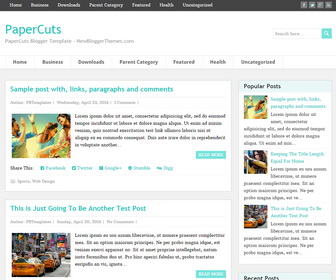
PaperCuts is a simple and easy to use multipurpose blogger theme with auto post summaries on homepage. It is a fully responsive blogger template that allows for easy viewing on any device. PaperCuts blogger template has social icons, post share buttons, related posts, right sidebar, 3 columns footer, 2 navigation menu, scroll to top button and more.
How To Add Links to Top Navigation Menu
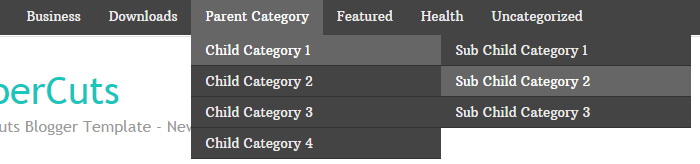
Find this in “Edit HTML”:
<ul class='menunbt' id='top-navnbt'>

<li><a expr:href='data:blog.homepageUrl'>Home</a></li>

<li><a href='#'>Business</a>
<ul class='sub-menu'>
<li><a href='#'>Internet</a></li>
<li><a href='#'>Market</a></li>
<li><a href='#'>Stock</a></li>
</ul>
</li>

...

<li><a href='#'>Uncategorized</a></li>

</ul>
Replace “#” marks with real URLs and change anchor texts as you like.
How To Configure Social Buttons
Find this in “Edit HTML”:
<div class='header-iconsnbt'>
  <a class='social-iconnbt facebook-iconnbt' href='#' target='_blank'><img alt='Facebook' src='http://3.bp.blogspot.com/-nQnMMucD7k4/VRK_Tt7f1gI/AAAAAAAAMFo/-4_yI-gi-Y8/s1600/icon-facebook.png'/></a>
  <a class='social-iconnbt twitter-iconnbt' href='#' target='_blank'><img alt='Twitter' src='http://1.bp.blogspot.com/-bB4tnzKRa3w/VRK_VlBieGI/AAAAAAAAMF0/wK6iRdTnCUs/s1600/icon-twitter.png'/></a>
  <a class='social-iconnbt google-iconnbt' href='#' target='_blank'><img alt='Google +' src='http://3.bp.blogspot.com/-eCq6GIxGnxE/VRK_TzN4C8I/AAAAAAAAMFY/65IOjKWLqt8/s1600/icon-google.png'/></a>
  <a class='social-iconnbt rss-iconnbt' href='#' target='_blank'><img alt='RSS' src='http://3.bp.blogspot.com/--iYfIfWbhJY/VRK_Ux5vRgI/AAAAAAAAMGU/XuPVvyYGH0U/s1600/icon-rss.png'/></a>
</div>
Add your own social links replacing “#” marks.
How To Add Links to Secondary Navigation Menu
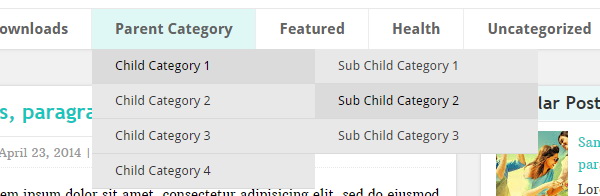
Find this in “Edit HTML”:
<ul class='menunbt' id='navnbt'>

<li><a expr:href='data:blog.homepageUrl'>Home</a></li>

<li><a href='#'>Business</a>
<ul class='sub-menu'>
<li><a href='#'>Internet</a></li>
<li><a href='#'>Market</a></li>
<li><a href='#'>Stock</a></li>
</ul>
</li>

...

<li><a href='#'>Uncategorized</a></li>

</ul>
Replace “#” marks with real URLs and change anchor texts as you like.
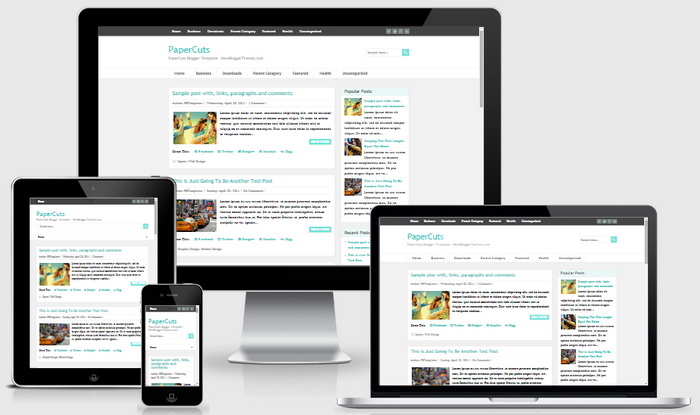
PaperCuts Blogger Template Responsive View:




awesome template you got here, pls. how can someone remove or reduce the secondary menu
HI I want to remove the top menu bar, how it possible, can u plz guide me
just go to Edit HTML and remove it.
Very beatiful templeta !
Good template thank you sir but i only need in my comment form is not good compare to your comment form please say how i am add this comment form because your comment form have name email website and message option.
you can use a third party comment system like Disqus.
Thankyou you are using wordpress comment form thankyou for help me about comment form i am add disqus in my blog
Sir good work i am install this template but sir i want to remove search bar please say how i am do this
Just remove this code from the theme:
<form action='/search' id='searchformnbt' method='get'>
<div class='searchform-wrappernbt'>
<input id='snbt' name='q' placeholder='Search here…' type='text' value=''/>
<input alt='send' class='sendnbt' name='searchsubmitnbt' src='http://2.bp.blogspot.com/-xhZkxLAvUMI/VRK_S9EMJzI/AAAAAAAAMFM/QIkBu1sVhLU/s1600/empty.gif' type='image'/>
</div>
</form>
Sir thankyou for code and i am appreciate your work nice job and one more time thankyou.
Sir thankyou your work is almost great but i only need when i am customise the home and older post by pagenumber navigation sometime page number navigation see after home and older post please say how to hide only home and older post only see page numbernavigation.thankyou.please help me and thankyou.
I can not tell the problem without knowing your site URL.
sir good work thank you.but sir i only need to remove“ share this “widget who is below all post i want to add another share this widget please help me how to remove share this widget.
Hi Nikhil,
Remove this part form theme code:
<b:if cond='data:blog.pageType != "static_page"'>
<div class='pbtsharethisbutt'>
<ul class='pbt-social-icons'>
<li class='Share-this-arti'>Share This: </li>
<li class='pbtfacebook'><a expr:href='"http://www.facebook.com/share.php?v=4&src=bm&u=" + data:post.url + "&t=" + data:post.title' onclick='window.open(this.href,"sharer","toolbar=0,status=0,width=626,height=436"); return false;' rel='nofollow' target='_blank' title='Share this on Facebook'><i class='fa fa-facebook-square'/> Facebook</a></li><li class='pbttwitter'><a expr:href='"http://twitter.com/home?status=" + data:post.title + " — " + data:post.url' rel='nofollow' target='_blank' title='Tweet This!'><i class='fa fa-twitter-square'/> Twitter</a></li><li class='pbtgoogle'><a expr:href='"https://plus.google.com/share?url=" + data:post.url' onclick='javascript:window.open(this.href, "", "menubar=no,toolbar=no,resizable=yes,scrollbars=yes,height=600,width=600");return false;' rel='nofollow' target='_blank' title='Share this on Google+'><i class='fa fa-google-plus-square'/> Google+</a></li><li class='pbtstumbleupon'><a expr:href='"http://www.stumbleupon.com/submit?url=" + data:post.url + "&title=" + data:post.title' rel='nofollow' target='_blank' title='Stumble upon something good? Share it on StumbleUpon'><i class='fa fa-stumbleupon-circle'/> Stumble</a></li><li class='pbtdigg'><a expr:href='"http://digg.com/submit?phase=2&url=" + data:post.url + "&title=" + data:post.title' rel='nofollow' target='_blank' title='Digg this!'><i class='fa fa-digg'/> Digg</a></li>
</ul>
</div>
<div style='clear: both;'/>
</b:if>
sir tomas toman you`r service is great because i am ask you a question and you answer the question within 2 or 3 days/