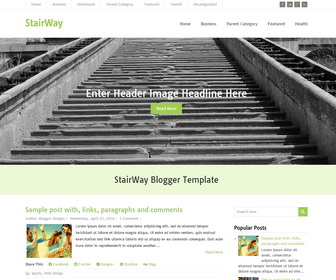
StairWay is an easy to use, minimal multipurpose blogger theme. It is a 100% responsive theme that displays well on any device. StairWay blogger template has right sidebar, 3 columns footer widgets area, social icons, share buttons, related posts, right sidebar, 2 dropdown navigation menus, scroll to top button and more.
How To Add Links to Top Navigation Menu
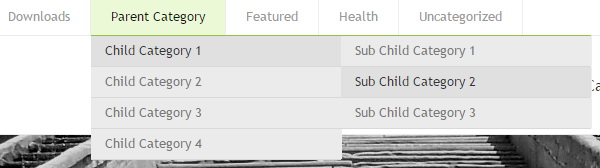
Find this in “Edit HTML”:
<ul class='menunbt' id='top-navnbt'>

<li><a expr:href='data:blog.homepageUrl'>Home</a></li>

<li><a href='#'>Business</a>
<ul class='sub-menu'>
<li><a href='#'>Internet</a></li>
<li><a href='#'>Market</a></li>
<li><a href='#'>Stock</a></li>
</ul>
</li>

...

<li><a href='#'>Uncategorized</a></li>

</ul>
Replace “#” marks with real URLs and change anchor texts as you like.
How To Configure Social Buttons

Find this in “Edit HTML”:
<div class='header-iconsnbt'>
  <a class='social-iconnbt facebook-iconnbt' href='#' target='_blank'><img alt='Facebook' src='http://3.bp.blogspot.com/-nQnMMucD7k4/VRK_Tt7f1gI/AAAAAAAAMFo/-4_yI-gi-Y8/s1600/icon-facebook.png'/></a>
  <a class='social-iconnbt twitter-iconnbt' href='#' target='_blank'><img alt='Twitter' src='http://1.bp.blogspot.com/-bB4tnzKRa3w/VRK_VlBieGI/AAAAAAAAMF0/wK6iRdTnCUs/s1600/icon-twitter.png'/></a>
  <a class='social-iconnbt google-iconnbt' href='#' target='_blank'><img alt='Google +' src='http://3.bp.blogspot.com/-eCq6GIxGnxE/VRK_TzN4C8I/AAAAAAAAMFY/65IOjKWLqt8/s1600/icon-google.png'/></a>
  <a class='social-iconnbt rss-iconnbt' href='#' target='_blank'><img alt='RSS' src='http://3.bp.blogspot.com/--iYfIfWbhJY/VRK_Ux5vRgI/AAAAAAAAMGU/XuPVvyYGH0U/s1600/icon-rss.png'/></a>
</div>
Add your own social links replacing “#” marks.
How To Add Links to Secondary Navigation Menu
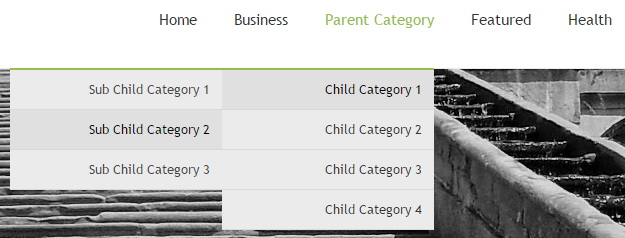
Find this in “Edit HTML”:
<ul class='menunbt' id='navnbt'>

<li><a expr:href='data:blog.homepageUrl'>Home</a></li>

<li><a href='#'>Business</a>
<ul class='sub-menu'>
<li><a href='#'>Internet</a></li>
<li><a href='#'>Market</a></li>
<li><a href='#'>Stock</a></li>
</ul>
</li>

...

<li><a href='#'>Health</a>
<ul class='sub-menu'>
<li><a href='#'>Childcare</a></li>
<li><a href='#'>Doctors</a></li>
</ul>
</li>

</ul>
Replace “#” marks with real URLs and change anchor texts as you like.
StairWay Blogger Template Responsive View
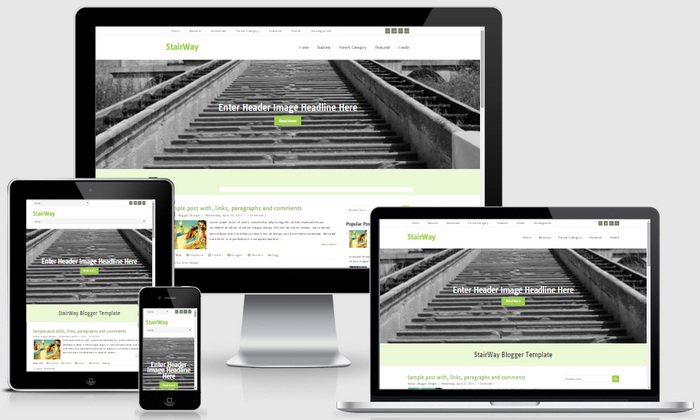




this is aunique blogger theme .the html css code is great.I realy like it .