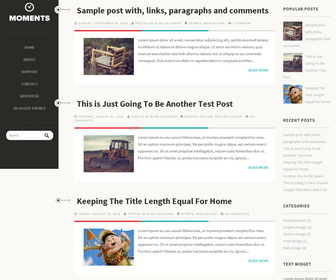
Moments is 2 Column Responsive Blogger Template for Personal Blogs. Moments Blogger Template has 2 Columns Layout, Navigation Menus, Social Buttons, Google Web Fonts, Right Sidebar and More Features.
How To Add Links to Navigation Menu
Go to “Layout”. Click on “Edit” link of “Edit This Menu” widget.
Now add your links to that link list widget.
How To Configure Social Buttons

Find this in “Edit HTML”:
<!-- social stuff -->
<div class='widget' id='social'>
   <a href='mailto:info@yoursite.com'><i class='fa fa-envelope fa-2'/></a>
   <a href='#'><i class='fa fa-twitter fa-2'/></a>
   <a href='#'><i class='fa fa-dribbble fa-2'/></a>
   <a href='#'><i class='fa fa-facebook-square fa-2'/></a>
   <a href='#'><i class='fa fa-vimeo-square fa-2'/></a>
   <a href='#'><i class='fa fa-linkedin fa-2'/></a>
   <a href='#'><i class='fa fa-github fa-2'/></a>
   <a href='#'><i class='fa fa-rss fa-2'/></a>
</div>
<!-- end social stuff -->
Add your email address replacing “info@yoursite.com”.
Add your own social links replacing “#” marks.
wow! nice template collection. Thank you for sharing those template with us………
Hi. This is a lovely template. I’m already using it. I cant figure out how to make the pages work though. I tested making pages on blogger but it’s not displaying on the site. Would appreciate your help. Thanks.
Hi Danielle, After creating pages, link them into the menu like this: https://newbloggerthemes.com/blog/how-to-configure-linklist-menu-widget/
I want to change the “Read More” name, is it possible?
yes, find it in Edit HTML and change.
super collection tnx
Hi,
How can i add more google fonts into de html markup??
It keep sending me this error message:
Ocorreu um erro ao analisar o XML, linha 1814, coluna 3: The element type “link” must be terminated by the matching end-tag “”. Ocultar notificação
you need to close "link" tag.
I simply love this blog theme. Is there any way I can change the timestamp to showing the date instead? (at the top of the post?)
There are various post timestamp formats under Blogger settings. You can select correct one from “Timestamp Format”.
Thank you! I love this theme but why does my recent posts won’t show? What’s the html for it?
<script>var numposts =5; var showpostdate = false; var showpostsummary = false; var numchars = 100; </script>
<script src="http://YOURBLOGNAME.blogspot.com/feeds/posts/default?orderby=published&alt=json-in-script&callback=rp">
</script>
How can I replace the left header bar with a vertical image of that size? Also is there a way to increase the width of that header sidebar? Thankyou for the great template.
Thanks for this beautiful theme! How do I add a blog description without the description and the image “moments’ overlapping each other? I would like the description to appear directly below the image if possible. Thank you!
Is it possible to align the template to the centre of the page instead of left align?
recent post not showing and could you please tell me how to add links like about and home and contact in left sidebar!!!
love this template
To add recent posts enter this code to “HTML/JavaScript” box:
<script>var numposts =5; var showpostdate = false; var showpostsummary = false; var numchars = 100; </script>
<script src="http://YOURBLOGNAME.blogspot.com/feeds/posts/default?orderby=published&alt=json-in-script&callback=rp">
</script>
To add links into the menu read this:
https://newbloggerthemes.com/blog/how-to-configure-linklist-menu-widget/
Hello, thank you so much for making this awesome theme called Moments. I have a quick question for this. Can i use my own logo instead of blog name on top left? Best wishes…
you can upload your logo going to “Layout”.
Hey, I love this template, but could you tell me how can I give sub-pages (like on the demo) on this left sided header? By the way visit my blog for more details, it’s confusing.
Oh already found it, thanks.
Hi, how can i add a logo bellow to blogs name?
Is it possible to add sub category to the navigation menu ? if yes, whats the code?
there is no sub category option available.
Hi. This is a very beautiful theme. I have run into an issue though. “Powered by Blogger.” is showing twice on my blog. One under “total pageview” on the sidebar, the other at the bottom of the page. May I ask how could I get rid of the extra “Powered by Blogger” that’s under the “total pageview”? Thank you.
This will help you:
http://www.bloggertipandtrick.net/how-to-remove-delete-blogger-attribution-widget/
Hey,I want know if there’s a way to expand the boxes that shows off the posts,because they auto adjust the image to adapt to that size,then it distorts the image…
Also,even if I use spaces,jump lines or something,in the box,it appears one text behind the other.
This will help you to remove auto post summaries from homepage:
http://www.premiumbloggertemplates.com/blog/how-to-remove-blogger-auto-read-more-option/
Love this template. How do I add the links on the side like “about”, “home” etc? Also, how do I add an Instagram link? Thank you.
To add menu links, read this:
https://newbloggerthemes.com/blog/how-to-configure-linklist-menu-widget/
To add Instagram button use this code:
<a href=’#’><i class=’fa fa-instagram fa-2′></i></a>
Hi! Wonderful theme, thank you so much!
There is a google plus button? Like the facebook, rss, email ones…. That would be great!
Thank you!
To add Google Plus button, use this code:
<a href=’#’><i class=’fa fa-google-plus-square fa-2′></i></a>
I really love this template, I’d just like to know how to change the background color of the blog and how to change the fonts on the blog.
To change font family, find this:
body{ font-family:’Source Sans Pro’,sans-serif}
Replace ‘Source Sans Pro’ with other font name.
To change background color, find this:
body {
font: 15px/26px Source Sans Pro, sans serif;
color:#666659;
background:#FAF9F5;
}
Change “#FAF9F5” to other color value.
how do you make the menu be on the left instead of top, and the popular posts be on the right instead of bottom, as it is in the picture above? thanks
great template, thanks
Hi,
Thank you for this great template.
Is there a reason why there are only 2 posts in home page? (I checked blogger settings and it says max to 5 posts).
Thank you.
http://www.premiumbloggertemplates.com/blog/incorrect-number-of-posts-per-page-blogger/
Thank you! great template. But, i want to remove the “read more” widget. What’s the html for it?
to remove read more find this:
<b:if cond=’data:blog.pageType != "static_page"’>
<b:if cond=’data:blog.pageType != "item"’>
<div expr:id=’"summary" + data:post.id’><data:post.body/></div>
<script type=’text/javascript’>createSummaryAndThumb("summary<data:post.id/>");</script>
</b:if>
</b:if>
<b:if cond=’data:blog.pageType == "item"’><data:post.body/></b:if>
<b:if cond=’data:blog.pageType == "static_page"’><data:post.body/></b:if>
<b:if cond=’data:blog.pageType != "static_page"’>
<b:if cond=’data:blog.pageType != "item"’>
<div style=’float:right;padding-right:0px;margin-top:10px;’>
<a class=’more-link’ expr:href=’data:post.url’>Read More</a>
</div>
</b:if>
</b:if>
Replace it with:
<data:post.body/>
Hi, I’m having some problems. The template is only with this format when browser is set to 90%. When it is set to 100% or more for viewing, the header takes the entire top, and go to the right sidebar below the posts. How do I solve this so that the subject appear correctly in all display modes?
This is not a problem. That’s how a responsive template works.
Hi. Is the a way to expand the Navigation Bar so you can scroll trhough it? I’d like to add more elements to it.
Is it possible add submenu?
Thank you! Great layout!
there is not sub menu option in this theme.
HI there, thank you for this great template.
Could you let us know how to make the font size in the blog post bigger?
Thanks in advance
Hi, to change blog posts font size, find this:
body {
font: 15px/26px Source Sans Pro, sans serif;
color:#666659;
background:#FAF9F5;
}
change “15px” value to other value you need.
Hi! Thanks for the great theme!
Could you please just clarify one point. What page should be set as the posts page in WordPress? I assume it is the blog page. In that case, how can I show posts on the home page as well?
Hi Alexandre, this is a Blogger theme. not WordPress.
Is anyone having trouble with the comment on the posts?
Nothing seems to be showing up….
even my old comments are all disappeared….
Hi, I checked your site. But can not see any comments available to display. Also you are using Disqus comment system.
How can I remove the comment count? 🙂
Thank you!
To remove comment count, find this and remove it:
<b:if cond=’data:post.allowComments’><span><i class=’fa fa-comments’/> <a expr:href=’data:post.addCommentUrl’ expr:onclick=’data:post.addCommentOnclick’><b:if cond=’data:post.numComments == 0′>No comments</b:if><b:if cond=’data:post.numComments == 1′>1 comment</b:if><b:if cond=’data:post.numComments >= 2′><data:post.numComments/> comments</b:if></a></span></b:if>
Hi
Nice design and great work in developing this.
can you please help me to increase the width of side bar and decrease the width of post section.
Hi Rahul, if you need a customization, please use contact form.
Hi:
Congrats for the amazing template, just wanted to know how to make line breaks show in the post summaries in the home page.
Thanks in advance.
Mike
Hi Mike, to show line breaks, need to remove auto read more feature from the template.
Hey guys,
the cool read more feature is not working with my website?
What shall I do?
Try re-uploading the theme. It will work.
Great Template !!
but how to make releted post below post ?
There is no built-in related posts with this theme. I will update it future with related posts.
I love you Template!!
But I have a problem with how to make a related article .
I tried at least 10 ways on the Internet but failed 🙁
Contact me for paid support. Thanks.
wow 😀 very cool
please help me for costumize template http://prntscr.com/8bsfku
UI of this template is very nice