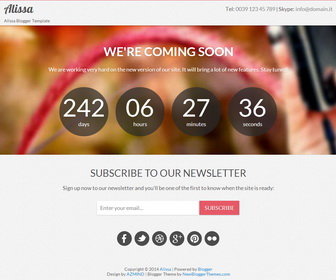
Alissa is a coming soon/under construction Blogger Template built with Twitter Bootstrap. Alissa Blogger Template can be used to launch a new project or service soon and you want to begin creating your email list before the launch. Alissa Blogger Theme comes with responsive design, images slideshow, countdown timer, minimal and light design and social icons.
How to Configure the Counter
Find this in “Edit HTML”:
var countTo = "2014/10/18";
Change the date “2014/10/18” to the date you need.
How to configure email subscribe box
Find this in “Edit HTML”:
<div class='span12 subscribeboxbot'>
<h3>Subscribe to our newsletter</h3>
<p>Sign up now to our newsletter and you'll be one of the first to know when the site is ready:</p>
<form action='http://feedburner.google.com/fb/a/mailverify' class='form-inline' id='signup' method='post' onsubmit='window.open('http://feedburner.google.com/fb/a/mailverify?uri=newbthemes', 'popupwindow', 'scrollbars=yes,width=550,height=520');return true' style='' target='popupwindow'>
<input id='email' name='email' placeholder='Enter your email...' type='email'/>
<input name='uri' type='hidden' value='newbthemes'/>
<input name='loc' type='hidden' value='en_US'/>
<button class='btn' type='submit'>Subscribe</button>
</form>
</div>
Replace “newbthemes” with your Feedburner ID. (you can see it 2 times)
How To Change Slideshow Images
Find below 3 image URLs in “Edit HTML” and replace them with your own image URLs:
http://3.bp.blogspot.com/-1Ao7l-scZQo/UwHWaN1Fv3I/AAAAAAAALHY/XcdpN-8qWcg/s1600/1.jpg
http://2.bp.blogspot.com/-vUT-JV0xnKI/UwHWZy6t7TI/AAAAAAAALHU/J85ZFt-Ksdk/s1600/2.jpg
http://3.bp.blogspot.com/-wvyZHpScqxY/UwHWaIw0T0I/AAAAAAAALHg/VoTpcDQ8Frc/s1600/3.jpg
How To Change Header Contact Details
Find this in “Edit HTML” in change it:
<div class='call-us span8'>
   <p>Tel: <span>0039 123 45 789</span> | Skype: <span>info@domain.it</span></p>
</div>
How To Configure Social Buttons
Find this in “Edit HTML”:
<div class='row'>
   <div class='span12 social'>
      <a class='facebook' data-original-title='Facebook' data-placement='top' href='#' rel='tooltip'/>
      <a class='twitter' data-original-title='Twitter' data-placement='top' href='#' rel='tooltip'/>
      <a class='dribbble' data-original-title='Dribbble' data-placement='top' href='#' rel='tooltip'/>
      <a class='googleplus' data-original-title='Google Plus' data-placement='top' href='#' rel='tooltip'/>
      <a class='pinterest' data-original-title='Pinterest' data-placement='top' href='#' rel='tooltip'/>
      <a class='flickr' data-original-title='Flickr' data-placement='top' href='#' rel='tooltip'/>
   </div>
</div>
Add your own social links replacing “#” marks.




Do you know what size the slideshow images are?
you can try using different sizes. I have used 593px × 362px size images.