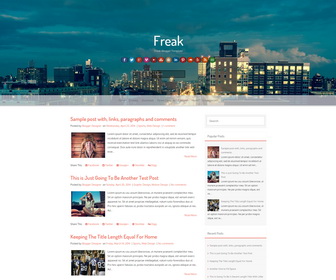
Freak is a fully responsive, 2 columns, beautiful Blogger theme with a stunning parallax header background. Freak Blogger template has a right sidebar, bottom 4 columns widgets area, cool animation effects, Google web fonts and icon fonts, related posts with thumbnails, social icons, sharing buttons, multiple navigation menus, unique search options, auto read more on homepage and more. This blogger theme has been thoroughly tested with all modern Mobile platforms including Android, iPhone and Windows Phone and it works flawlessly.
How To Change Header Image
Find this:
http://4.bp.blogspot.com/-kFu1MYFxPMU/Vbwug36v7GI/AAAAAAAAOg4/GrIew1sKnbU/s000/city.jpg
Replace it with your new header image URL.
How To Configure Social Buttons

Find this in “Edit HTML”:
<div class='social-iconsnbt col-md-12'>
<a href='#' rel='nofollow' target='_blank'><img src='http://4.bp.blogspot.com/-FpVu-MmNPSs/Vbwug5-986I/AAAAAAAAOgw/LvnaC50pN5o/s1600/facebook.png'/></a>
<a href='#' rel='nofollow' target='_blank'><img src='http://4.bp.blogspot.com/-26Au5x6AbqA/VbwujQZMR6I/AAAAAAAAOho/TOQwQVZxSV8/s1600/twitter.png'/></a>
<a href='#' rel='nofollow' target='_blank'><img src='http://2.bp.blogspot.com/-_-yAj6BJ7qc/VbwuhHkBw3I/AAAAAAAAOg0/UVPZFcg7aM8/s1600/google-plus.png'/></a>
<a href='#' rel='nofollow' target='_blank'><img src='http://1.bp.blogspot.com/-Y6WWsuOpt7c/VbwujiM68HI/AAAAAAAAOhw/FtQcQMwpIvQ/s1600/vimeo.png'/></a>
<a href='#' rel='nofollow' target='_blank'><img src='http://2.bp.blogspot.com/-QVstH1cwMlQ/VbwukJjyaaI/AAAAAAAAOh8/TZyRQcDPW34/s1600/youtube.png'/></a>
<a href='#' rel='nofollow' target='_blank'><img src='http://2.bp.blogspot.com/-loB6F76T_qM/VbwujCMsKwI/AAAAAAAAOhg/fDMPBpnTOEA/s1600/stumbleupon.png'/></a>
<a href='#' rel='nofollow' target='_blank'><img src='http://4.bp.blogspot.com/-alUq9yV_CMc/Vbwuhnt9s9I/AAAAAAAAOhA/Kd6joK_gQ7I/s1600/instagram.png'/></a>
<a href='#' rel='nofollow' target='_blank'><img src='http://3.bp.blogspot.com/-L9XHWR9YdD0/Vbwuh-N9ieI/AAAAAAAAOhI/kl7JsIXTEmM/s1600/linkedin.png'/></a>
<a href='#' rel='nofollow' target='_blank'><img src='http://1.bp.blogspot.com/-d-oVu8Gdq7s/VbwuiYMccHI/AAAAAAAAOhQ/rGd6J9z_nMc/s1600/pinterest.png'/></a>
<a href='#' rel='nofollow' target='_blank'><img src='http://2.bp.blogspot.com/-ysxYIrlKfqM/Vbwui8nVFlI/AAAAAAAAOhc/adi3FAYI74A/s1600/soundcloud.png'/></a>
<a href='#' rel='nofollow' target='_blank'><img src='http://4.bp.blogspot.com/-iXhEmjsCDTA/VbwujxmnOYI/AAAAAAAAOh0/zk83OT2zi3U/s1600/yelp.png'/></a>
<a href='#' rel='nofollow' target='_blank'><img src='http://2.bp.blogspot.com/-Ewv_r9qoUYY/Vbwuiib7_YI/AAAAAAAAOhY/3CG_VpVg-AM/s1600/rss.png'/></a>
<a href='mailto:123@abc.com' rel='nofollow' target='_blank'><img src='http://4.bp.blogspot.com/-44gG93Ntekg/VbwuiGVY_6I/AAAAAAAAOhM/nmI0J7hOCHU/s1600/mail.png'/></a>
</div>
Add your own social links replacing “#” marks.
How To Add Links to Navigation Menus
There are 3 navigation menu in this theme.
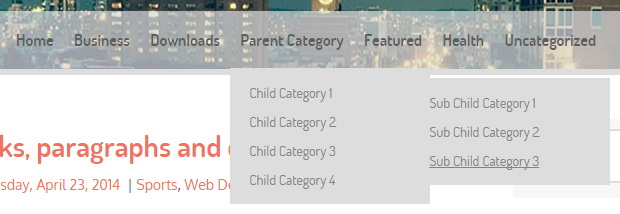
Mobile Menu:
<!-- mobile menu start -->
<nav id='mobile-static-menunbt'>
<div class='menunbt'>
<ul>

...

</ul>
</div>
</nav>
<!-- mobile menu end -->
Top Fixed Menu:
<!-- top fixed menu bar start -->
<div id='static-menunbt'>
<div class='menunbt'>
<ul>

...

</ul>
</div>
</div>
<!-- top fixed menu bar end -->
Main Menu:
<!-- main menu start -->
<nav id='top-menunbt'>
<div class='menunbt'>
<ul>

...

</ul>
</div>
</nav>
<!-- main menu end -->
For each menu, replace “#” marks with your real URLs and change anchor texts as you like.
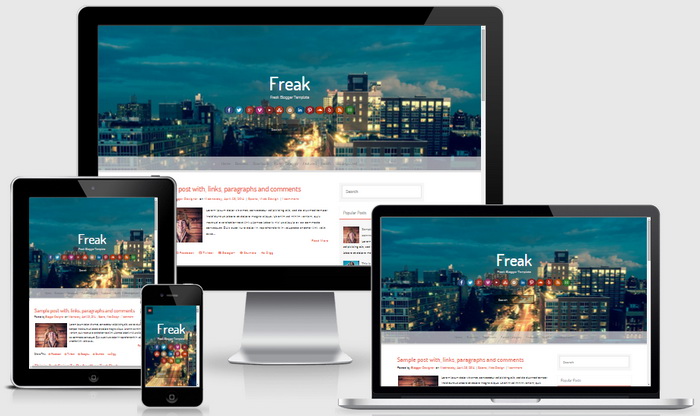
Freak Blogger Template Responsive View




Hello Mr…
this is not available to edit of layout page?
Sorrry Mr…
Its because my internet was weak, now its apperas.
Sorry.. N please just delete all my message.
Thank You.
Hey, how to change the white background?
find this:
.mega-containernbt {
background: white;
…
}
change "white" with your new color.
how can i change the sumary post information length? is very small…….
find this line:
summary_img = 350;
change the value "350" to a higher number.
How do I change the header background image?
I have explained it above.
Hi there.
Is there any possibility to set the table border spacing to any value other than 0?
Thank you in advance.
possible. find and change the CSS code related to table border spacing.
Help me please
How to shrink the size of the image in the header?
Thanks
Hiya i am a huge fan of this theme 😀 i was thinking whether to switch to weebly until i saw this theme so it would be amazing if you could help me 🙂
I have tried almost everything to change the background (my site is http://3rdparallelworld.blogspot.com) and i just couldnt make it look like this: http://burningseratesting.weebly.com, can you give me any tips for making the background stretch out nicely like the on weebly please? the pic can be found here http://imgur.com/mnDkq7A
Many thanks for your great work really. Hope to hear back from you 🙂 amazing theme again really!
Hi, find this:
http://4.bp.blogspot.com/-kFu1MYFxPMU/Vbwug36v7GI/AAAAAAAAOg4/GrIew1sKnbU/s000/city.jpg
Replace it with this image address of yours:
http://www.editmysite.com/uploads/5/8/5/1/58510141/background-images/908540791.png
Thanks
thanks alot!
can i ask one more question, can you change the colour of the font for the words in header (under the title)? I looked it up myself but i am not sure which line to change because i only want to the change font colour for the words under the header.
many thanks!
find this line:
#mastheadnbt h2.site-descriptionnbt { color: #c4c4c4; }
change color value "#c4c4c4".
Instead of date published each of my posts only show the timestamp how can I make it show both?
https://newbloggerthemes.com/blog/fix-posted-date-undefined-error-blogger/
hi mr…
i cant EXtrax this file :((,
Can u help me up full file
Thanks u so much!
use a software like Winzip, WinRAR, 7-Zip,… for this.