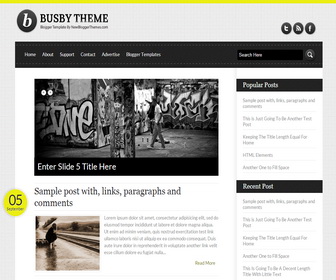
Busby is a clean, personal blogger theme with it’s own unique look. Busby Blogger template has a top drop-down navigation menu, featured posts slider, right sidebar, web fonts, related posts with thumbnails, social icons, share buttons, auto read more on homepage, and more features.
How To Configure Featured Content Slider

Go to “Template” –> “Edit HTML” of your blog.
Find This:
<ul id='slidernbt'>

	<li><h2><a href='ENTER-SLIDE-1-LINK-HERE'>Enter Slide 1 Title Here</a></h2><a href='ENTER-SLIDE-1-LINK-HERE'><img src='http://4.bp.blogspot.com/-SPYqlNLEsoE/UUcY3-z0tmI/AAAAAAAAGE4/c5YxH34uOhg/s1600/1.jpg'/></a></li>

	<li><h2><a href='ENTER-SLIDE-2-LINK-HERE'>Enter Slide 2 Title Here</a></h2><a href='ENTER-SLIDE-2-LINK-HERE'><img src='http://1.bp.blogspot.com/-v2R48H9yI8g/UUcY-OUuyCI/AAAAAAAAGFA/J-0ngnavHy4/s1600/2.jpg'/></a></li>

	<li><h2><a href='ENTER-SLIDE-3-LINK-HERE'>Enter Slide 3 Title Here</a></h2><a href='ENTER-SLIDE-3-LINK-HERE'><img src='http://3.bp.blogspot.com/-3d1sIJzwa1Y/UUcZABJp9EI/AAAAAAAAGFI/parSjOfRwMI/s1600/3.jpg'/></a></li>

	<li><h2><a href='ENTER-SLIDE-4-LINK-HERE'>Enter Slide 4 Title Here</a></h2><a href='ENTER-SLIDE-4-LINK-HERE'><img src='http://4.bp.blogspot.com/-P6NHGYSrYPM/UUcZEICmsjI/AAAAAAAAGFU/hTq7cLozTD0/s1600/4.jpg'/></a></li>

	<li><h2><a href='ENTER-SLIDE-5-LINK-HERE'>Enter Slide 5 Title Here</a></h2><a href='ENTER-SLIDE-5-LINK-HERE'><img src='http://4.bp.blogspot.com/-K3IaZ4k6yrQ/UUcZEH8IeEI/AAAAAAAAGFQ/53OsB4HdFkE/s1600/5.jpg'/></a></li>

</ul>
There are 5 slides in slider. For each slide replace,
ENTER-SLIDE-X-LINK-HERE with your real slide link.
Enter Slide X Title Here with your real slide title.
Slide image URL.
How To Change Social Links

Go to “Template” –> “Edit HTML” of your blog.
Find This:
<ul id='socialnbt'>
  <li class='twitternbt'><a href='http://twitter.com/newbthemes' rel='nofollow' target='_blank'>Twitter</a></li>
  <li class='rssnbt'><a href='http://feeds.feedburner.com/newbthemes' rel='nofollow' target='_blank'>RSS</a></li>
  <li class='facebooknbt'><a href='http://www.facebook.com/newbthemes' rel='nofollow' target='_blank'>Facebook</a></li>
</ul>
Replace “newbthemes” with your Twitter, RSS and Facebook usernames.
How To Add Links Top Navigation Menu
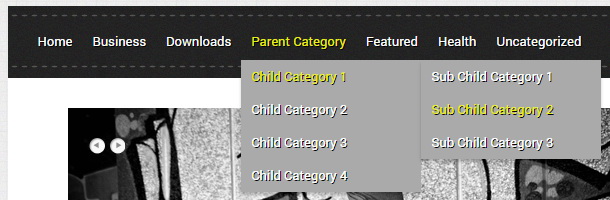
Find this in “Edit HTML”:
<div class='menunbt'>
<ul>

<li><a expr:href='data:blog.homepageUrl'>Home</a></li>

<li><a href='#'>Business</a>
<ul class='sub-menu'>
<li><a href='#'>Internet</a></li>
<li><a href='#'>Market</a></li>
<li><a href='#'>Stock</a></li>
</ul>
</li>

...

</ul>
</div>
Replace “#” marks with real URLs and change anchor texts as you like.




Very good template for my new blog!
Thank you!
thanks my friend for this amazing theme
how to remove “undefined” of the entries post?????
https://newbloggerthemes.com/blog/fix-posted-date-undefined-error-blogger/
wow,,nice templates……..
nice templates , and it’s easy to use ,
love it! simple and attractive….
for the slide URL, where do I get it, if the image is just stored my my PC right now?
no. upload it to somewhere and get the link.
Please can you be a bit explicit on this? I’m finding it difficult.
You upload at Photobucket for example, than copy and paste the link into the html to show your image. 🙂
Wow this one is look like professional template.
Thanks for all of these, they’re awesome!
sir
i want to change bg colour instead of bg picture
(http://3.bp.blogspot.com/-EJWDj01UvJI/UUcYDaMVLhI/AAAAAAAAGCQ/L48ekTtzrj0/s1600/bg.gif)
==================================================
body{
background: #ddd url(http://3.bp.blogspot.com/-EJWDj01UvJI/UUcYDaMVLhI/AAAAAAAAGCQ/L48ekTtzrj0/s1600/bg.gif) fixed;
text-align: center;
color:#242326;
font-family:’Lato’,sans-serif;
}
how could i change bg colour
for example if you need to change background color to #eee,
body{
background: #eee;
text-align: center;
color:#242326;
font-family:’Lato’,sans-serif;
}
i have a problem with postdate in my blog http://cornering-indonesia.blogspot.com, date can’t show “undefined”
<a href="https://newbloggerthemes.com/blog/fix-posted-date-undefined-error-blogger/" target="_blank">https://newbloggerthemes.com/blog/fix-posted-date-undefined-error-blogger/</a>
wow… i like this template.. cool