How To Add Links Top Navigation Menu
Go to “Layout”. Click on “Edit” link of “Edit This Menu” widget.
Now add your links to that link list widget.
The Blogger collection
A fresh design for your stories. Preview it, download it, make it yours.
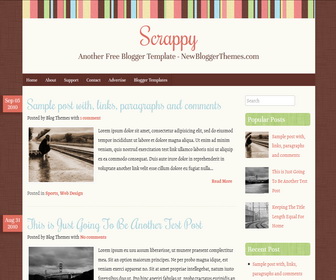
Get to know the design
Explore the theme information and any setup notes below.
Go to “Layout”. Click on “Edit” link of “Edit This Menu” widget.
Now add your links to that link list widget.
Follow our installation guide or get in touch with your theme name and blog URL.
Installation guide →Ask a question →Keep exploring
Gallery · Magazine
Magazine · Minimalist
Gallery · Magazine
Magazine · Minimalist
The conversation




how can i change background color ?? it look so dark !! soory !!
need to remove this from the template:
body.custom-background { background-image: url(‘http://3.bp.blogspot.com/–fm-p17EA2I/UYMf5EcEddI/AAAAAAAAHWQ/mUtVZstccgo/s1600/bg.gif’); background-repeat: repeat; background-position: top left; background-attachment: scroll; }
also find this:
body, .body-fauxcolumn-outer {
background-color: #6d4238;
}
now change “#6d4238” color value to other you like.
There are blocks on the left of the screen that say “undefined”. What am I doing wrong? I assume it has to do with the date.
Thank you.
https://newbloggerthemes.com/blog/fix-posted-date-undefined-error-blogger/
Perfect! Thank you so much!
How to change "Read more" css style in this theme? 🙁 Please help me!
Add your CSS styles to class "morer".
Thanks for your answer!
And I have a more question: how to customzing a 404 Page on this template?
I can't make that!