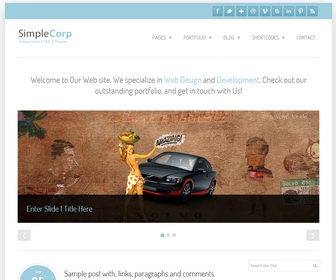
How To Configure Social Buttons
Find this in “Edit HTML”:
<ul id='social-links'> <li class='facebook-link'><a class='facebook' href='http://www.facebook.com/newbthemes' id='social-01' title='Join Us on Facebook!'>Facebook</a></li> <li class='twitter-link'><a class='twitter' href='http://twitter.com/newbthemes' id='social-02' title='Follow Us on Twitter'>Twitter</a></li> <li class='google-link'><a class='google' href='#' id='social-03' title='Google+'>Google</a></li> <li class='dribbble-link'><a class='dribbble' href='#' id='social-04' title='Dribble'>Dribble</a></li> <li class='vimeo-link'><a class='vimeo' href='#' id='social-05' title='Vimeo'>Vimeo</a></li> <li class='skype-link'><a class='skype' href='#' id='social-06' title='Skype'>Skype</a></li> <li class='linkedin-link'><a class='linkedin' href='#' id='social-07' title=' LinkedIn'>Linkedin</a></li> <li class='pinterest-link'><a class='pinterest' href='#' id='social-09' title='Pinterest'>Pinterest</a></li> <li class='rss-link'><a class='rss' expr:href='data:blog.homepageUrl + "feeds/posts/default"' id='social-08' title='RSS'>RSS Feeds</a></li> </ul>
Add your own social links replacing “#” marks. I have already added social links for Facebook and Twitter.
How To Configure Top Navigation Menu
Find this in “Edit HTML”:
<nav class='main-menu' id='main-navigation'> <ul class='sf-menu' id='menu-top-menu'> <li><a href='#'>Pages</a> <ul class='sub-menu'> <li><a href='#'>About Us</a></li> <li><a href='#'>Typography</a></li> <li><a href='#'>Sample Page Fullwidth</a></li> </ul> </li> <li><a href='#'>Portfolio</a> <ul class='sub-menu'> <li><a href='#'>Portfolio Fullwidth</a></li> <li><a href='#'>Porfolio with Sidebar</a></li> </ul> </li> <li><a href='#'>Blog</a> <ul class='sub-menu'> <li><a href='#'>News</a></li> <li><a href='#'>Events</a></li> </ul> </li> <li><a href='#'>Shortcodes</a> <ul class='sub-menu'> <li><a href='#'>Columns</a></li> <li><a href='#'>List Styles</a></li> <li><a href='#'>Buttons</a></li> <li><a href='#'>Message Boxes</a></li> <li><a href='#'>Toggle & Tabs</a></li> <li><a href='#'>Media</a></li> <li><a href='#'>Social & Gallery</a></li> </ul> </li> <li><a href='#'>Contact</a></li> </ul> </nav>
Replace “#” marks with real URLs and change anchor texts as you like.
How To Edit Wellcome Message
Find this in “Edit HTML”:
<h2>Welcome to Our Web site. We specialize in <strong>Web Design</strong> and <strong>Development</strong>. Check out our outstanding portfolio, and get in touch with Us!</h2>
Change this message as you like.
How To Configure Slider
Find this in “Edit HTML”:
<ul class='slides'>
   <li>
      <a href='ENTER-SLIDE-1-LINK-HERE'><img src='http://2.bp.blogspot.com/-5zWP2COqvRo/UkE4VLs_MBI/AAAAAAAAKAo/4Zhq1vSvFVg/s1600/slide-img-1.jpg'/></a>
      <div class='flex-caption'>
         <h3>Enter Slide 1 Title Here</h3>
      </div>
   </li>
   <li>
      <a href='ENTER-SLIDE-2-LINK-HERE'><img src='http://1.bp.blogspot.com/-sM7BZGeBQT8/UkE4aHHQrDI/AAAAAAAAKA4/Wvdto9mEnMQ/s1600/slide-img-2.jpg'/></a>
      <div class='flex-caption'>
         <h3>Enter Slide 2 Title Here</h3>
      </div>
   </li>
   <li>
      <a href='ENTER-SLIDE-3-LINK-HERE'><img src='http://2.bp.blogspot.com/-KUY05vpdAys/UkE4YUmPSpI/AAAAAAAAKAw/lb41_6e1x0w/s1600/slide-img-3.jpg'/></a>
      <div class='flex-caption'>
         <h3>Enter Slide 3 Title Here</h3>
      </div>
   </li>
</ul>
Replace,
ENTER-SLIDE-X-LINK-HEREs with real slide links.
Enter Slide X Title Heres with real slide titles.
Slider image URLs with your own image links.




Dear Sir, I have upload your SimpleCorp Responsive Template and the problem i face is the Year, date, time gives Undefined with each article/post. So please guide me how can i correct it so that it can show year, date & time.
Go to "Settings" –> "Language and formatting".
Select "Timestamp Format" from drop-down menu similar to Tuesday, November 14, 2012 format.
Click on "Save settings" button.
Thank you, Very cool template ^^
thank you for this template; also the date is fixed thanks you for all your help 😉
Thanks for template!
Nice Template and really can responsive… Thanks much 🙂
sir , i wanna ask why the post keep pops undefined text?
http://www.bloggertipandtrick.net/solve-post-date-undefined-error-blogger/
Dear sir,
I have read the instructions for the date fix
“Go to “Settings” –> “Language and formatting”.
Select “Timestamp Format” from drop-down menu similar to Tuesday, November 14, 2012 format.
Click on “Save settings” button”
but still it doesn’t work to me and there is only the Undefined word.
Has something changed?
Thank you
I just rellised my mistake. Now it works. Thank you.
what was your mistake? I am doing it and nothing changes
you need to change "Timestamp Format" format instead of "Comment Timestamp Format".
i still have problem with the date, hope u can help me
please follow the instructions given above.
Hi Lasantha.
My comments dont show up on my blog.
I can comment, there’ google+ comment box, but when I publish it, it doesn’t show up though comment record went up. I did select ‘Show’ comment on Blogger setting
nevermind it’s working now. btw thank you for the template
hello. can i ask you what the meaning of ENTER-SLIDE-X-LINK-HEREs with real slide links. what do you mean by real slide links?
btw sorry,i’m new at using blog so kinda confused to follow the instruction of your template and i don’t understand how to change the slide picture.
thanks.
“real slide links” means where you need to go when click on a slide image. It may be a post or page or other web address.
love this template..it's cool..
thanks alot