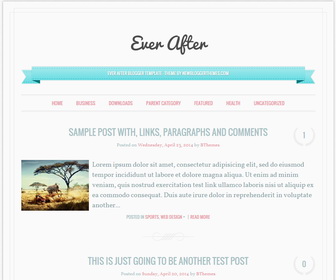
Ever After Blogger template is a responsive, SEO friendly, minimal blogger theme with auto read more. Ever After theme has drop-down navigation, related posts, 3 columns footer, Google fonts, clean and simple design and more.
How To Add Links to Top Navigation Menu
Find this in “Edit HTML”:
<div class='menu-testing-menu-container'>
<ul class='menunbt' id='menu-testing-menu'>

<li><a expr:href='data:blog.homepageUrl'>Home</a></li>

<li><a href='#'>Business</a>
<ul class='sub-menu'>
<li><a href='#'>Internet</a></li>
<li><a href='#'>Market</a></li>
<li><a href='#'>Stock</a></li>
</ul>
</li>

...

<li><a href='#'>Featured</a></li>

<li><a href='#'>Health</a>
<ul class='sub-menu'>
<li><a href='#'>Childcare</a></li>
<li><a href='#'>Doctors</a></li>
</ul>
</li>

<li><a href='#'>Uncategorized</a></li>

</ul>
</div>
Replace “#” marks with real URLs and change anchor texts as you like.
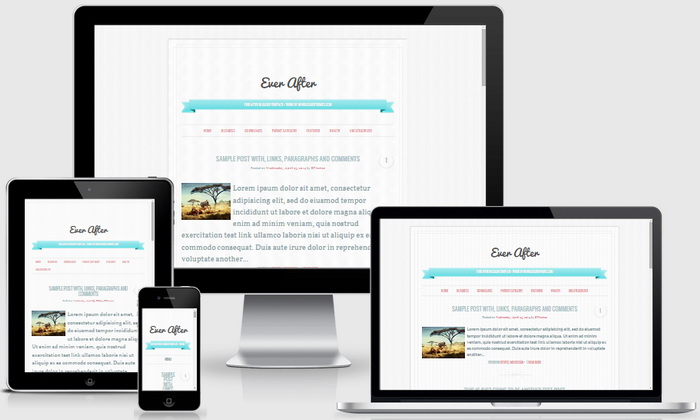
Ever After Blogger Template Responsive View:



Hi, is it possible to change the default font size? The normal size is too big, and the small size is too small…
you can change it. find this in "Edit HTML":
body,
button,
input,
textarea {
color: #87a2a5;
font-family: ‘Vollkorn’, serif;
font-size: 20px;
font-size: 2.0rem;
font-weight: 400;
line-height: 1.5;
-webkit-font-smoothing: antialiased;
}
Let’s say you need to change font size from 2.0rem to 1.6rem. Change above values like this:
body,
button,
input,
textarea {
color: #87a2a5;
font-family: ‘Vollkorn’, serif;
font-size: 16px;
font-size: 1.6rem;
font-weight: 400;
line-height: 1.5;
-webkit-font-smoothing: antialiased;
}
Hi,
thanks a lot for the template, it’s beautiful.
i juste have two little questions cause I have some problems with the post dates. They don’t appear on my blog (on the front page and on the article page, it’s the same), only the hours appear. I think it’s because the date is in english in this template whereas my blog is in french. How can I fix this ? Cause i tried to look for it by myself but i can’t find how to do this.
And another little thing is about the header. I put an image instead of a text for my blog title. But when i put an image, then it’s not centered, the logo goes on the left… And again, i don’t know what to do to have the image in the center automatically.
So if you can help me with these problems it would be great!
Thanks
For first question:
https://newbloggerthemes.com/blog/fix-posted-date-undefined-error-blogger/
For second question, contact me with your site URL.