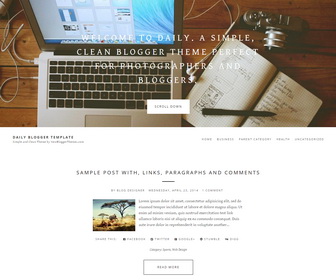
Daily is a responsive, SEO friendly, simple and clean Blogger theme perfect for photographers and bloggers. Daily Blogger template has top featured image area, auto post summaries with thumbnails, related posts, top navigation, social profile buttons, post share buttons, Google fonts and more unique features.
How To Change Top Featured Area Content
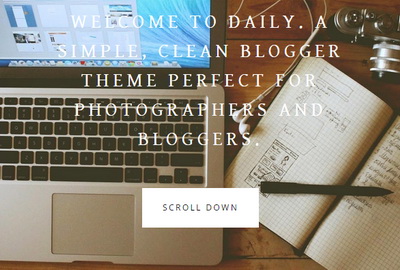
To change featured area image, find this:
https://1.bp.blogspot.com/-8d6IJVBGiIw/VGIiRTXFxXI/AAAAAAAAM_w/Ftlj6hpCto8/s0/featured-image.jpg
Replace it with your own featured image URL.
To change featured area message, find this:
WELCOME TO DAILY. A SIMPLE, CLEAN BLOGGER THEME PERFECT FOR PHOTOGRAPHERS AND BLOGGERS.
Replace it with your own welcome message.
How To Add Links to Top Navigation Menu

Find this in “Edit HTML”:
<div class='menu-menutop-containernbt'>
<ul class='menunbt'>

<li><a expr:href='data:blog.homepageUrl'>Home</a></li>

<li><a href='#'>Business</a></li>

<li><a href='#'>Parent Category</a>
<ul class='sub-menu'>
<li><a href='#'>Child Category 1</a></li>
<li><a href='#'>Child Category 2</a></li>
<li><a href='#'>Child Category 3</a></li>
<li><a href='#'>Child Category 4</a></li>
</ul>
</li>

<li><a href='#'>Health</a>
<ul class='sub-menu'>
<li><a href='#'>Childcare</a></li>
<li><a href='#'>Doctors</a></li>
</ul>
</li>

<li><a href='#'>Uncategorized</a></li>

</ul>
</div>
Replace “#” marks with real URLs and change anchor texts as you like.
How To Configure Social Buttons

Find this in “Edit HTML”:
<div class='daily-social-buttons'> <a href='https://plus.google.com/' rel='nofollow' target='_blank' title='GooglePlus'><i class='fa fa-google-plus-square'/></a> <a href='https://twitter.com/' rel='nofollow' target='_blank' title='Twitter'><i class='fa fa-twitter-square'/></a> <a href='https://www.facebook.com/' rel='nofollow' target='_blank' title='Facebook'><i class='fa fa-facebook-square'/></a> <a href='http://instagram.com/' rel='nofollow' target='_blank' title='Instagram'><i class='fa fa-instagram'/></a> <a href='https://www.youtube.com/' rel='nofollow' target='_blank' title='Youtube'><i class='fa fa-youtube-square'/></a> <a href='http://www.pinterest.com/' rel='nofollow' target='_blank' title='Pinterest'><i class='fa fa-pinterest-square'/></a> <a href='http://www.linkedin.com/' rel='nofollow' target='_blank' title='Linkedin'><i class='fa fa-linkedin-square'/></a> <a href='https://vimeo.com/' rel='nofollow' target='_blank' title='Vimeo'><i class='fa fa-vimeo-square'/></a> <a href='http://tumblr.com/' rel='nofollow' target='_blank' title='Tumblr'><i class='fa fa-tumblr-square'/></a> <a expr:href='data:blog.homepageUrl + "feeds/posts/default"' rel='nofollow' target='_blank' title='RSS'><i class='fa fa-rss-square'/></a> </div>
Add your social profile URLs replacing these social media networks homepages URLs.
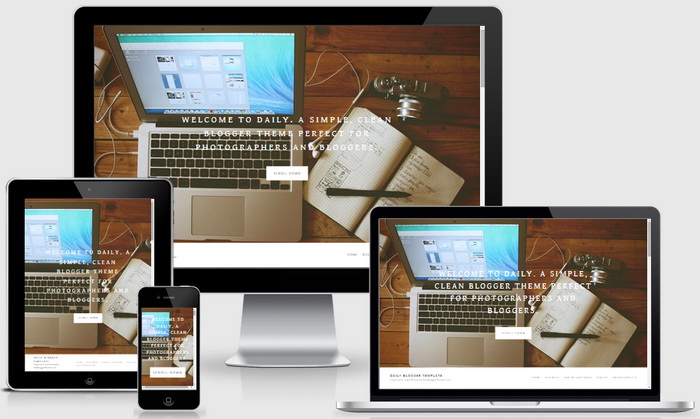
Daily Blogger Template Responsive View:




Hey ! I need your help, I don’t know how to use the navigation ! Can you explain me what I have to do to use it well ?
Thank you 🙂
Please follow instructions given above.
Hi there,
Can someone tell me how to customize the header image size? I’d like to use a logo in place of a title that overlaps the main image. If it cannot overlap, even to increase the size of the image. As is, the header image gets reduced to too small a size.
Thanks!
Can you give me your site URL?
I was just wondering how to make it so when you post, you don’t have to see the full post by clicking ‘Read More’ and just have the full post already there?
I absolutely love the template.
Hi Katy, you can remove auto read more feature from the theme:
https://newbloggerthemes.com/blog/remove-blogger-auto-read-more/
Hi there,
Anytime I try to edit the image on the homepage or the text, the image disappears completely. I can’t change any of it. Is there something I’m doing wrong? Thanks.
Upload your image to Blogger test post and get image URL right clicking on it.
Thank you so much for this template. I love it. I will be spreading your name around.
I really like this template. I was jut wondering if it was possible to add the date along with the time within the post?
Go to your blog "Settings" –> "Language and formatting".
Select "Timestamp Format" from drop-down menu similar to "Friday, October 16, 2015" format.
I did that, but nothing happens ;/
By the way, thank you very much for this template!
What must be the header image size for it to fit?
We are using 1920×1280 size image.
is there anyway to add a scrolling sidebar on the right hand side to this template?
Sorry. No.
Thanks for the template, i use it and its so cool. Now i have some question, if possible can I just contact you directly by email?
Thanks
How do we make the preview image in a post bigger? Preferably to look more like the original wordpress theme (placed before the post title and huge).
find ".pbtthumbimg" CSS class and change values.
Hi.
I would like to know how to eliminate the featured area in daily-blogger-template.
Thanks!
Hi Carlos, contact me for theme customization.
Hi!
Very nice template, but I have little problem.
When I add a post it shows only time, like for example "12:35". How can I change it to show full date, like for example "Friday, April 22, 2015" Please, help me 🙂
Or only April 22, 2015 (without Friday)
Go to your blog "Settings" –> "Language and formatting".
Select "Timestamp Format" from drop-down menu similar to "Friday, April 22, 2015" format.
This is an excellent template.
Could you help me with resizing the thumbnail images that show up with the snippet preview?
Thanks
Hi Elle, find this:
.pbtthumbimg {
float:left;
margin:0px 10px 5px 0px;
padding:4px;
border:0px solid #eee;
background:none;
width:180px;
height:auto;
}
change "180px" value.
hi!
was wondering if you guys received my message about 2-3 weeks ago?
thanks!
ira
Sorry for delay. How can I help you?
hi, I have just started using this template, and it is working very well except for the fact that i can not find the place to edit the area message anywhere. If you could even tell me what number it is on that would help. Thank you:))
Hi Elise, You need to go "Edit HTML" for that.
Hej,
is it possible to spread the picture of the post completely behind the writing? So that the first picture of the blogpost is the background behind the teaser on the homepage? I saw this on this website: http://blog.viktor-schanz.de He is using your template as well and he has the picture as a background of each post on the homepage.
I searched for it in the html code, but I couldn't find anything…
Hi Annika, The web you are showing is in WordPress. But it will be possible after doing some customization.
Wonderful, if templatehave two columns is better
Hey! Really great theme, I was just wondering if I could get it to be a single column footer rather than a triple column?
find this line and remove it from Edit HTML:
width: 33.33333333%;
Help me!
How to fixed or change distance (height) from comment-form (comment editor) to "LINKS TO THIS POST" (bottom)? It is not fixed and looks bad 🙁
you can disable it using blog widget settings.
Hello, is it possible to make the 3 column-footer into 4? How do you do it? THanks
possible. please use contact form for requesting a theme customization.
Very beautiful
Hello!
If I buy the pro version, can the header be a slider/slideshow and the posts below be in grid style?
Thanks.
Hi Kaila, Sorry. It doesn't work that way. If you need a custom template contact me. Thanks.