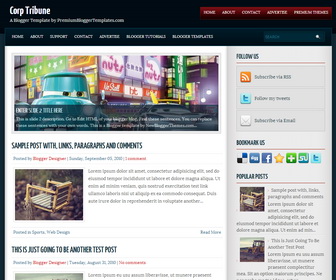
Corp Tribune is a 2 Columns Simple and Clean Magazine Style Blogger Template. Corp Tribune Blogger Template has a Featured Content Slider, Navigation Menus, Social and Share Buttons, Right Sidebar and More Features.
How To Add Links to First Navigation Menu
Go to “Layout”. Click on “Edit” link of “First Menu – Edit This Menu” widget.
Now add your links to that link list widget.
How To Add Links to Second Navigation Menu
Go to “Layout”. Click on “Edit” link of “Second Menu – Edit This Menu” widget.
Now add your links to that link list widget.
How To Configure Featured Content Slider:
Find this in “Edit HTML”:
<div id='slider'>
<ul id='sliderContent'>

   <!-- slide 1 code start -->
   <li class='sliderImage'>
      <a href='ENTER-SLIDE-1-LINK-HERE'><img height='229' src='http://3.bp.blogspot.com/-Vyz7Pt5rtHg/UsekghiJbYI/AAAAAAAAKFI/94DbI8qCtDI/s1600/slide-image-1.jpg' width='599'/></a>
      <span class='bottom'>
         <h2><a href='ENTER-SLIDE-1-LINK-HERE'>Enter Slide 1 Title Here</a></h2>
         <p>This is slide 1 description. Go to Edit HTML of your blogger blog. Find these sentences. You can replace these sentences with your own words. This is a Blogger template by NewBloggerThemes.com...</p>
      </span>
   </li>
   <!-- slide 1 code end -->

   <!-- slide 2 code start -->
   <li class='sliderImage'>
      <a href='ENTER-SLIDE-2-LINK-HERE'><img height='229' src='http://2.bp.blogspot.com/-FirK7Gc4VnM/UsekgX7n8yI/AAAAAAAAKFE/PqDXr4-DnqE/s1600/slide-image-2.jpg' width='599'/></a>
      <span class='bottom'>
         <h2><a href='ENTER-SLIDE-2-LINK-HERE'>Enter Slide 2 Title Here</a></h2>
         <p>This is slide 2 description. Go to Edit HTML of your blogger blog. Find these sentences. You can replace these sentences with your own words. This is a Blogger template by NewBloggerThemes.com...</p>
      </span>
   </li>
   <!-- slide 2 code end -->

   <!-- slide 3 code start -->
   <li class='sliderImage'>
      <a href='ENTER-SLIDE-3-LINK-HERE'><img height='229' src='http://3.bp.blogspot.com/-3ZtQ6oEiBTo/UsekkBpqUdI/AAAAAAAAKFU/u1A2Ur0GqaY/s1600/slide-image-3.jpg' width='599'/></a>
      <span class='bottom'>
         <h2><a href='ENTER-SLIDE-3-LINK-HERE'>Enter Slide 3 Title Here</a></h2>
         <p>This is slide 3 description. Go to Edit HTML of your blogger blog. Find these sentences. You can replace these sentences with your own words. This is a Blogger template by NewBloggerThemes.com...</p>
      </span>
   </li>
   <!-- slide 3 code end -->

   <div class='clear sliderImage'/>
</ul>
</div>
There are 3 slides in the slider. You can add or remove more slides if you want.
Now replace,
“ENTER-SLIDE-X-LINK-HERE”s with your real slide link,
“Enter Slide X Title Here” with your real slide title,
“This is slide X description. Go to Edit HTML of your blogger blog. Find these sentences. You can replace these sentences with your own words. This is a Blogger template by NewBloggerThemes.com…” with your real slide description,
Slide image URL,
for each slide. (X = 1 or X = 2 or X = 3)
How To Configure Social Buttons
Find this in “Edit HTML”:
<ul id='topsoc'>
<li class='first'>
   <a href='#' id='socrss'>Subscribe via RSS</a>
</li>
<li class='second'>
   <a href='#' id='twitter'>Follow my tweets</a>
</li>
<li class='third'>
   <a href='#' id='email'>Subscribe via Email</a>
</li>
</ul>
Add your own social links replacing “#” marks.



