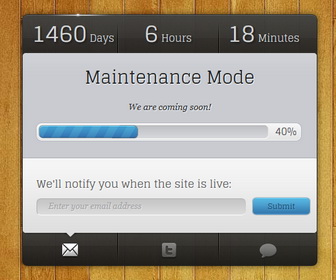
Maintenance Mode is a beautiful coming soon/under construction blogger template for your upcoming blog. It has jQuery countdown timer, progress bar to display site progress, tabbed widget, Feedburner email subscribe box and twitter follow and share buttons and message area.
How to Configure jQuery Countdown Timer

Find this line in “Edit HTML”:
MaintenanceDay = new Date('10/04/2018 01:10');
It will look like this:
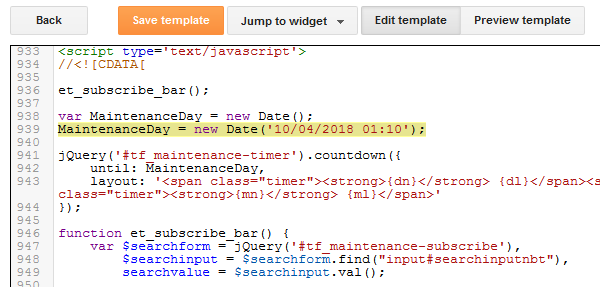
Change above date and time (10/04/2018 01:10) as you like.
How to Change Progress Bar 40% Value

Let’s say we need to change progress bar value to 60. Find this line in “Edit HTML”:
et_percent = 40,
It will look like this:
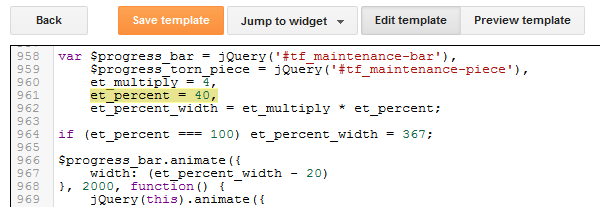
Change value 40 to 60.
Find this line in “Edit HTML”:
<span id='percent_textnbt'>40%</span>
Change value 40% to 60%.
How To Configure Email Subscription Box

Find this in “Edit HTML”:
<form action='http://feedburner.google.com/fb/a/mailverify' id='searchformnbt' method='post' onsubmit='window.open('http://feedburner.google.com/fb/a/mailverify?uri=newbthemes', 'popupwindow', 'scrollbars=yes,width=550,height=520');return true' target='popupwindow'> <input id='searchinput' name='email' placeholder='Enter your email address' type='text' value=''/> <input name='uri' type='hidden' value='newbthemes'/> <input name='loc' type='hidden' value='en_US'/> <input class='buttonsnbt' id='searchsubmitnbt' type='submit' value='Submit'/> </form>
Look at the image below:
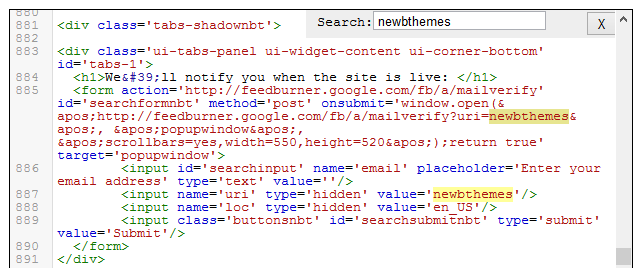
Add your feedburner ID replacing my feedburner ID (newbthemes).
How to Change Welcome Message
Find this in “Edit HTML”:
Maintenance Mode is a free coming soon/under construction blogger template from NewBloggerThemes.com. Maintenance Mode blogger template has jQuery countdown timer, progress bar, tabbed view section, email subscription box and twitter follow and share buttons. You can go to Edit HTML replace this with your own words. For more free blogger templates, visit <a href='https://newbloggerthemes.com/' rel='nofollow' target='_blank'>NewBloggerThemes.com</a>.
Replace it with your welcome message.
How to Configure Twitter Buttons
Find this:
<!-- Twitter Follow Button Started -->
<a class='twitter-follow-button' data-show-count='false' data-size='large' href='https://twitter.com/newbthemes'>Follow @newbthemes</a>
<!-- Twitter Follow Button End -->

<!-- Twitter Share Button Started -->
<a class='twitter-share-button' data-size='large' data-via='newbthemes' href='https://twitter.com/share'>Tweet</a>
<!-- Twitter Share Button End -->
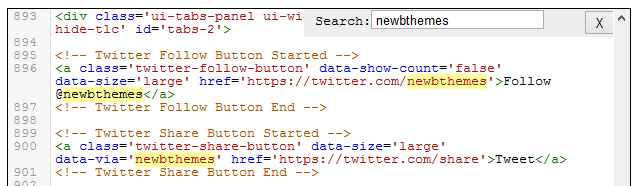
Change “newbthemes” with your Twitter username.



