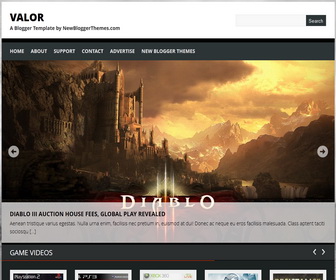
How To Configure Top Featured Content Slider
Find this in “Edit HTML”:
<div class='flexslider'> <ul class='slides'> <li> <a href='ENTER-SLIDE-1-URL-HERE'><img class='f-image' height='500' src='http://2.bp.blogspot.com/-u7k_jg82KgY/UGxSYLxpEmI/AAAAAAAAHHo/8x5QTXcHcFc/s1600/slide1-1000x500.jpg' width='1000'/></a> <div class='flex-caption'> <h3> Introducing: Agent 47 – Hitman</h3> <p><p>Nulla condimentum pulvinar turpis, ac dapibus purus consequat a. Maecenas condimentum lorem id tellus scelerisque sagittis. Aenean odio massa, tristique quis posuere non, porta a [...]</p></p> </div> </li> <li> <a href='ENTER-SLIDE-2-URL-HERE'><img class='f-image' height='500' src='http://2.bp.blogspot.com/-NVyFGAppS_4/UGxSafuRkKI/AAAAAAAAHHw/cA8iPml5u-0/s1600/slide2-1000x500.jpg' width='1000'/></a> <div class='flex-caption'> <h3> Starcraft II: Heart of the Swarm hands-on at MLG event</h3> <p><p>In suscipit vestibulum sem, nec consectetur enim consequat nec. Donec elit turpis; dignissim pharetra porttitor in, fringilla sed tortor. Vivamus scelerisque blandit velit sit amet [...]</p></p> </div> </li> <li> <a href='ENTER-SLIDE-3-URL-HERE'><img class='f-image' height='500' src='http://1.bp.blogspot.com/-7ZbnOTxynsA/UGxScqKUflI/AAAAAAAAHH4/6WmCeCru6yk/s1600/slide3-1000x500.jpg' width='1000'/></a> <div class='flex-caption'> <h3> Crysis dev backtracks on blocking used games comment</h3> <p><p>Suspendisse tellus nunc, iaculis vulputate placerat sit amet, lacinia sed mi. Nulla quam nisl, eleifend nec iaculis eu, sollicitudin sed lectus. Vivamus sodales tempor massa [...]</p></p> </div> </li> <li> <a href='ENTER-SLIDE-4-URL-HERE'><img class='f-image' height='500' src='http://1.bp.blogspot.com/-83VkLQhlsa4/UGxSe3Cq6tI/AAAAAAAAHIA/KYvC6_aoQDc/s1600/slide4-1000x500.jpg' width='1000'/></a> <div class='flex-caption'> <h3> Diablo III auction house fees, Global Play revealed</h3> <p><p>Aenean tristique varius egestas. Nulla urna enim, facilisis nec pretium in, euismod at dui! Donec ac neque eu eros facilisis malesuada. Class aptent taciti sociosqu [...]</p></p> </div> </li> </ul> </div>
There are 4 slides were added into slider. You can add more or remove existing slides if you want.
For each slide,
Replace “ENTER-SLIDE-X-URL-HERE” with real slide link.
Replace slide image urls.
Replace h3 titles and other content with your own.
How To Configure Second Slider
Find this in “Edit HTML”:
<ul id='carousel'>

<li class='panel'>
	<a href='ENTER-PANEL-1-URL-HERE'><img class='v-image' height='200' src='http://4.bp.blogspot.com/-CphDxAnmPr4/UGxSPkC2GqI/AAAAAAAAHGo/emKy9lBAbsc/s1600/panel1-150x200.jpg' width='150'/></a>
	<h3><a href='ENTER-PANEL-1-URL-HERE'>Arkham city</a></h3>
</li>

<li class='panel'>
	<a href='ENTER-PANEL-2-URL-HERE'><img class='v-image' height='200' src='http://3.bp.blogspot.com/-Yxrt7P7Yuh4/UGxSQkk6pCI/AAAAAAAAHGw/MQPZw0wZyzo/s1600/panel2-150x200.jpg' width='150'/></a>
	<h3><a href='ENTER-PANEL-2-URL-HERE'>Bioshock</a></h3>
</li>

<li class='panel'>
	<a href='ENTER-PANEL-3-URL-HERE'><img class='v-image' height='200' src='http://1.bp.blogspot.com/-C0eDjWDWgtk/UGxSRTlai3I/AAAAAAAAHG4/SlgIm2_oV98/s1600/panel3-150x200.jpg' width='150'/></a>
	<h3><a href='ENTER-PANEL-3-URL-HERE'>Crysis</a></h3>
</li>

<li class='panel'>
	<a href='ENTER-PANEL-4-URL-HERE'><img class='v-image' height='200' src='http://2.bp.blogspot.com/-RPpO-rF6kHY/UGxSSWT_TOI/AAAAAAAAHHA/cXyfrlGYeOs/s1600/panel4-150x200.jpg' width='150'/></a>
	<h3><a href='ENTER-PANEL-4-URL-HERE'>Resistance</a></h3>
</li>

<li class='panel'>
    <a href='ENTER-PANEL-5-URL-HERE'><img class='v-image' height='200' src='http://4.bp.blogspot.com/-lTMwPwNf-g0/UGxSTK_PIpI/AAAAAAAAHHI/qGfaG2131AE/s1600/panel5-150x200.jpg' width='150'/></a>
	<h3><a href='ENTER-PANEL-5-URL-HERE'>Fallout 3</a></h3>
</li>

<li class='panel'>
	<a href='ENTER-PANEL-6-URL-HERE'><img class='v-image' height='200' src='http://4.bp.blogspot.com/-hlLyebA5380/UGxSULJCG_I/AAAAAAAAHHQ/Pcjx44DEc4g/s1600/panel6-150x200.jpg' width='150'/></a>
	<h3><a href='ENTER-PANEL-6-URL-HERE'>Killzone 2</a></h3>
</li>

<li class='panel'>
	<a href='ENTER-PANEL-7-URL-HERE'><img class='v-image' height='200' src='http://4.bp.blogspot.com/-1bWFIReOchc/UGxSVVqsEyI/AAAAAAAAHHY/N2LO4MBrfYk/s1600/panel7-150x200.jpg' width='150'/></a>
	<h3><a href='ENTER-PANEL-7-URL-HERE'>Oblivion</a></h3>
</li>

<li class='panel'>
	<a href='ENTER-PANEL-8-URL-HERE'><img class='v-image' height='200' src='http://4.bp.blogspot.com/-NUJJjFJI2Lc/UGxSWCda6eI/AAAAAAAAHHg/shXy6UnWdAM/s1600/panel8-150x200.jpg' width='150'/></a>
	<h3><a href='ENTER-PANEL-8-URL-HERE'>Alone in Dark</a></h3>
</li>

</ul>
For each slide,
Replace “ENTER-PANEL-1-URL-HERE” with real slide link.
Replace slide image urls.
Replace h3 titles with your own slide title.
How To Add Links Top Navigation Menu
Go to “Layout”. Click on “Edit” link of “Edit This Menu” widget.




I need to guild list this picture show http://3.bp.blogspot.com/-2TZcPIaWhFc/UHwDHCudsdI/AAAAAAAACq4/jDxv9wRFZ1M/s1600/ads%C4%B1z.bmp
How do I modify the second slider to reflect “popular posts”?
Thanks you very much, it’s so perfect.
I’m french and i love you ^^