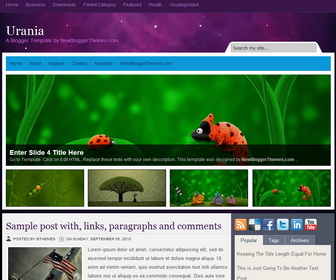
How To Configure Top Featured Content Slider
Find this in “Edit HTML”:
<div class='featuredwidgetsnbt' id='tabzine'>

<div class='tabdiv'>

<div id='feature-1'>
<div class='inpost'>
	<h3>Enter Slide 1 Title Here</h3>
	<p>Go to Template. Click on Edit HTML. Replace these texts with your own description. This template was designed by <strong>NewBloggerThemes.com</strong> ...</p>
</div>
<a href='ENTER-SLIDE-1-URL-HERE'>
<img alt='' class='sidim' src='http://2.bp.blogspot.com/-9LJDe7NbTLk/UG6c20TFlUI/AAAAAAAAHM0/GAoiJAbBEwU/s1600/slide-1-large-image.jpg'/>
</a>
</div>

<div id='feature-2'>
<div class='inpost'>
	<h3>Enter Slide 2 Title Here</h3>
	<p>Go to Template. Click on Edit HTML. Replace these texts with your own description. This template was designed by <strong>NewBloggerThemes.com</strong> ...</p>
</div>
<a href='ENTER-SLIDE-2-URL-HERE'>
<img alt='' class='sidim' src='http://3.bp.blogspot.com/-V8d67vb9r30/UG6c6Rj83-I/AAAAAAAAHNE/4J-r5vijrOE/s1600/slide-2-large-image.jpg'/>
</a>
</div>

<div id='feature-3'>
<div class='inpost'>
	<h3>Enter Slide 3 Title Here</h3>
	<p>Go to Template. Click on Edit HTML. Replace these texts with your own description. This template was designed by <strong>NewBloggerThemes.com</strong> ...</p>
</div>
<a href='ENTER-SLIDE-3-URL-HERE'>
<img alt='' class='sidim' src='http://4.bp.blogspot.com/-N86pliELeak/UG6c9nz3yrI/AAAAAAAAHNU/sLNvEndis7o/s1600/slide-3-large-image.jpg'/>
</a>
</div>

<div id='feature-4'>
<div class='inpost'>
	<h3>Enter Slide 4 Title Here</h3>
	<p>Go to Template. Click on Edit HTML. Replace these texts with your own description. This template was designed by <strong>NewBloggerThemes.com</strong> ...</p>
</div>
<a href='ENTER-SLIDE-4-URL-HERE'>
<img alt='' class='sidim' src='http://1.bp.blogspot.com/-IM4r9k-Idvk/UG6dArLb3HI/AAAAAAAAHNk/HwMaWbCDDLM/s1600/slide-4-large-image.jpg'/>
</a>
</div>

</div>

<ul id='tabnav'>

<li>
	<a class='listab' href='#feature-1'>
		<img alt='' class='thumbim' src='http://3.bp.blogspot.com/-eG99ClUcSWI/UG6c4JD_D7I/AAAAAAAAHM8/XYNNJR3QpOA/s1600/slide-1-small-image.jpg'/>
	</a>
</li>

<li>
	<a class='listab' href='#feature-2'>
		<img alt='' class='thumbim' src='http://3.bp.blogspot.com/-qh6wdTemIMI/UG6c7zDpRxI/AAAAAAAAHNM/poryLYj8DT4/s1600/slide-2-small-image.jpg'/>
	</a>
</li>

<li>
	<a class='listab' href='#feature-3'>
		<img alt='' class='thumbim' src='http://1.bp.blogspot.com/-gycwNY8c4Xc/UG6c-vgGUxI/AAAAAAAAHNc/q7aIedelUEs/s1600/slide-3-small-image.jpg'/>
	</a>
</li>

<li>
	<a class='listab' href='#feature-4'>
		<img alt='' class='thumbim' src='http://4.bp.blogspot.com/-BgXKJRMq-Rc/UG6dBmjhZoI/AAAAAAAAHNs/FOFFTJo0r7M/s1600/slide-4-small-image.jpg'/>
	</a>
</li>

</ul>

</div>
For each slide,
Replace “ENTER-SLIDE-X-URL-HERE” with real slide link.
Replace slide image urls.
Replace h3 titles and other content with your own.
How To Add Links Top Navigation Menu
Go to “Layout”. Click on “Edit” link of “Edit This Menu” widget.




Thanks, I am now using this template 🙂
thanks alot, gosh, i just bookmarked this blog, YOU’RE AWESOME, this template is cool.