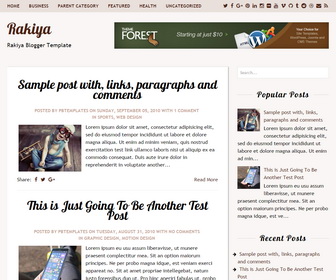
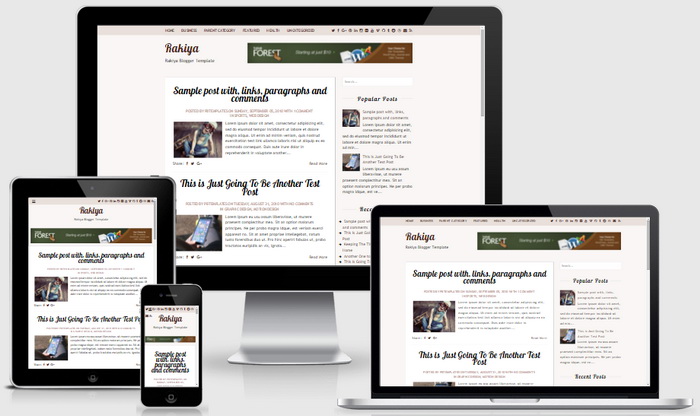
Rakiya is a clean Blogger theme specially made for personal blogs or writers. With this creative Blogger theme you can easily superintending your content so that you can attract the attention of your visitors. Rakiya Blogger template is fully responsive and has a right sidebar, 2 top and bottom navigation menus, related posts with thumbnails, social and share buttons, auto read more on homepage, Google web fonts and more features.
How To Configure Top Navigation Menu
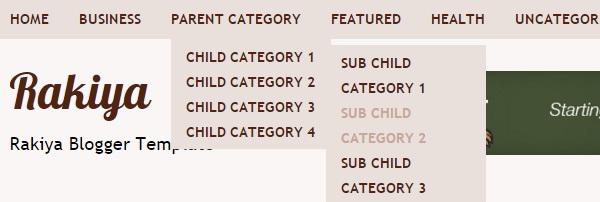
Find this in “Edit HTML”:
<ul class='menu-itemsnbt' id='menu-primary-items'>

<li><a expr:href='data:blog.homepageUrl'>Home</a></li>

<li><a href='#'>Business</a>
<ul class='sub-menu'>
<li><a href='#'>Internet</a></li>
<li><a href='#'>Market</a></li>
<li><a href='#'>Stock</a></li>
</ul>
</li>

...

</ul>
Replace “#” marks with real URLs and change anchor texts as you like.
How To Configure Social Buttons

Find this:
<div id='socialnbt'>
	<a href='#' rel='nofollow' target='_blank' title='Twitter'><i class='fa fa-twitter'/></a>
	<a href='#' rel='nofollow' target='_blank' title='Facebook'><i class='fa fa-facebook'/></a>
	<a href='#' rel='nofollow' target='_blank' title='GooglePlus'><i class='fa fa-google-plus'/></a>
	<a href='#' rel='nofollow' target='_blank' title='Pinterest'><i class='fa fa-pinterest'/></a>
    ...
</div>
Add your own social links replacing “#” marks.
How To Add Links to Footer Navigation Menu

Go to “Layout”. Click on “Edit” link of “Edit This Menu” widget.
https://newbloggerthemes.com/blog/how-to-configure-linklist-menu-widget/
Now add your links to that link list widget.
Rakiya Blogger Template Responsive View




My theme looks good in blogger too 🙂
Going to use this Theme, Lovely Theme.
Thanks. love this theme 😀