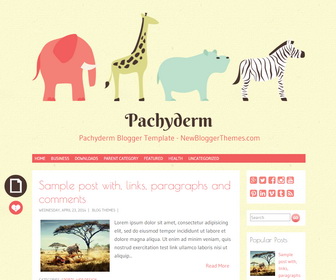
Pachyderm is a 2 columns, cute, clean and responsive micro-blogging Blogger theme. Pachyderm Blogger template has right sidebar, social profile buttons, related posts, auto post summaries, social share icons, top drop-down navigation menu, Google fonts and more.
How To Change Header Image
Find this in “Edit HTML”:
<img height='200' src='http://4.bp.blogspot.com/-_ziuup1T5JA/VExT5IcPYdI/AAAAAAAAMU8/RPfBrj1Kcv4/s1600/zoo.png' width='790'/>
Change this header image address with your new header image address.
How To Add Links to Top Navigation Menu
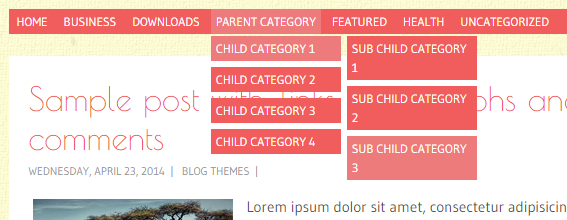
Find this in “Edit HTML”:
<ul class='menunbt'>

<li><a expr:href='data:blog.homepageUrl'>Home</a></li>

<li><a href='#'>Business</a>
<ul class='sub-menu'>
<li><a href='#'>Internet</a></li>
<li><a href='#'>Market</a></li>
<li><a href='#'>Stock</a></li>
</ul>
</li>

...

<li><a href='#'>Uncategorized</a></li>

</ul>
Replace “#” marks with real URLs and change anchor texts as you like.
How To Configure Social Buttons
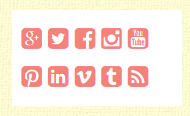
Find this in “Edit HTML”:
<div class='pachyderm-social-buttons'> <a href='https://plus.google.com/' rel='nofollow' target='_blank' title='GooglePlus'><i class='fa fa-google-plus-square'/></a> <a href='https://twitter.com/' rel='nofollow' target='_blank' title='Twitter'><i class='fa fa-twitter-square'/></a> <a href='https://www.facebook.com/' rel='nofollow' target='_blank' title='Facebook'><i class='fa fa-facebook-square'/></a> <a href='http://instagram.com/' rel='nofollow' target='_blank' title='Instagram'><i class='fa fa-instagram'/></a> <a href='https://www.youtube.com/' rel='nofollow' target='_blank' title='Youtube'><i class='fa fa-youtube-square'/></a> <a href='http://www.pinterest.com/' rel='nofollow' target='_blank' title='Pinterest'><i class='fa fa-pinterest-square'/></a> <a href='http://www.linkedin.com/' rel='nofollow' target='_blank' title='Linkedin'><i class='fa fa-linkedin-square'/></a> <a href='https://vimeo.com/' rel='nofollow' target='_blank' title='Vimeo'><i class='fa fa-vimeo-square'/></a> <a href='http://tumblr.com/' rel='nofollow' target='_blank' title='Tumblr'><i class='fa fa-tumblr-square'/></a> <a expr:href='data:blog.homepageUrl + "feeds/posts/default"' rel='nofollow' target='_blank' title='RSS'><i class='fa fa-rss-square'/></a> </div>
Add your social profile URLs replacing these social media networks homepages URLs.
Pachyderm Blogger Template Responsive View:
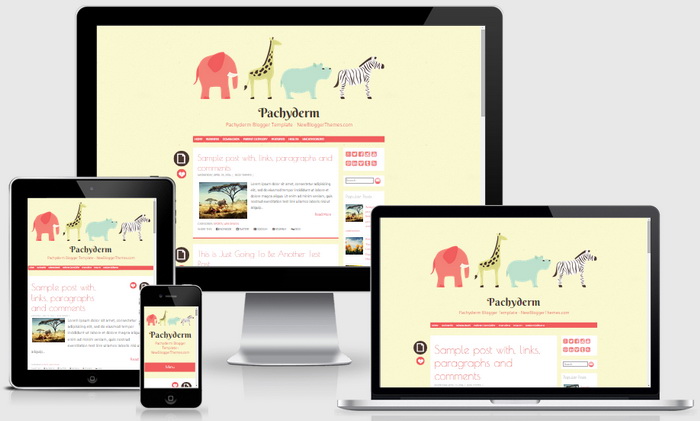




can i change the font size of this blog template?
find this:
body,
button,
input,
select,
textarea {
font-family: Gudea, Helvetica, Arial, sans-serif;
font-size: 15px;
font-size: 1.5rem;
color: #555;
line-height: 1.6;
}
for example, if you need to change font size to 18px change above code as:
body,
button,
input,
select,
textarea {
font-family: Gudea, Helvetica, Arial, sans-serif;
font-size: 18px;
font-size: 1.8rem;
color: #555;
line-height: 1.6;
}
Hey, why my posts always double? is it my html wrong?
my blog: keriba-keribo.blogspot.com
Thanks. 🙂
ps: sorry for my bad english.
hi, I can not see like that problem in your blog.
How can i change number of posts that appear on the front page?
you can do it using blogger settings.
can I change the background?
find this:
body {
background-image: url('http://1.bp.blogspot.com/-64OwbKRoW2c/VExT0yq9vSI/AAAAAAAAMUc/DsftMaNFIzQ/s1600/background.png');
background-repeat: repeat;
background-position: top left;
background-attachment: scroll;
}
change background image URL: http://1.bp.blogspot.com/-64OwbKRoW2c/VExT0yq9vSI/AAAAAAAAMUc/DsftMaNFIzQ/s1600/background.png
thanks! 😀
Hello! First of all, thank for this template! I'd like to ask you how can i change the width of the hole blog. I'd like to make it larger. Will this interfere on the responsiveness of the template? My actual blog has a general width of 1097, where my sidebar has a width of 330px. How can I mantain this proportions on this template? thanks in advance!
For this type of theme customization, contact me.
Hi! First of all, Thanks for the template!
I'd like to ask you how can i exclude this menu, cause i'd like a menu with social buttons integrated instead of having them on the sidebar. thank you in advance!
To remove the menu, go to edit html and delete this:
<nav class='navigation-mainnbt' id='site-navigationnbt' role='navigation'>
…
</nav><!– #site-navigation –>
Thank you!
HI.
how to disable mobile template because it seems like not changing anything after i disable it?
you mean blogger default mobile template?
My mobile site isn't looking anything like the one that you have pictured. It's just a plain white blog, with none of the images or colors of my real blog.
You have to disable Blogger default mobile template to see it.
I am trying to add gadgets to the sidebar but instead it is putting everything at the footer. is it doing that by default or did I mess up the code when I took away the social buttons.
try re-uploading the theme again.
hai. I'd like to make it larger. how can it be?