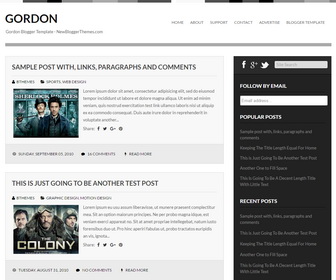
Theme Categories: 1 Sidebar, 2 Columns, Adapted from Wordpress, Black, Color Options, Fixed width, Grey, Magazine, Minimalist, Pro Version Available, Responsive, Right Sidebar, Top Navigation Bar, White,
Theme Name:
Gordon
Author / URL:
NewBloggerThemes | https://newbloggerthemes.com/
Designer / URL:
Fabthemes | http://www.fabthemes.com/
Published Date:
September 4, 2012
Updated Date:
Monday, June 6, 2016
[purchase_link id="4558" text="Buy Now - Gordon - PRO Version" style="button" color="blue"]
Gordon Free vs. Pro Versions : Features Comparison
| Features | Free Version | PRO Version |
|---|---|---|
| Template Designer Compatible (Color Options / Font Options / Background Support) |
✖ | ✔ | Search Engine Optimized | ✖ | ✔ |
| Remove Footer Credits | ✖ | ✔ |
| Priority Support | ✖ | ✔ |
| No Encrypted Scripts | ✖ | ✔ |
| Lifetime Theme Updates | ✔ | ✔ |
| For Unlimited Domains | ✔ | ✔ |
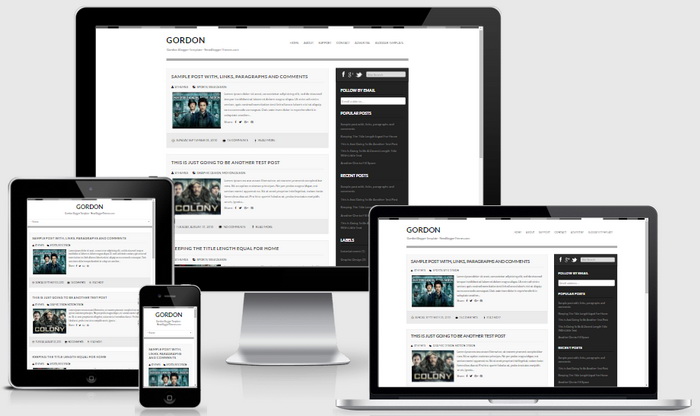
Gordon is a clean, minimal and 100% responsive, 2 columns HTML5/CSS3 Blogger theme. Gordon Blogger template has a right sidebar, mobile friendly layout, related posts with thumbnails, social and share buttons, top navigation menu, auto post summaries, Google web fonts and more. Also Gordon PRO version is Blogger Template Designer Compatible and search engine optimized. You can change colors and fonts with in few seconds.
How To Add Links to Top Navigation Menu

Go to "Layout". Click on "Edit" link of "Edit This Menu" widget.
Now add your links to that link list widget.
How To Link Social Buttons to your Profiles

Find this in "Edit HTML":
<ul class='socialnbt'>
<li><a href='https://www.facebook.com/username' rel='nofollow' target='_blank'><img src='https://3.bp.blogspot.com/-JGE3n6T-Tz0/UDsnutEvkPI/AAAAAAAAHYA/cfsi1wZIviI/s1600/facebook.png'/></a></li>
<li><a href='https://plus.google.com/profileid' rel='nofollow' target='_blank'><img src='https://2.bp.blogspot.com/-oS5zV5jr31c/UDsnvsXRs4I/AAAAAAAAHYI/tOCVsNVpxBw/s1600/google.png'/></a></li>
<li><a href=' https://twitter.com/twitter' rel='nofollow' target='_blank'><img src='https://1.bp.blogspot.com/-R6l9-ym742Q/UDsnw1QthhI/AAAAAAAAHYQ/7NLLHaGkD5A/s1600/twitter.png'/></a></li>
</ul>
Add your own social links replacing default social profile URLs.
Gordon Blogger Template Responsive View