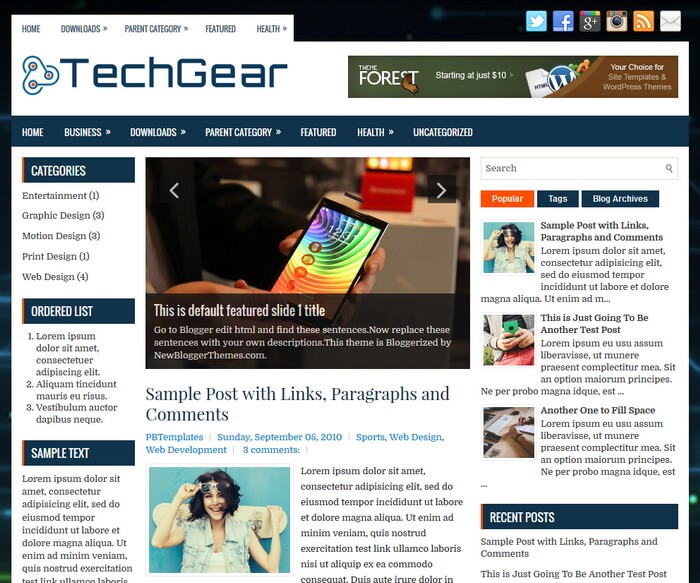
TechGear is a mobile friendly, 3 columns blogger theme with left/right sidebars and 3 columns footer widgets area. TechGear Blogger template has a featured post slider, primary and secondary navigation menus, Google fonts, auto post summaries, social profile icons, header banner, related posts with thumbnails and more.
How To Configure Primary Navigation Menu
Find this in “Edit HTML”:
<div class='menu-primary-container'>
<ul class='menus menu-primary'>

<li><a expr:href='data:blog.homepageUrl'>Home</a></li>

<li><a href='#'>Downloads</a>
<ul class='children'>
<li><a href='#'>Dvd</a></li>
<li><a href='#'>Games</a></li>
<li><a href='#'>Software</a>
<ul class='children'>
<li><a href='#'>Office</a>
</li>
</ul>
</li>
</ul>
</li>

...

</ul>
</div>
Replace “#” marks with real URLs and change anchor texts as you like.
How To Configure Secondary Navigation Menu
Find this in “Edit HTML”:
<div class='menu-secondary-container'>
<ul class='menus menu-secondary'>

<li><a expr:href='data:blog.homepageUrl'>Home</a></li>

<li><a href='#'>Business</a>
<ul class='children'>
<li><a href='#'>Internet</a></li>
<li><a href='#'>Market</a></li>
<li><a href='#'>Stock</a></li>
</ul>
</li>

...

</ul>
</div>
Replace “#” marks with real URLs and change anchor texts as you like.
How To Configure Featured Content Slider:
There are 5 slides in the slider. This is the code of the first slide:
<!-- Slide 1 Code Start -->
<li>
    <a href='ENTER-SLIDE-1-LINK-HERE'><img src='https://1.bp.blogspot.com/-KjAr3Emx2Xs/WcKAUKZXoaI/AAAAAAAASUk/WEDAMj-CoWowcB7z5K8pjrSP13ugYlHUACLcBGAs/s1600/1.jpg'/></a>
    <div class='flex-slideinfo'>
        <h3><a href='ENTER-SLIDE-1-LINK-HERE'>This is default featured slide 1 title</a></h3>
        <p>Go to Blogger edit html and find these sentences.Now replace these sentences with your own descriptions.This theme is Bloggerized by NewBloggerThemes.com.</p>
    </div>
</li>
<!-- Slide 1 Code End -->
Now replace,
“This is default featured slide 1 title” with your featured post title.
“ENTER-SLIDE-1-LINK-HERE” with your featured post URL.
“Go to Blogger edit html and find these sentences.Now replace these sentences with your own descriptions.This theme is Bloggerized by NewBloggerThemes.com.” with your description.
“https://1.bp.blogspot.com/-KjAr3Emx2Xs/WcKAUKZXoaI/AAAAAAAASUk/WEDAMj-CoWowcB7z5K8pjrSP13ugYlHUACLcBGAs/s1600/1.jpg” with your slider image.
There are another 4 slide codes you have to configure like this.
TechGear Blogger Template Responsive View





i wish to buy this tamplate