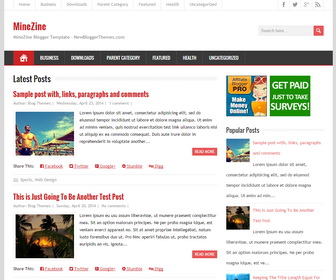
MineZine is a fully responsive 2 columns blogger theme that allows for easy viewing on any device. MineZine blogger template has social network profile links in header, custom search box, post share links, google fonts, Icon fonts, auto post summaries, related posts, right sidebar, 3 columns footer area and much more.
How To Add Links to Top Navigation Menu
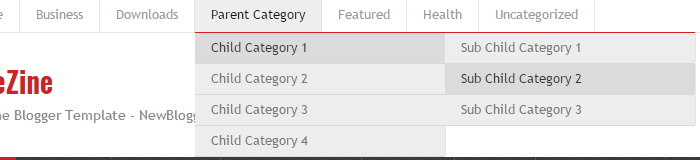
Find this in “Edit HTML”:
<ul class='menunbt' id='top-navnbt'>

<li><a expr:href='data:blog.homepageUrl'>Home</a></li>

<li><a href='#'>Business</a>
<ul class='sub-menu'>
<li><a href='#'>Internet</a></li>
<li><a href='#'>Market</a></li>
<li><a href='#'>Stock</a></li>
</ul>
</li>

...

<li><a href='#'>Uncategorized</a></li>

</ul>
Replace “#” marks with real URLs and change anchor texts as you like.
How To Configure Social Buttons

Find this in “Edit HTML”:
<div class='header-iconsnbt'> <a class='social-iconnbt facebook-iconnbt' href='https://www.facebook.com/newbthemes/' rel='nofollow' target='_blank'/> <a class='social-iconnbt twitter-iconnbt' href='https://twitter.com/newbthemes' rel='nofollow' target='_blank'/> <a class='social-iconnbt google-iconnbt' href='https://plus.google.com/114594158726319551901/posts' target='_blank'/> <a class='social-iconnbt rss-iconnbt' expr:href='data:blog.homepageUrl + "feeds/posts/default"' rel='nofollow' target='_blank'/> </div>
Add your own social links replacing my social network profile URLs.
How To Add Links to Secondary Navigation Menu
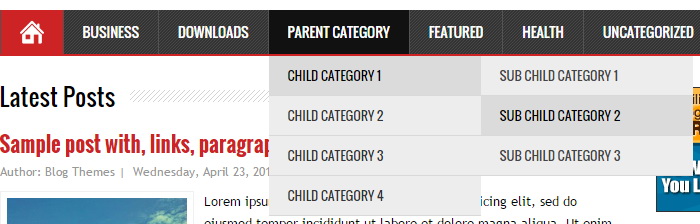
Find this in “Edit HTML”:
<ul class='menunbt' id='navnbt'>

<li><a href='#'>Business</a>
<ul class='sub-menu'>
<li><a href='#'>Internet</a></li>
<li><a href='#'>Market</a></li>
<li><a href='#'>Stock</a></li>
</ul>
</li>

...

<li><a href='#'>Uncategorized</a></li>

</ul>
Replace “#” marks with real URLs and change anchor texts as you like.
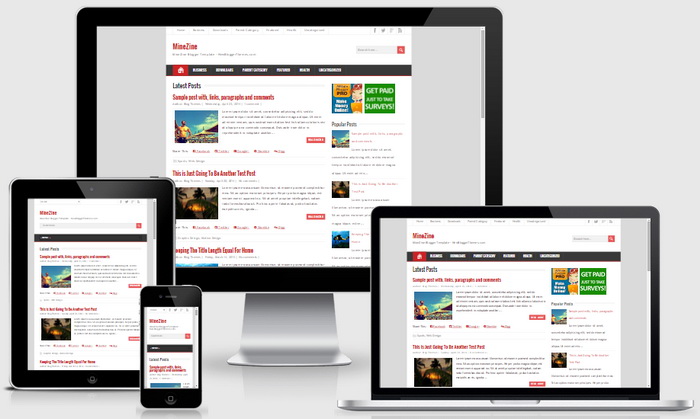
MineZine Blogger Template Responsive View:




Hi,
The post date for my articles seem to be missing. I have tried the Time Stamp guide and other similar templates but the date just does not appear. Any advice will be greatly appreciated.
Hi, I can see now post dates are displaying correctly on your blog.
Really nice template