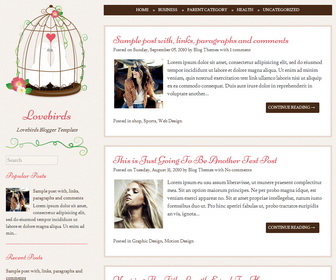
Lovebirds blogger template is a 100% responsive, simple, 2 columns, quaint wedding blogger theme designed to aid in the planning and preparation for your big day. Lovebirds Blogger template has a left sidebar, top navigation menu, related posts with thumbnails, social icons and share buttons, auto post summaries and more features.
How To Change Lovebirds Image in Header
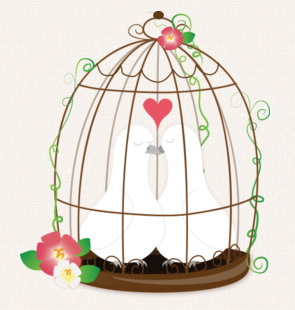
Find this in “Edit HTML”:
http://3.bp.blogspot.com/-3ReUNMSSgzc/UmsjluIxPcI/AAAAAAAALB8/wXbcybn2V74/s1600/lovebirds-2x.png
Replace it with your own header image URL. Header image size should be 250px width and 290px height.
How To Configure Top Navigation Menu
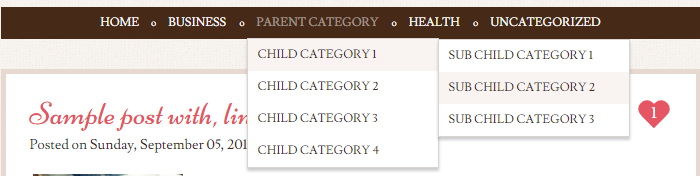
Find this in “Edit HTML”:
<div class='menu'>
<ul>
<li><a expr:href='data:blog.homepageUrl'>Home</a></li>

<li><a href='#'>Business</a>
<ul class='children'>
<li><a href='#'>Internet</a></li>
<li><a href='#'>Market</a></li>
<li><a href='#'>Stock</a></li>
</ul>
</li>

<li><a href='#'>Parent Category</a>
<ul class='children'>
<li><a href='#'>Child Category 1</a>
<ul class='children'>
<li><a href='#'>Sub Child Category 1</a></li>
<li><a href='#'>Sub Child Category 2</a></li>
<li><a href='#'>Sub Child Category 3</a></li>
</ul>
</li>
<li><a href='#'>Child Category 2</a></li>
<li><a href='#'>Child Category 3</a></li>
<li><a href='#'>Child Category 4</a></li>
</ul>
</li>


<li><a href='#'>Health</a>
<ul class='children'>
<li><a href='#'>Childcare</a></li>
<li><a href='#'>Doctors</a></li>
</ul>
</li>

<li><a href='#'>Uncategorized</a></li>
</ul>
</div>
Replace “#” marks with real URLs and change anchor texts as you like.
How To Configure Social Buttons
Find this in “Edit HTML”:
<div class='social-buttonsnbt'>
<a href='https://twitter.com/' rel='nofollow' target='_blank' title='Twitter'><i class='fa fa-twitter'/></a>
<a href='https://www.facebook.com/' rel='nofollow' target='_blank' title='Facebook'><i class='fa fa-facebook'/></a>
<a href='https://plus.google.com/' rel='nofollow' target='_blank' title='GooglePlus'><i class='fa fa-google-plus'/></a>
<a href='https://www.pinterest.com/' rel='nofollow' target='_blank' title='Pinterest'><i class='fa fa-pinterest'/></a>
...
</div>
Add your own social links replacing default social profile URLs.
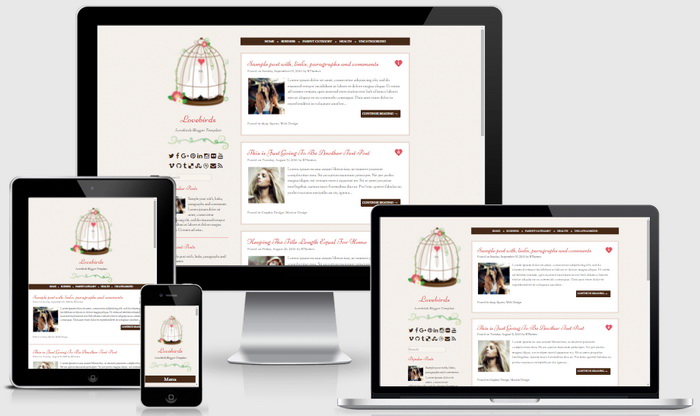
Lovebirds Blogger Template Responsive View




I love this template! But I have a hard time installing it as I cant seem to edit top navigation menu. Help please?
please follow the instructions given.
I love the theme. How to change fonts?
find this:
body,
button,
input,
select,
textarea {
color: #333;
font-family: Lusitana, "Times New Roman", serif;
font-size: 16px;
font-size: 1.6rem;
line-height: 1.5;
background-color:#f8f4ee;
}
change “Lusitana” font to other.
Hello! I loved this theme, but how can I remove the "continue reading" option?
Hi, follow this: https://newbloggerthemes.com/blog/remove-blogger-auto-read-more/
Wonderful theme, love it.
How can I change the solid line of a blockquote to a box blockquote? I tried to add it in to 'Add CSS', doesn't allow. I did purchase the pro version.
Hi, Go to Edit HTML and add this code just before </head> tag of your blog:
<style type='text/css'>
blockquote{border:5px solid #888;padding:1.5em;}
</style>
Thanks