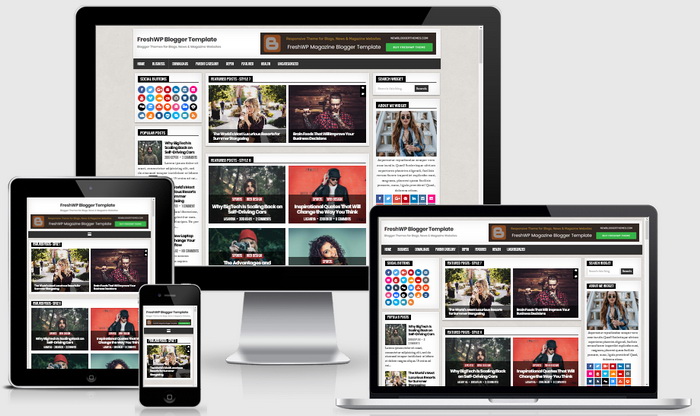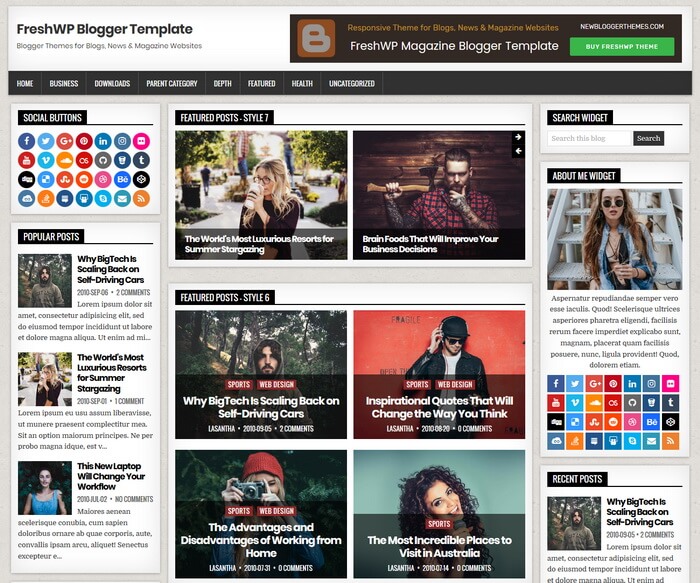
FreshWP is a Theme Designer compatible, fully responsive, 3 columns blogger template with left/right sidebars and 4 columns footer. FreshWP Blogger template has many color and font options, 8 featured posts widgets, sticky menu and sidebars, social buttons widget, about me widget, clean post summaries, background image support, related posts with thumbnails, social and share buttons, top navigation menu, scroll-to-top button and more.
How To Configure Top Navigation Menu
Find this in “Edit HTML”:
<ul class='freshwp-nav-menu menu-primary' id='menu-primary-navigation'>

<li><a expr:href='data:blog.homepageUrl'>Home</a></li>

<li class='menu-item-has-children'><a href='#'>Business</a>
<ul class='sub-menu'>
<li><a href='#'>Internet</a></li>
<li><a href='#'>Market</a></li>
<li><a href='#'>Stock</a></li>
</ul>
</li>

...

</ul>
Replace “#” marks with real URLs and change anchor texts as you like.
How To Add Featured Posts Widgets and Other Widgets
FreshWP theme has 8 featured posts widgets, tabbed widget, social widget and about me widget. All widget codes with instructions are given with the theme file. Check the “widget-codes” folder.
How To Configure Footer Social Buttons

Find this in “Edit HTML”:
<div class='freshwp-social-icons clearfix'>
<div class='freshwp-social-icons-inner clearfix'>

<a class='freshwp-social-icon-twitter' href='#' target='_blank' title='Twitter'><i aria-hidden='true' class='fa fa-twitter'/></a>
<a class='freshwp-social-icon-facebook' href='#' target='_blank' title='Facebook'><i aria-hidden='true' class='fa fa-facebook'/></a>
<a class='freshwp-social-icon-google-plus' href='#' target='_blank' title='Google Plus'><i aria-hidden='true' class='fa fa-google-plus'/></a>
<a class='freshwp-social-icon-pinterest' href='#' target='_blank' title='Pinterest'><i aria-hidden='true' class='fa fa-pinterest'/></a>
<a class='freshwp-social-icon-linkedin' href='#' target='_blank' title='Linkedin'><i aria-hidden='true' class='fa fa-linkedin'/></a>
...

</div>
</div>
Add your own social links replacing default social profile URLs.
FreshWP Blogger Template Responsive View
This Blogger theme is 100% responsive and adopts to various screen sizes, ensuring that your content is perfectly displayed to the visitors using tablets and mobile devices.