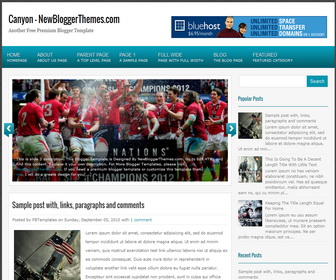
How To Configure Featured Content Slider
Find this in “Edit HTML”:
<div class='flexslider'>
<ul class='slides'>

<li>
<a href='SLIDE-1-LINK-HERE'><img class='slideimg' src='http://2.bp.blogspot.com/-2IPHucIsAEM/UL4LSqCUSPI/AAAAAAAAB-c/wG0nxcUMRkY/s1600/1.jpg'/></a>
<div class='flex-caption'>
<p>This is slide 1 description. This Blogger Template is Designed By NewBloggerThemes.com. Go to Edit HTML and find this content. Replace it your own description. For More Blogger Templates, please visit <a href='https://newbloggerthemes.com/'>NewBloggerThemes.com</a>. If you need a premium blogger template or customize this template then <a href='https://newbloggerthemes.com/contact/'>contact me</a>. I will do a greate design for you[...]</p>
</div>
</li>

<li>
<a href='SLIDE-2-LINK-HERE'><img class='slideimg' src='http://3.bp.blogspot.com/-c_t6nnbt8us/UL4LUA2a35I/AAAAAAAAB-g/IxDp4oCSGZ8/s1600/2.jpg'/></a>
<div class='flex-caption'>
<p>This is slide 2 description. This Blogger Template is Designed By NewBloggerThemes.com. Go to Edit HTML and find this content. Replace it your own description. For More Blogger Templates, please visit <a href='https://newbloggerthemes.com/'>NewBloggerThemes.com</a>. If you need a premium blogger template or customize this template then <a href='https://newbloggerthemes.com/contact/'>contact me</a>. I will do a greate design for you[...]</p>
</div>
</li>

<li>
<a href='SLIDE-3-LINK-HERE'><img class='slideimg' src='http://4.bp.blogspot.com/-1kYiEe_eS0s/UL4LWNcF8DI/AAAAAAAAB-s/tjLPFHy_x2g/s1600/3.jpg'/></a>
<div class='flex-caption'>
<p>This is slide 3 description. This Blogger Template is Designed By NewBloggerThemes.com. Go to Edit HTML and find this content. Replace it your own description. For More Blogger Templates, please visit <a href='https://newbloggerthemes.com/'>NewBloggerThemes.com</a>. If you need a premium blogger template or customize this template then <a href='https://newbloggerthemes.com/contact/'>contact me</a>. I will do a greate design for you[...]</p>
</div>
</li>

</ul>
</div>
For each slide,
Replace “SLIDE-1-LINK-HERE” with real slide link.
Replace slide image url and other content.
How To Add Links Top Navigation Menu
Go to “Layout”. Click on “Edit” link of “Edit This Menu” widget.
Now add your links to that link list widget.




This one is an amazing template. You have so much talent bro!
Great template!
I’m seriously considering using it for my blog, but wanted to know if it’s compatible with Disqus because that’s what I use on my Blogger blog.
If you could let me know, I would really appreciate it.
Thank you!
there is no problem using it with Disqus comment system.