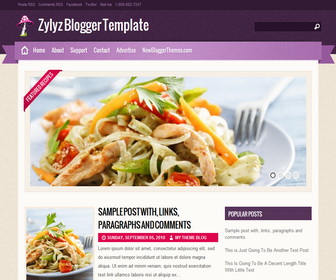
How to Configure Slider
Find this (in “Edit HTML”) :
<div class='nivoSlider' id='slider'>

<a href='SLIDE-1-URL-HERE'><img class='slideimg' src='http://2.bp.blogspot.com/-NMGFgvrzb4s/UGO8v00Xc8I/AAAAAAAAGr8/5pkLhlYy7iE/s1600/slide-1.jpg' title=''/></a>

<a href='SLIDE-2-URL-HERE'><img class='slideimg' src='http://4.bp.blogspot.com/-1oNH_HHbvMI/UGO81HGn8KI/AAAAAAAAGsE/h0FCbhE0qjs/s1600/slide-2.jpg' title=''/></a>

<a href='SLIDE-3-URL-HERE'><img class='slideimg' src='http://1.bp.blogspot.com/-e7JuCoDno7I/UGO84HjiQyI/AAAAAAAAGsM/Aw5E8SiEqAw/s1600/slide-3.jpg' title=''/></a>

<a href='SLIDE-4-URL-HERE'><img class='slideimg' src='http://1.bp.blogspot.com/-5Sddh4UUOFA/UGO9RQ_7dVI/AAAAAAAAGsU/2mV0zF7k3Aw/s1600/slide-4.jpg' title=''/></a>

</div><!-- nivo-Slider -->
There are 4 slides in slider. For each slide, change “SLIDE-X-URL-HERE” with your slide url. Also change slide image url.
How To Add Links Top Navigation Menu
Go to “Layout”. Click on “Edit” link of “Edit This Menu” widget.




This is simply gorgeous!
Is it possible to have one with the social buttons above the Popular posts?
I notice there were no social icons.
You can add a third party social widget as a html/javascript box.
how to add drop down menus to top navigation bar?
thx gan
Does anybody know of any good hosting site options for this template?
Hi
How can I change the pictures on slideshow.
Hi
I download this template but unfortunately I am not seeing the top navigtion links on my blog. I don’t know why. I really apprecite your help.
Thanks a lot!
https://newbloggerthemes.com/blog/how-to-configure-linklist-menu-widget/
This is a beautiful layout and perfect for my blog. Is there a way to change the mushroom graphic? Thank you so much for sharing!
I have explained it above: How to Configure Slider
Hi there!
How do I remove the Featured Recipes in the slider?
how to add read more button in this template?
Hello
I love your template, but I am having trouble trying to figure where the pages are that I create, they are not showing up on the header or on the side as I have different types of books I need to be able to add pages that visitors will see, I have tried everything and am not having any luck. Any Help would be great full
Thank You
JoAnn
https://newbloggerthemes.com/blog/how-to-configure-linklist-menu-widget/
how to add drop down menus to top navigation bar?
it is not possible without a customization.
Very nice, but isn’t responsive 😛
if you need a responsive theme, there are many free themes available here.
Hi. Thanks for this excellent theme. Is it possible to add post link or url to postimg which will make theme better?
Best regards.
Thanks
Hi, it requires some theme customization. use contact form for support. thanks.