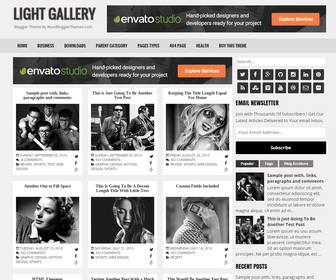
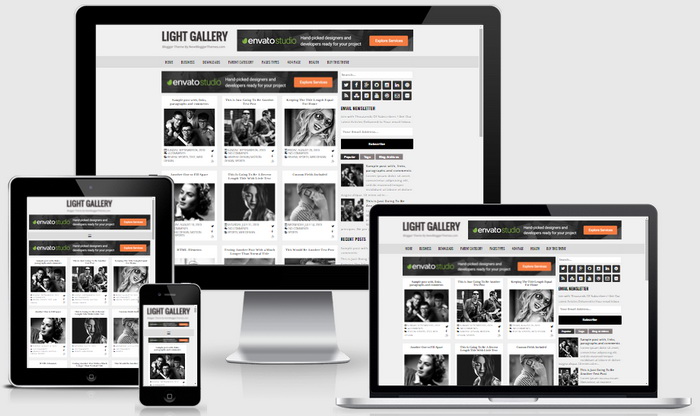
Light Gallery is a very easy to use, search engine optimized, elegant and minimal looking galley blogger template for your blog. It is 100% responsive (mobile friendly) and adopts to various screen sizes, ensuring that your site content is perfectly displayed to every visitor using different devices. You can change colors and fonts of any element of this theme within few seconds using blogger template designer (without going to Edit HTML). Light Gallery Blogger template has 4 columns footer widgets section, right sidebar, hundreds of web fonts, unlimited color options, Font Awesome icon fonts, background image support, related posts with thumbnails, social buttons on sidebar, post share buttons, top navigation menu, scroll to top button, customized email subscribe widget, multi tabbed widget and more.
Light Gallery Blogger Template Features
- 100% Responsive (Check Mobile Friendly)
- Search Engine Friendly
- Structured Data Included (Check SEO)
- Unlimited Colors to Choose (Check Colors)
- Hundreds of Fonts to Select (Check Fonts)
- Support for a Background Image (Check Background Image Support)
- Related Posts with Thumbnails
- Clean Admin Layout Page
- Different Layout Options for Posts and Pages (full width/left sidebar/right sidebar)
- 728×90 Header Ad Banner Area
- 4 Columns Footer Widgets Area
- Full Width Not Found(404) Page Check 404 Page
- Top Multi-level Responsive Navigation Menu
- Multi Tabbed Widget Area
- Numbered Page Navigation
- Custom Post Navigation
- Beautiful Social Buttons
- Post Share Buttons
- Feedburner Email Subscription Box
- Facebook and Twitter Meta Data
- Many More Features…
Here I explain how to configure some settings of the theme. For full setup instructions, read the documentation given with the theme.
How To Configure Top Navigation Menu
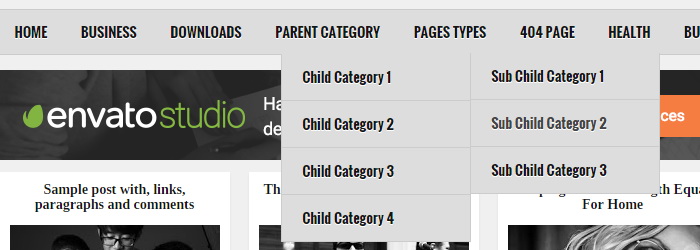
Find this in “Edit HTML”:
<nav class='nav-primary container' id='primary-navigation' itemscope='itemscope' itemtype='http://schema.org/SiteNavigationElement' role='navigation'>
<ul class='menu nbtheme-nav-menu menu-primary' id='menu-primary-navigation'>

<li class='menu-item'><a expr:href='data:blog.homepageUrl'>Home</a></li>

<li class='menu-item menu-item-has-children'><a href='#'>Business</a>
<ul class='sub-menu'>
<li class='menu-item'><a href='#'>Internet</a></li>
<li class='menu-item'><a href='#'>Market</a></li>
<li class='menu-item'><a href='#'>Stock</a></li>
</ul>
</li>

...

<li class='menu-item'><a href='https://newbloggerthemes.com/light-gallery-blogger-template/'>Buy This Theme</a></li>

</ul>
</nav>
Replace “#” marks with real URLs and change anchor texts as you like. I have already configured a part of the menu (see “Pages Types”) with sample URLs and anchor text to understand how it works.
How To Configure Social Buttons
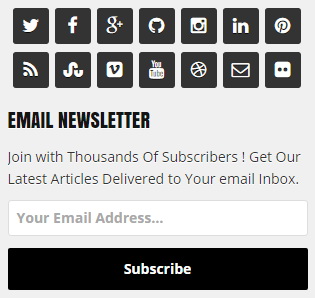
Find this in “Edit HTML”:
<div class='pg-social-icons'>
<ul>
   <li class='social-twitter'><a href='#' rel='nofollow' target='_blank' title='Twitter'><i class='fa fa-twitter'/></a></li>
   <li class='social-facebook'><a href='#' rel='nofollow' target='_blank' title='Facebook'><i class='fa fa-facebook'/></a></li>
   <li class='social-gplus'><a href='#' rel='nofollow' target='_blank' title='Google Plus'><i class='fa fa-google-plus'/></a></li>
   <li class='social-github'><a href='#' rel='nofollow' target='_blank' title='Github'><i class='fa fa-github'/></a></li>
   <li class='social-instagram'><a href='#' rel='nofollow' target='_blank' title='Instagram'><i class='fa fa-instagram'/></a></li>
   <li class='social-linkedin'><a href='#' rel='nofollow' target='_blank' title='Linkedin'><i class='fa fa-linkedin'/></a></li>
   <li class='social-pinterest'><a href='#' rel='nofollow' target='_blank' title='Pinterest'><i class='fa fa-pinterest'/></a></li>
   <li class='social-rss'><a href='#' rel='nofollow' target='_blank' title='RSS'><i class='fa fa-rss'/></a></li>
   <li class='social-stumbleupon'><a href='#' rel='nofollow' target='_blank' title='Stumbleupon'><i class='fa fa-stumbleupon'/></a></li>
   <li class='social-vimeo'><a href='#' rel='nofollow' target='_blank' title='Vimeo'><i class='fa fa-vimeo-square'/></a></li>
   <li class='social-youtube'><a href='#' rel='nofollow' target='_blank' title='Youtube'><i class='fa fa-youtube'/></a></li>
   <li class='social-dribbble'><a href='#' rel='nofollow' target='_blank' title='Dribbble'><i class='fa fa-dribbble'/></a></li>
   <li class='social-email'><a href='#' rel='nofollow' target='_blank' title='Email'><i class='fa fa-envelope-o'/></a></li>
   <li class='social-flickr'><a href='#' rel='nofollow' target='_blank' title='Flickr'><i class='fa fa-flickr'/></a></li>
</ul>
</div>
Add your own social links replacing “#” marks.
How To Configure Numbered Page Navigation

Find this:
var pageNaviConf = {
	perPage: 12,
	numPages: 6,
	firstText: "First",
	lastText: "Last",
	nextText: "Next",
	prevText: "Prev"
}
By default, page navigation has configured to display 12 posts per page. For example if you need to display 6 posts per page, change “perPage” value to 6. Now final code should be:
var pageNaviConf = {
	perPage: 6,
	numPages: 6,
	firstText: "First",
	lastText: "Last",
	nextText: "Next",
	prevText: "Prev"
}
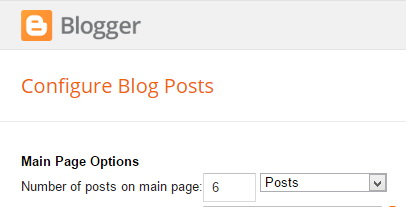
Note: Also set “Number of posts on main page” value to 6 through Blogger settings.
Light Gallery Responsive View




Very fast and efficient support, thanks.
Christian from Italy.