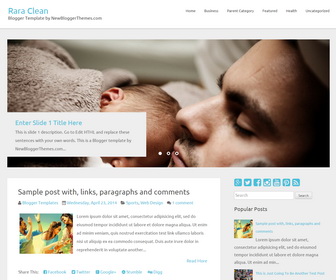
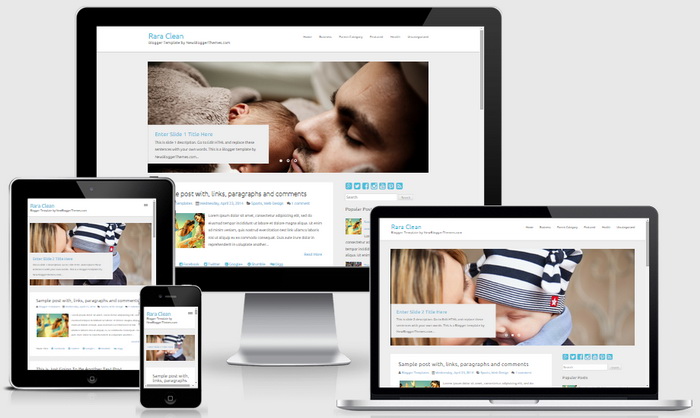
Rara Clean is a simple and clean, 2 columns Blogger theme. It is 100% responsive and adopts to various screen sizes, ensuring that your content is perfectly displayed to the visitors using tablets and mobile devices. If you are looking for a clean and professional blogger template that compliments your visuals and also provides you ample space for text, Rara Clean is a perfect choice for you. Rara Clean Blogger template has a right sidebar, Google fonts, related posts with thumbnails, social buttons and share buttons, top navigation menu, and more.
How To Add Links to Top Navigation Menu
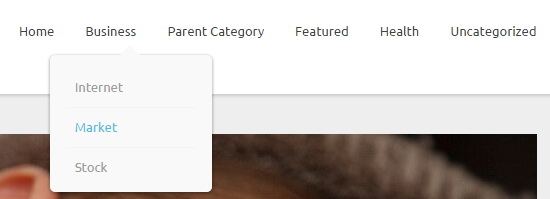
Find this in “Edit HTML”:
<ul class='accordionnbt'>

<li><a expr:href='data:blog.homepageUrl'>Home</a></li>

<li><a href='#'>Business</a>
<ul class='sub-menu'>
<li><a href='#'>Internet</a></li>
<li><a href='#'>Market</a></li>
<li><a href='#'>Stock</a></li>
</ul>
</li>

...

<li><a href='#'>Uncategorized</a></li>

</ul>
Replace “#” marks with real URLs and change anchor texts as you like.
How To Configure Featured Content Slider:
Find this in “Edit HTML”:
<div class='slidesetnbt'>

<!-- Slide 1 Code Start -->
<div class='slidenbt'>

    <img src='http://4.bp.blogspot.com/-E-EycYZU0oA/VYeCoKyVfFI/AAAAAAAANoE/v0w3zsQ46-A/s1600/slide-image-1.jpg'/>

	<div class='banner-textnbt'>

		<strong class='titlenbt'>
			<a href='ENTER-SLIDE-1-LINK-HERE'>Enter Slide 1 Title Here</a>
		</strong>

		<p>This is slide 1 description. Go to Edit HTML and replace these sentences with your own words. This is a Blogger template by NewBloggerThemes.com...</p>

	</div>

</div>
<!-- Slide 1 Code End -->


...

</div>
There are 3 slides in the slider. You can add or remove more slides if you want.
Now replace,
“ENTER-SLIDE-X-LINK-HERE”s with your real slide link,
“Enter Slide X Title Here” with your real slide title,
“This is slide X description. Go to Edit HTML and replace these sentences with your own words. This is a Blogger template by NewBloggerThemes.com…” with your real slide description,
Slide image URL,
for each slide. (X = 1 or X = 2 or X = 3)
How To Configure Social Buttons
Find this in “Edit HTML”:
<div class='social-buttonsnbt'> <a href='https://plus.google.com/' rel='nofollow' target='_blank' title='Google Plus'><i class='fa fa-google-plus-square'/></a> <a href='https://twitter.com/' rel='nofollow' target='_blank' title='Twitter'><i class='fa fa-twitter-square'/></a> <a href='https://www.facebook.com/' rel='nofollow' target='_blank' title='Facebook'><i class='fa fa-facebook-square'/></a> <a href='http://instagram.com/' rel='nofollow' target='_blank' title='Instagram'><i class='fa fa-instagram'/></a> <a href='https://www.youtube.com/' rel='nofollow' target='_blank' title='Youtube'><i class='fa fa-youtube-square'/></a> <a href='http://www.pinterest.com/' rel='nofollow' target='_blank' title='Pinterest'><i class='fa fa-pinterest-square'/></a> <a expr:href='data:blog.homepageUrl + "feeds/posts/default"' rel='nofollow' target='_blank' title='RSS'><i class='fa fa-rss-square'/></a> </div>
Add your own social links replacing default social profile URLs.
Rara Clean Blogger Template Responsive View




Hi, How can I add the date of publication to the post? Thanks
Go to "Settings" –> "Language and formatting".
Select the "Timestamp Format" you need from the drop-down.