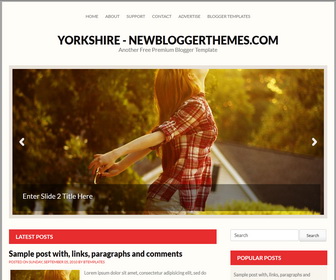
Theme Categories: 1 Sidebar, 2 Columns, 3 Columns Footer, Adapted from Wordpress, Brown, Featured Section, Fixed width, Grey, Magazine, Red, Right Sidebar, Slider, Top Navigation Bar, Yellow,
Theme Name:
Yorkshire
Author / URL:
NewBloggerThemes | https://newbloggerthemes.com/
Designer / URL:
Fabthemes | http://www.fabthemes.com/
Published Date:
January 27, 2013
How To Configure Featured Posts
Find this in "Edit HTML":
<ul class='sb-slider' id='sb-slider'>

<!-- Slide 1 Code Start -->
<li>
<a href='ENTER-SLIDE-1-LINK-HERE'><img src='http://1.bp.blogspot.com/-Vo05rdpVtyE/UQW5TB1CI-I/AAAAAAAAEWw/S6rWiPDRh0Y/s1600/image-1.jpg'/></a>
<div class='sb-description'>
<h3>Enter Slide 1 Title Here</h3>
</div>
</li>
<!-- Slide 1 Code End -->

<!-- Slide 2 Code Start -->
<li>
<a href='ENTER-SLIDE-2-LINK-HERE'><img src='http://1.bp.blogspot.com/-pBlEeUaKjzw/UQW5S6k5e0I/AAAAAAAAEWs/dSYPP0VSrSQ/s1600/image-2.jpg'/></a>
<div class='sb-description'>
<h3>Enter Slide 2 Title Here</h3>
</div>
</li>
<!-- Slide 2 Code End -->

<!-- Slide 3 Code Start -->
<li>
<a href='ENTER-SLIDE-3-LINK-HERE'><img src='http://3.bp.blogspot.com/-PqqoIPp_91k/UQW5WDDXYOI/AAAAAAAAEW8/50GOYH5qeQU/s1600/image-3.jpg'/></a>
<div class='sb-description'>
<h3>Enter Slide 3 Title Here</h3>
</div>
</li>
<!-- Slide 3 Code End -->

</ul>
For each featured post,
Replace "ENTER-SLIDE-1-LINK-HERE" with real slide link.
Replace "Enter Slide 1 Title Here" with real slide title.
Replace slide image URL.
How To Add Links Top Navigation Menu
Go to "Layout". Click on "Edit" link of "Edit This Menu" widget.
Now add your links to that link list widget.