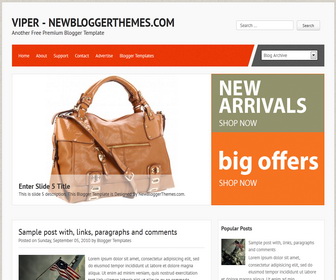
How To Configure Featured Content Slider
There are 9 slides in slider. This explains how to configure first slide.
Find this in “Edit HTML”:
<li>
<a href='ENTER-SLIDE-1-LINK-HERE'><img class='slideimg' src='http://3.bp.blogspot.com/-zMvSasQLzUc/UNWFesoOwXI/AAAAAAAACzc/CVuYjoxMP-U/s1600/1.jpg'/></a>
<div class='flex-caption'>
<h3>Enter Slide 1 Title</h3>
<p>This is slide 1 description. This Blogger Template is Designed By NewBloggerThemes.com.</p>
</div>
</li>
Replace “ENTER-SLIDE-1-LINK-HERE” with real slide 1 link.
Replace “Enter Slide 1 Title” with real slide 1 title.
Replace “http://3.bp.blogspot.com/-zMvSasQLzUc/UNWFesoOwXI/AAAAAAAACzc/CVuYjoxMP-U/s1600/1.jpg” with slide 1 small image address.
Replace slide 1 description.
Now you have configure first slide. You can use same steps for other slides.
How To Add Links Top Navigation Menu
Go to “Layout”. Click on “Edit” link of “Edit This Menu” widget.
Now add your links to that link list widget.




Great template..
thanks..
loving it….:)
Nice template…
So Pretty and Poerfull template.. Looks Great!
How to make dropdown menu?
How is it (if possible)?
How to make and display a banner 468×60 side by side with the blog title?
you are asking about theme customization. contact me to help you.
How do you replace the http://1.bp.blogspot.com/-k3e5os5SH0E/UNZsL_7YyzI/AAAAAAAAC1I/gO0HdmUMjXM/s1600/bigbanner340360.png graphic that is to the right of the featured slides?
Thanks in advance!
go to Edit HTML and replace that image URL with your image URL.