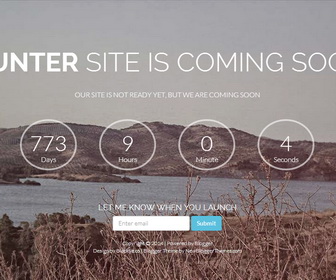
Counter blogger template is a single column, simple and responsive coming soon blogger template for your blogger blog. Counter blogger theme has a full Screen slider/slideshow, jQuery countdown area, and email subscribe box.
How to Configure the Counter:
Find this line in “Edit HTML”:
var launch = new Date(2016, 06, 14, 11, 00);
You can see date format as new Date(year, month, day, hours, minutes);
Change this date to any date you like.
How To Configure Slider:
Find this in “Edit HTML”:
<div class='rev_slider' id='slider'>
   <ul>
      <li data-slotamount='1' data-thumb='' data-transition='slideleft'>
         <img src='http://3.bp.blogspot.com/-NhaUWv3xHWw/U4VwB8MUQQI/AAAAAAAAJp0/_nFSUd4g0vM/s1600/slideimg-1.jpg'/>
      </li>
      <li data-slotamount='1' data-thumb='' data-transition='slideleft'>
         <img src='http://1.bp.blogspot.com/-D-nSA6hqxbg/U4VwAcJAktI/AAAAAAAAJpo/Bp7qhIuMKv8/s1600/slideimg-2.jpg'/>
      </li>
      <li data-slotamount='1' data-thumb='' data-transition='slideleft'>
         <img src='http://3.bp.blogspot.com/-z0TcwyNIuz0/U4VwAdLPryI/AAAAAAAAJpk/IG2RlufV8PI/s1600/slideimg-3.jpg'/>
      </li>
      <li data-slotamount='1' data-thumb='' data-transition='slideleft'>
         <img src='http://1.bp.blogspot.com/-3OHtQ0h5W1g/U4VwGS9aArI/AAAAAAAAJp8/8sOKv3DoXlU/s1600/slideimg-4.jpg'/>
      </li>
   </ul>
</div>
There are 4 slides in the slider. You can add or remove more slides if you want.
Now replace slide image URL for each slide.
How To Configure Email Subscribe Box
Find this in “Edit HTML”:
<form action='http://feedburner.google.com/fb/a/mailverify' class='form-inline' method='post' onsubmit='window.open("http://feedburner.google.com/fb/a/mailverify?uri=newbthemes", "popupwindow", "scrollbars=yes,width=550,height=520");return true' role='form' target='popupwindow'>
<div class='form-group'>
<label class='sr-only' for='exampleInputEmail2'>Email address</label>
<input class='form-control' id='exampleInputEmail2' name='email' placeholder='Enter email' type='text'/>
<input name='uri' type='hidden' value='newbthemes'/>
<input name='loc' type='hidden' value='en_US'/>
</div>
<button class='btn btn-info' type='submit'>Submit</button>
</form>
Add your feedburner ID replacing my feedburner ID (newbthemes).



