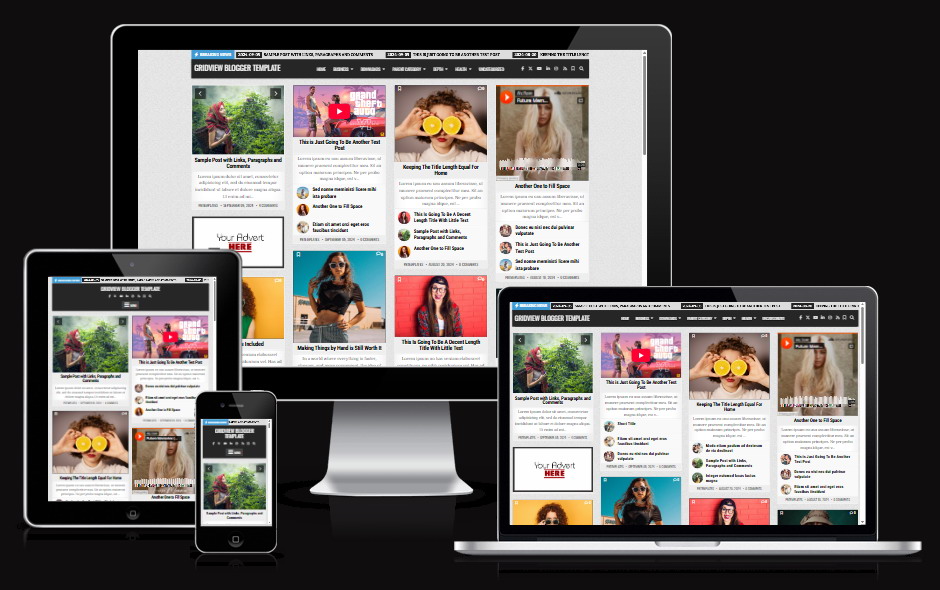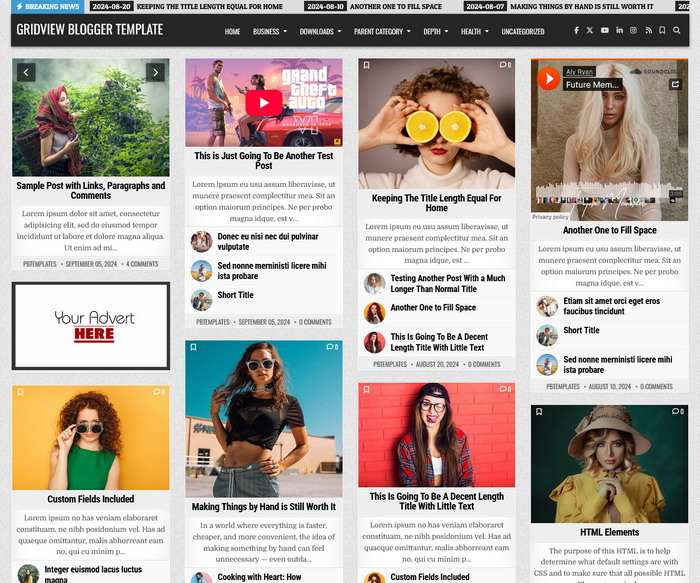
GridView is a responsive Blogger template for personal blogs, online magazines, photography journals, and mixed-media websites. Its masonry grid brings articles, images, videos, audio, and galleries together, with two sidebars on individual posts and static pages.
Customize backgrounds, colors, and fonts through Blogger Theme Designer. Manage navigation, header images, social links, widgets, and main-grid settings through Blogger’s Layout page.
Key Features
- Responsive Masonry Grid: Choose up to four columns, with fewer columns on narrower screens.
- Dedicated Main Grid Settings: Control card elements, date formats, excerpt length, media, galleries, and related content.
- Blogger Customizer Support: Explore 35 settings groups for backgrounds, colors, fonts, and individual theme areas.
- Flexible Header & Navigation: Configure a header image with caption, primary/footer dropdown menus, social icons, RSS, and search.
- Custom Content Widgets: Add grid, list, or three-tab post sections with label filters, IDs, exclusions, sorting, and visibility controls. Compatible widgets can fetch posts from another public Blogger blog.
- News & Profile Widgets: Highlight posts with the trending ticker, introduce your blog with About & Social, and display recent comments.
- Save & Share: Offer browser-based article bookmarks and sharing links for Facebook, X, Pinterest, Reddit, and LinkedIn.
- Related Posts & Author Bio: Help readers discover more content, with configurable related lists inside main and custom grid cards.
- Sorting & Pagination: Sort main listings by date, updates, comments, or random order, with dynamic numbered navigation and consistent random ordering across pages.
- Flexible Advertisement Area: Add, edit, or remove ad gadgets as needed. Each complete group of four posts allows one populated ad card.
- Finishing Details: Four footer columns, post formatting styles, automatic page titles, canonical URLs, Open Graph, and Twitter Cards.
One Grid, Eight Post Formats
| Format | Card Presentation |
|---|---|
| Image | Featured image with title and excerpt. |
| Text Only | Article card without a cover image. |
| YouTube | Clickable poster that loads the player. |
| Vimeo / Dailymotion | Supported iframe video player. |
| HTML5 Video | Hosted video with native playback controls. |
| HTML5 Audio | Hosted audio with native playback controls. |
| SoundCloud / Spotify | Supported embedded audio player. |
| Gallery | Gallery-labelled posts with at least two images, navigation, and alt-text captions. |
Use actual player embeds or HTML5 media elements in your posts. Playback depends on accessible files, supported formats, and provider/browser rules.
Make the Grid Your Own
For example, build a three-column listing with your most-commented posts first, longer excerpts, and selected metadata hidden. Adjust these options in Main Posts Grid Settings, then choose your fonts and colors in Theme Designer.
Get Started in Three Steps
- Install: back up your current theme and install the supplied XML.
- Configure: arrange Layout gadgets and adjust the main grid.
- Personalize: save your Theme Designer changes and check desktop/mobile views.
The documentation includes full settings/widget codes, post-format examples, troubleshooting, and a final checklist.
Frequently Asked Questions
Do I need coding knowledge?
Colors, fonts, and backgrounds use Theme Designer. Menus and images use Layout gadgets; main-grid settings and custom widgets use supplied HTML snippets with documented examples.
How many ad gadgets can I add?
There is no fixed two-gadget limit. Replace, remove, or add gadgets freely. Each contributes one card, with one ad allowed per four posts on the current page.
Do saved posts sync between devices?
No. Bookmarks stay in the visitor’s browser for that site. They do not sync across devices, and clearing site storage removes them.
Which Blogger feed setting should I use?
For complete feed-based feature support, go to Settings → Site feed → Allow blog feed, select Full, and click Save. This supplies complete post content for media, galleries, and excerpts in feed-loaded cards/widgets. It also makes complete posts available through your public feed.
Can I show sidebar widgets on the homepage?
The two sidebars appear on posts and static pages. Use Featured Widgets or footer columns for widgets needed on listing pages.
See GridView in Action
Explore the responsive layout below and try the live demo before configuring your blog.