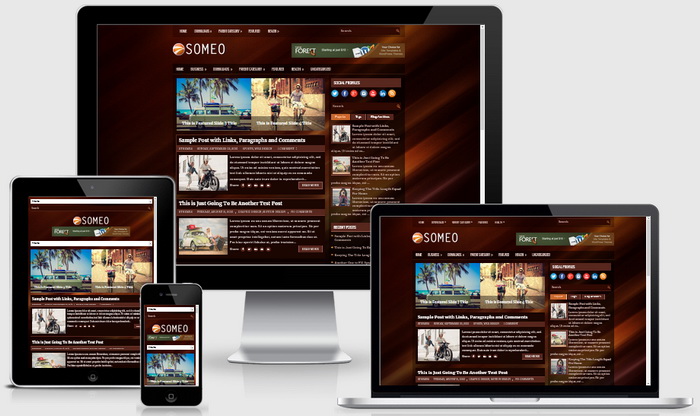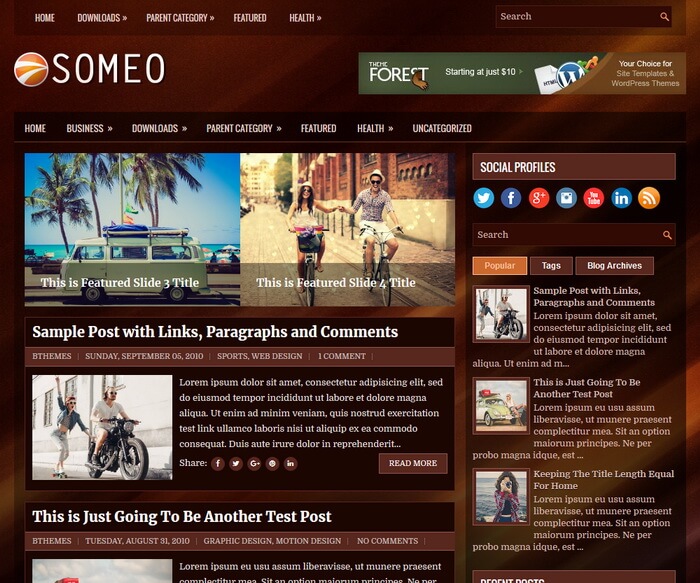
Someo is a free and elegant looking, 2 columns blogger theme with widget area in sidebar and footer. Someo Blogger template has auto post summaries, featured content slider, primary and secondary menus, right sidebar, 3 columns footer, tabbed widgets, web fonts, social icons and share buttons, header banner, related posts with thumbnails and more.
How To Setup Primary Navigation Menu
Find this in “Edit HTML”:
<div class='menu-primary-container'>
<ul class='menus menu-primary'>

<li><a expr:href='data:blog.homepageUrl'>Home</a></li>

<li><a href='#'>Downloads</a>
<ul class='children'>
<li><a href='#'>Dvd</a></li>
<li><a href='#'>Games</a></li>
<li><a href='#'>Software</a>
<ul class='children'>
<li><a href='#'>Office</a>
</li>
</ul>
</li>
</ul>
</li>

...

</ul>
</div>
Replace “#” marks with real URLs and change anchor texts as you like.
How To Setup Secondary Navigation Menu
Find this in “Edit HTML”:
<div class='menu-secondary-container'>
<ul class='menus menu-secondary'>

<li><a expr:href='data:blog.homepageUrl'>Home</a></li>

<li><a href='#'>Business</a>
<ul class='children'>
<li><a href='#'>Internet</a></li>
<li><a href='#'>Market</a></li>
<li><a href='#'>Stock</a></li>
</ul>
</li>

...

</ul>
</div>
Replace “#” marks with real URLs and change anchor texts as you like.
How To Setup Featured Content Slider:
There are 5 slides in the slider. This is the code of the first slide:
<!-- Slide 1 Code Start -->
<div class='nbt-featured-post'>
<div class='nbt-entry-thumbnail'>
<a href='#'><img height='330' src='https://2.bp.blogspot.com/-bB0Ex5Rfluc/WjnUjLVJRTI/AAAAAAAATCM/T7D61EkM3wgcxluCRwKSg4Tqw-Tl7h0fgCLcBGAs/s1600/slide-1.jpg' width='465'/></a>
</div>
<div class='nbt-entry-header'>
<h2><a href='#'>This is Featured Slide 1 Title</a></h2>
</div>
</div>
<!-- Slide 1 Code End -->
Now replace,
“This is Featured Slide 1 Title” with your featured post title.
“#” marks with your featured post URL.
“https://2.bp.blogspot.com/-bB0Ex5Rfluc/WjnUjLVJRTI/AAAAAAAATCM/T7D61EkM3wgcxluCRwKSg4Tqw-Tl7h0fgCLcBGAs/s1600/slide-1.jpg” with your slider image.
There are another 4 slide codes you have to configure like this.
How To Configure Social Buttons
Find this in “Edit HTML”:
<div class='social-profiles-widget'>
<h3 class='widgettitle'>Social Profiles</h3>
    <a href='https://twitter.com/' target='_blank'><img alt='Twitter' src='https://3.bp.blogspot.com/-At2fKKXOTqg/WfxtIiDv5oI/AAAAAAAASuQ/jPOX__UfY9cR5fMlafZ7aaa2El86c30UgCLcBGAs/s1600/twitter.png' title='Twitter'/></a>
    <a href='https://facebook.com/' target='_blank'><img alt='Facebook' src='https://4.bp.blogspot.com/-9riVGWz3Xg8/WfxtGWcN71I/AAAAAAAASt0/nzzviSQcOKI0v0NLslDBuZ3Dz6Ct5-XvgCLcBGAs/s1600/facebook.png' title='Facebook'/></a>
    <a href='https://plus.google.com/' target='_blank'><img alt='Google Plus' src='https://2.bp.blogspot.com/-0aR9pasCQ6w/WfxtGfcloQI/AAAAAAAASt8/SCnPzR21KNA_-vOEKjSFVIVOzCmKJAzgwCLcBGAs/s1600/google.png' title='Google Plus'/></a>
    <a href='https://instagram.com/' target='_blank'><img alt='Instagram' src='https://2.bp.blogspot.com/-u1yHMS9lqX4/WfxtHHtUhTI/AAAAAAAASuA/d1UkV4KqPogqnLKqwzAdLtucKGZ5YC8IQCLcBGAs/s1600/instagram.png' title='Instagram'/></a>
    ...
</div>
Add your social profile links replacing default social network homepage URLs.
Someo Blogger Template Responsive View