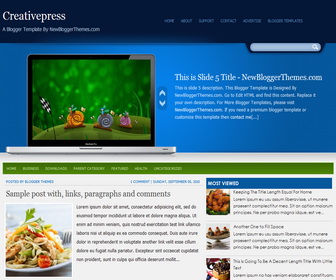
How To Configure Featured Content Slider
Find this in “Edit HTML” (This is slide 1 code):
There are 6 slides in the slider. These are image URLs of slides from slide 1 to slide 6. Change them with your image addresses:
http://3.bp.blogspot.com/-vKEgMtiAcUM/UKjFt8klJmI/AAAAAAAAAeI/0f8XfqeG3iY/s1600/image-1.jpg
http://1.bp.blogspot.com/-1Ga1hitaoi4/UKjFvNurUWI/AAAAAAAAAeQ/l62geNyLnHs/s1600/image-2.jpg
http://4.bp.blogspot.com/-XRPyWkNW0dI/UKjFwRcaL4I/AAAAAAAAAeY/_hc7Wk0rMfk/s1600/image-3.jpg
http://1.bp.blogspot.com/-7TUKjzlyuQY/UKjFxeJSbrI/AAAAAAAAAeg/J3MoZGrVbeE/s1600/image-4.jpg
http://2.bp.blogspot.com/-Y4nuoSldOpM/UKjFyVt5F_I/AAAAAAAAAeo/ZdCkB52Q6M8/s1600/image-5.jpg
http://1.bp.blogspot.com/-wyUWc0OFdYs/UKjF022VVlI/AAAAAAAAAew/dxrkkuziJas/s1600/image-6.jpg
Now find this:
<ul>

<li>
<h2><a href='ENTER-SLIDE-1-LINK-HERE'>This is Slide 1 Title - NewBloggerThemes.com</a></h2>
<p>This is slide 1 description. This Blogger Template is Designed By NewBloggerThemes.com. Go to Edit HTML and find this content. Replace it your own description. For More Blogger Templates, please visit <a href='https://newbloggerthemes.com/'>NewBloggerThemes.com</a>. If you need a premium blogger template or customize this template then <a href='https://newbloggerthemes.com/contact/'>contact me</a>[...]</p>
</li>

<li>
<h2><a href='ENTER-SLIDE-2-LINK-HERE'>This is Slide 2 Title - NewBloggerThemes.com</a></h2>
<p>This is slide 2 description. This Blogger Template is Designed By NewBloggerThemes.com. Go to Edit HTML and find this content. Replace it your own description. For More Blogger Templates, please visit <a href='https://newbloggerthemes.com/'>NewBloggerThemes.com</a>. If you need a premium blogger template or customize this template then <a href='https://newbloggerthemes.com/contact/'>contact me</a>[...]</p>
</li>

<li>
<h2><a href='ENTER-SLIDE-3-LINK-HERE'>This is Slide 3 Title - NewBloggerThemes.com</a></h2>
<p>This is slide 3 description. This Blogger Template is Designed By NewBloggerThemes.com. Go to Edit HTML and find this content. Replace it your own description. For More Blogger Templates, please visit <a href='https://newbloggerthemes.com/'>NewBloggerThemes.com</a>. If you need a premium blogger template or customize this template then <a href='https://newbloggerthemes.com/contact/'>contact me</a>[...]</p>
</li>

<li>
<h2><a href='ENTER-SLIDE-4-LINK-HERE'>This is Slide 4 Title - NewBloggerThemes.com</a></h2>
<p>This is slide 4 description. This Blogger Template is Designed By NewBloggerThemes.com. Go to Edit HTML and find this content. Replace it your own description. For More Blogger Templates, please visit <a href='https://newbloggerthemes.com/'>NewBloggerThemes.com</a>. If you need a premium blogger template or customize this template then <a href='https://newbloggerthemes.com/contact/'>contact me</a>[...]</p>
</li>

<li>
<h2><a href='ENTER-SLIDE-5-LINK-HERE'>This is Slide 5 Title - NewBloggerThemes.com</a></h2>
<p>This is slide 5 description. This Blogger Template is Designed By NewBloggerThemes.com. Go to Edit HTML and find this content. Replace it your own description. For More Blogger Templates, please visit <a href='https://newbloggerthemes.com/'>NewBloggerThemes.com</a>. If you need a premium blogger template or customize this template then <a href='https://newbloggerthemes.com/contact/'>contact me</a>[...]</p>
</li>

<li>
<h2><a href='ENTER-SLIDE-6-LINK-HERE'>This is Slide 6 Title - NewBloggerThemes.com</a></h2>
<p>This is slide 6 description. This Blogger Template is Designed By NewBloggerThemes.com. Go to Edit HTML and find this content. Replace it your own description. For More Blogger Templates, please visit <a href='https://newbloggerthemes.com/'>NewBloggerThemes.com</a>. If you need a premium blogger template or customize this template then <a href='https://newbloggerthemes.com/contact/'>contact me</a>[...]</p>
</li>

</ul>
For each slide,
Replace “ENTER-SLIDE-X-LINK-HERE” with real slide link.(there are 2 locations)
Replace “This is Slide X Title – NewBloggerThemes.com” with real slide title.
Replace slide description.
How To Add Links Top Navigation Menu
Go to “Layout”. Click on “Edit” link of “Edit This Menu” widget.
Now add your links to that link list widget.




very interesting. how do i upload it to replace my blog’s existing template?
You can put the slides to automatically?
The slider in Creativepress Blogger Template can't change slides automatically…… Help me to fix this problem
You need to change images in this slider manually.