Your shortlist

A little collection of possibilities. Saved in this browser.

Tap the heart on a theme to save it here.

Find your next look.

Type at least 2 characters to search.

The Blogger collection

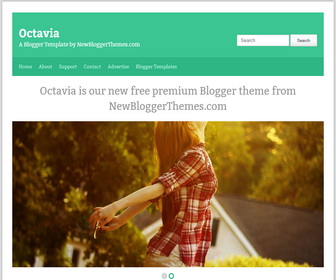
Octavia.

A fresh design for your stories. Preview it, download it, make it yours.

Octavia / Blogger
Octavia Blogger template preview
A closer look at your next chapter.Enlarge preview (opens image preview)

Get to know the design

The details. The possibilities.

Explore the theme information and any setup notes below.

How to Configure Slider

Find this (in “Edit HTML”) :

<li>
<a href='SLIDER-1-URL-HERE'><img class='slide-image' src='http://2.bp.blogspot.com/-fPRrxFGnI7s/UGWax4SEIkI/AAAAAAAAG1o/aK_jr-UP89Y/s1600/image1-940x400.jpg'/></a>
</li>

<li>
<a href='SLIDER-2-URL-HERE'><img class='slide-image' src='http://2.bp.blogspot.com/-_twkQH8oWBY/UGWaz1QUofI/AAAAAAAAG1w/qsD7p1w-prI/s1600/image2-940x400.jpg'/></a>
</li>

There are 2 slides in slider. You can add more. For each slide, change “SLIDER-X-URL-HERE” with your slide url. Also change slide image url.

How To Add Links Top Navigation Menu

Go to “Layout”. Click on “Edit” link of “Edit This Menu” widget.

A little help getting started?

Follow our installation guide or get in touch with your theme name and blog URL.

Installation guide →Ask a question →

Keep exploring

More to fall in love with.

Browse the collection

The conversation

2 thoughts on “Octavia Blogger Template”

Leave a Reply

Your email address will not be published. Required fields are marked *


This site uses Akismet to reduce spam. Learn how your comment data is processed.


