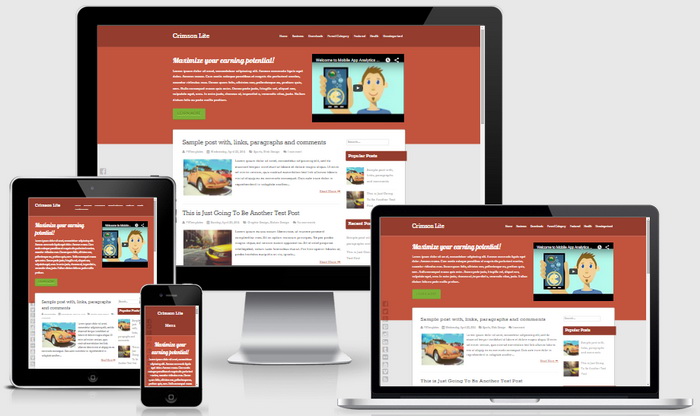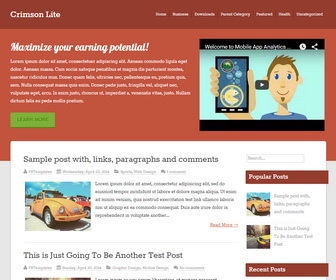
Crimson Lite is a minimal and fast loading, 2 columns Blogger theme for personal blogs. It is 100% responsive theme, so it works well on all screen sizes and devices. Crimson Lite Blogger template has a right sidebar, Google web fonts, Font Awesome fonts, related posts with thumbnails, fixed social buttons, post bottom share buttons, top drop-down navigation menu, auto post summaries and more.
How To Add Links to Top Navigation Menu
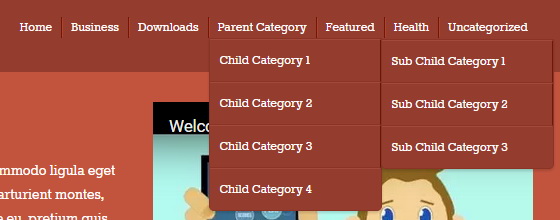
Find this in “Edit HTML”:
<div class='menu-nbt-menu-container'>
<ul class='menunbt'>

<li><a expr:href='data:blog.homepageUrl'>Home</a></li>

<li><a href='#'>Business</a>
<ul class='sub-menu'>
<li><a href='#'>Internet</a></li>
<li><a href='#'>Market</a></li>
<li><a href='#'>Stock</a></li>
</ul>
</li>

...

<li><a href='#'>Uncategorized</a></li>

</ul>
</div>
Replace “#” marks with real URLs and change anchor texts as you like.
How To Configure Featured Content
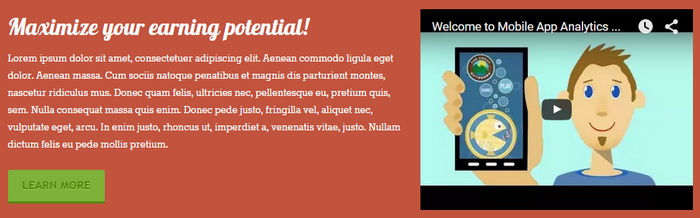
Find this:
<div class='inner-bannernbt wrapnbt clearfix'>

<div class='sevencol firstnbt' id='banner-contentnbt'>
	<h1>Maximize your earning potential!</h1>
    <p>Lorem ipsum dolor sit amet, consectetuer adipiscing elit. Aenean commodo ligula eget dolor. Aenean massa. Cum sociis natoque penatibus et magnis dis parturient montes, nascetur ridiculus mus. Donec quam felis, ultricies nec, pellentesque eu, pretium quis, sem. Nulla consequat massa quis enim. Donec pede justo, fringilla vel, aliquet nec, vulputate eget, arcu. In enim justo, rhoncus ut, imperdiet a, venenatis vitae, justo. Nullam dictum felis eu pede mollis pretium.</p>
	<div class='button-containernbt'>
	<a class='button green-buttonnbt' href='#'>Learn More</a>
	</div>
</div>

<div class='fivecol lastnbt' id='banner-imagenbt'>
	<iframe frameborder='0' height='280' src='https://www.youtube.com/embed/kXvA5CqGPbI' width='380'/>
</div>

</div>
Change featured content heading (Maximize your earning potential!) and description with your content.
Replace # symbol with the URL of featured content.
Also you need to change default Youtube video code with your own code. (it can be any code you like – ad code, video embed code, …)
How To Configure Social Buttons
Find this:
<ul> <li class='soc_facebook'><a href='#' rel='nofollow' target='_blank' title='Facebook'><i class='fa fa-facebook-square'/></a></li> <li class='soc_twitter'><a href='#' rel='nofollow' target='_blank' title='Twitter'><i class='fa fa-twitter-square'/></a></li> <li class='soc_gplus'><a href='#' rel='nofollow' target='_blank' title='Google Plus'><i class='fa fa-google-plus-square'/></a></li> <li class='soc_pinterest'><a href='#' rel='nofollow' target='_blank' title='Pinterest'><i class='fa fa-pinterest-square'/></a></li> <li class='soc_instagram'><a href='#' rel='nofollow' target='_blank' title='Instagram'><i class='fa fa-instagram'/></a></li> <li class='soc_linkedin'><a href='#' rel='nofollow' target='_blank' title='Linkedin'><i class='fa fa-linkedin-square'/></a></li> <li class='soc_tumblr'><a href='#' rel='nofollow' target='_blank' title='Tumblr'><i class='fa fa-tumblr-square'/></a></li> <li class='soc_flickr'><a href='#' rel='nofollow' target='_blank' title='Flickr'><i class='fa fa-flickr'/></a></li> <li class='soc_youtube'><a href='#' rel='nofollow' target='_blank' title='YouTube'><i class='fa fa-youtube-square'/></a></li> <li class='soc_vimeo'><a href='#' rel='nofollow' target='_blank' title='Vimeo'><i class='fa fa-vimeo-square'/></a></li> <li class='soc_rss'><a expr:href='data:blog.homepageUrl + "feeds/posts/default"' rel='nofollow' target='_blank' title='RSS'><i class='fa fa-rss-square'/></a></li> </ul>
Add your own social links replacing “#” marks.
Limelight Blogger Template Responsive View