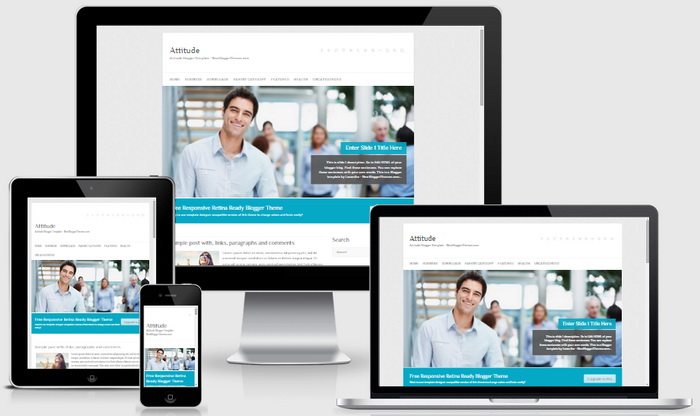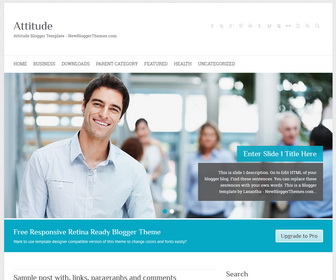
Attitude is a simple, clean and 100% responsive retina ready Blogger theme which adapts automatically to your tablets and mobile devices. Attitude Blogger template has featured slider, slogan area, right sidebar, 3 columns footer widgets area, Google web fonts, Font Awesome icons, related posts with thumbnails, social icons, sharing buttons, top navigation menu, custom search box, auto post summaries on homepage and more.
How To Configure Social Buttons

Find this in “Edit HTML”:
<div class='social-profilesnbt clearfix'> <ul> <li class='facebooknbt'><a href='#' rel='nofollow' target='_blank' title='Facebook'>Facebook</a></li> <li class='twitternbt'><a href='#' rel='nofollow' target='_blank' title='Twitter'>Twitter</a></li> <li class='google-plusnbt'><a href='#' rel='nofollow' target='_blank' title='Google Plus'>Google Plus</a></li> <li class='pinterestnbt'><a href='#' rel='nofollow' target='_blank' title='Pinterest'>Pinterest</a></li> <li class='linkednbt'><a href='#' rel='nofollow' target='_blank' title='Linkedin'>Linkedin</a></li> <li class='tumblrnbt'><a href='#' rel='nofollow' target='_blank' title='Tumblr'>Tumblr</a></li> <li class='vimeonbt'><a href='#' rel='nofollow' target='_blank' title='Vimeo'>Vimeo</a></li> <li class='my-spacenbt'><a href='#' rel='nofollow' target='_blank' title='Myspace'>Myspace</a></li> <li class='flickrnbt'><a href='#' rel='nofollow' target='_blank' title='Flickr'>Flickr</a></li> <li class='you-tubenbt'><a href='#' rel='nofollow' target='_blank' title='Youtube'>Youtube</a></li> <li class='rssnbt'><a expr:href='data:blog.homepageUrl + "feeds/posts/default"' rel='nofollow' target='_blank' title='RSS'>RSS</a></li> </ul> </div><!-- .social-profiles -->
Add your own social links replacing “#” marks.
How To Add Links to Top Navigation Menu
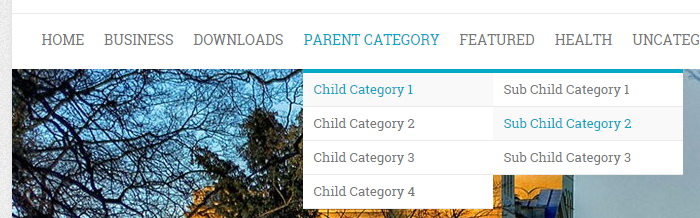
Find this in “Edit HTML”:
<nav class='clearfix' id='accessnbt'>
<div class='containernbt clearfix'>
<ul class='rootnbt'>

<li><a expr:href='data:blog.homepageUrl'>Home</a></li>

<li><a href='#'>Business</a>
<ul class='sub-menu'>
<li><a href='#'>Internet</a></li>
<li><a href='#'>Market</a></li>
<li><a href='#'>Stock</a></li>
</ul>
</li>

...

<li><a href='#'>Uncategorized</a></li>

</ul>
</div><!-- .container -->
</nav><!-- #access -->
Replace “#” marks with real URLs and change anchor texts as you like.
How To Configure Featured Content Slider:
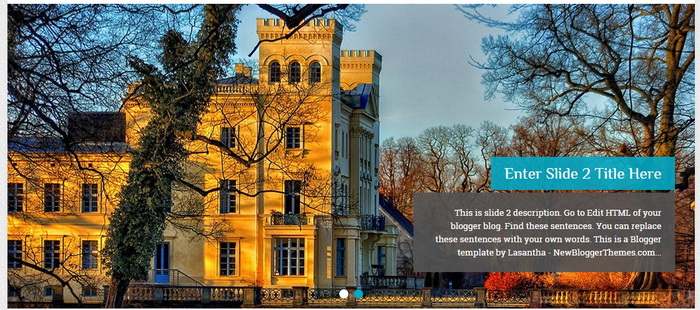
Find this in “Edit HTML”:
<div class='featured-slider'>
<div class='slider-cycle'>

  <div class='slides displayblock'>
	 <figure><a href='ENTER_SLIDE_1_LINK_HERE'><img height='460' src='http://2.bp.blogspot.com/-G6zJLHd-lLQ/VeENz0H8BNI/AAAAAAAAPrQ/eyI2-tXzF2g/s1600/slider-image-1.jpg' width='1038'/></a></figure>
	 <article class='featured-text'>
		<h2 class='featured-title'><a href='ENTER_SLIDE_1_LINK_HERE'>Enter Slide 1 Title Here</a></h2>
		<!-- .featured-title -->
		<div class='featured-content'>This is slide 1 description. Go to Edit HTML of your blogger blog. Find these sentences. You can replace these sentences with your own words. This is a Blogger template by Lasantha - NewBloggerThemes.com...</div>
		<!-- .featured-content -->
	 </article>
	 <!-- .featured-text -->
  </div>
  <!-- .slides -->

  ...

</div>
<nav class='clearfix' id='controllers'/>
<!-- #controllers -->
</div>
There are 2 slides in the slider. You can add or remove more slides if you want.
Now replace,
“ENTER_SLIDE_X_LINK_HERE”s with your real slide link,
“Enter Slide X Title Here” with your real slide title,
“This is slide X description. Go to Edit HTML of your blogger blog. Find these sentences. You can replace these sentences with your own words. This is a Blogger template by Lasantha – NewBloggerThemes.com…” with your real slide description,
Slide image URL,
for each slide. (X = 1 or X = 2)
How To Configure Slogan:

Find this and change the content:
<div class='slogan-wrap clearfix'>
<div class='containernbt'>
  <div class='slogan'>Free Responsive Retina Ready Blogger Theme<span>Want to use template designer compatible version of this theme to change colors and fonts easily?</span></div>
  <!-- .slogan --><a class='view-work' href='#' title='Upgrade to Pro'>Upgrade to Pro</a>
</div>
<!-- .container -->
</div>
Attitude Blogger Template Responsive View